
Arduino UNO RFID Access Control with Voice Feedback and LCD Display
View and Edit Project In Cirkit Designer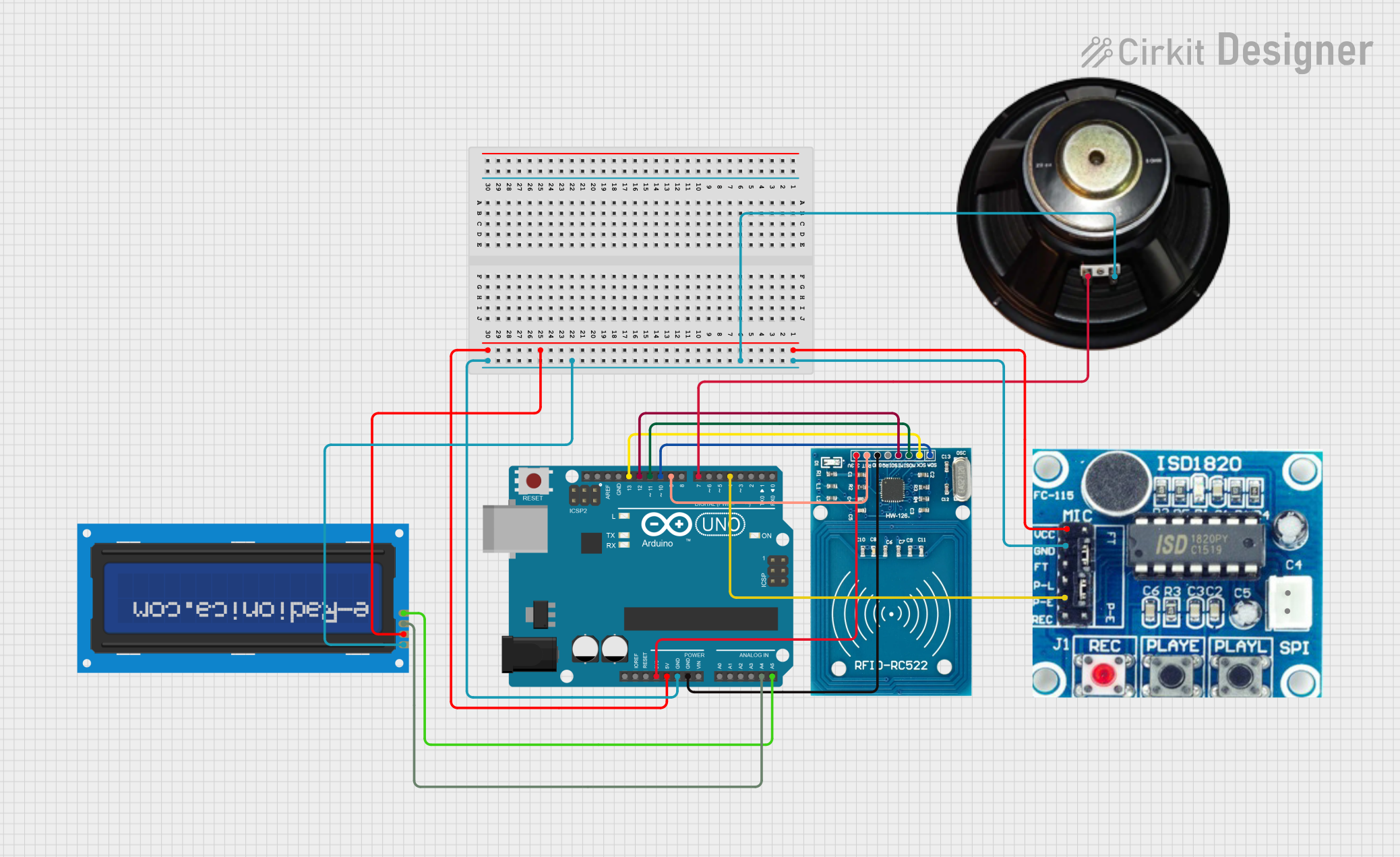
Circuit Documentation
Summary
This circuit integrates an Arduino UNO with an ISD1820 voice recording module, an RFID-RC522 reader, a speaker, and an LCD screen with an I2C interface. The Arduino UNO serves as the central processing unit, controlling the RFID reader for tag detection, driving the speaker for audio output, and displaying information on the LCD screen. The ISD1820 module is used for voice recording and playback. The RFID-RC522 module interfaces with the Arduino for RFID tag reading. The speaker is connected to the Arduino for audio output, and the LCD screen is used to display data or messages.
Component List
Arduino UNO
- Microcontroller board based on the ATmega328P
- It has 14 digital input/output pins, 6 analog inputs, a 16 MHz quartz crystal, a USB connection, a power jack, an ICSP header, and a reset button.
ISD1820
- Voice recording and playback module
- Features onboard microphone and can play back the recorded sound.
RFID-RC522
- RFID reader/writer module
- Operates at 13.56 MHz and interfaces with the Arduino through SPI.
Speaker
- An audio output device
- Used to play sounds or voice recordings.
LCD screen 16x2 I2C
- Alphanumeric liquid crystal display
- Has 16 characters by 2 lines display capability and an I2C interface for communication.
Wiring Details
Arduino UNO
3.3Vconnected to RFID-RC522 VCC (3.3V)5Vconnected to ISD1820 VCC and LCD screen VCCGNDconnected to ISD1820 GND, Speaker -, LCD screen GND, and RFID-RC522 GNDA4 (SDA)connected to LCD screen SDAA5 (SCL)connected to LCD screen SCLD13connected to RFID-RC522 SCKD12connected to RFID-RC522 MISOD11connected to RFID-RC522 MOSID10connected to RFID-RC522 SDAD9connected to RFID-RC522 RSTD7connected to Speaker +D4connected to ISD1820 P-E
ISD1820
VCCconnected to Arduino UNO 5VGNDconnected to Arduino UNO GNDP-Econnected to Arduino UNO D4
RFID-RC522
VCC (3.3V)connected to Arduino UNO 3.3VRSTconnected to Arduino UNO D9GNDconnected to Arduino UNO GNDIRQ(not connected)MISOconnected to Arduino UNO D12MOSIconnected to Arduino UNO D11SCKconnected to Arduino UNO D13SDAconnected to Arduino UNO D10
Speaker
+connected to Arduino UNO D7-connected to Arduino UNO GND
LCD screen 16x2 I2C
SCLconnected to Arduino UNO A5SDAconnected to Arduino UNO A4VCCconnected to Arduino UNO 5VGNDconnected to Arduino UNO GND
Documented Code
Arduino UNO Code (sketch.ino)
void setup() {
  // put your setup code here, to run once:

}

void loop() {
  // put your main code here, to run repeatedly:

}
Note: The provided code is a template and does not include specific functionality. It should be populated with setup and loop code to initialize the components and define the main behavior of the circuit.