
Circuit Documentation
Summary
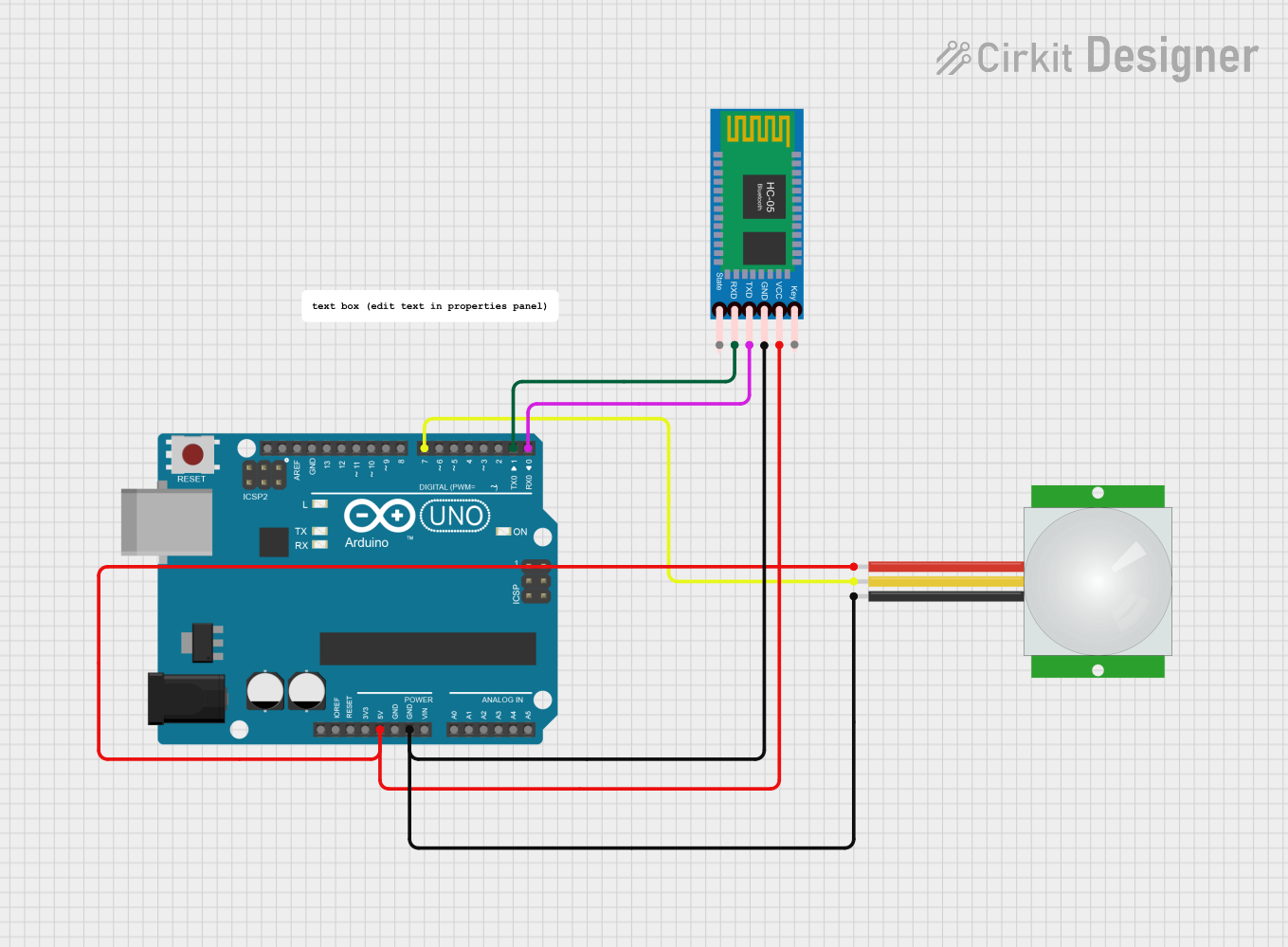
The circuit in question is designed to interface a PIR (Passive Infrared) sensor with an Arduino UNO microcontroller and a HC-05 Bluetooth module. The PIR sensor is used to detect motion, and upon detection, the Arduino UNO sends a signal via the HC-05 Bluetooth module. The Arduino UNO is also responsible for managing the power distribution to the PIR sensor and the HC-05 Bluetooth module.
Component List
Arduino UNO
- Description: A microcontroller board based on the ATmega328P.
- Purpose: Acts as the central processing unit of the circuit, reads the PIR sensor output, and communicates with the HC-05 Bluetooth module.
PIR Sensor
- Description: A sensor that detects motion by measuring changes in the infrared levels emitted by surrounding objects.
- Purpose: To detect motion and provide a signal to the Arduino UNO.
HC-05 Bluetooth Module
- Description: A Bluetooth module that allows for wireless communication.
- Purpose: To receive and transmit data wirelessly between the Arduino UNO and a Bluetooth-enabled device.
Comments
- Description: Textual annotations within the circuit design to provide additional information or instructions.
Wiring Details
Arduino UNO
- 5V: Provides power to the PIR sensor and the HC-05 Bluetooth module.
- GND: Common ground for the circuit.
- D7: Receives the signal from the PIR sensor.
- D1 (TX): Transmits data to the HC-05 Bluetooth module's RXD pin.
- D0 (RX): Receives data from the HC-05 Bluetooth module's TXD pin.
PIR Sensor
- VDD: Connected to the 5V output from the Arduino UNO.
- GND: Connected to the ground on the Arduino UNO.
- SIG: Sends the motion detection signal to the Arduino UNO's D7 pin.
HC-05 Bluetooth Module
- VCC: Powered by the 5V output from the Arduino UNO.
- GND: Connected to the ground on the Arduino UNO.
- TXD: Transmits data to the Arduino UNO's D0 (RX) pin.
- RXD: Receives data from the Arduino UNO's D1 (TX) pin.
Documented Code
Arduino UNO Code (sketch.ino)
int pir = 7; // PIR sensor connected to pin D7

void setup() {
  Serial.begin(9600); // Initialize serial communication at 9600 baud rate
  pinMode(pir, INPUT); // Set the PIR sensor pin as an input
}

void loop() {
  if (digitalRead(pir) == 1) { // Check if the PIR sensor is triggered
    Serial.println("23"); // Send the value "23" over serial when motion is detected
    delay(3000); // Wait for 3 seconds before the next read
  }
}
Note: The code sets up the Arduino UNO to read the PIR sensor's output from pin D7. When motion is detected, it sends the value "23" over the serial connection, which can be transmitted wirelessly via the HC-05 Bluetooth module. The system then waits for 3 seconds before checking for motion again.