
Circuit Documentation
Summary
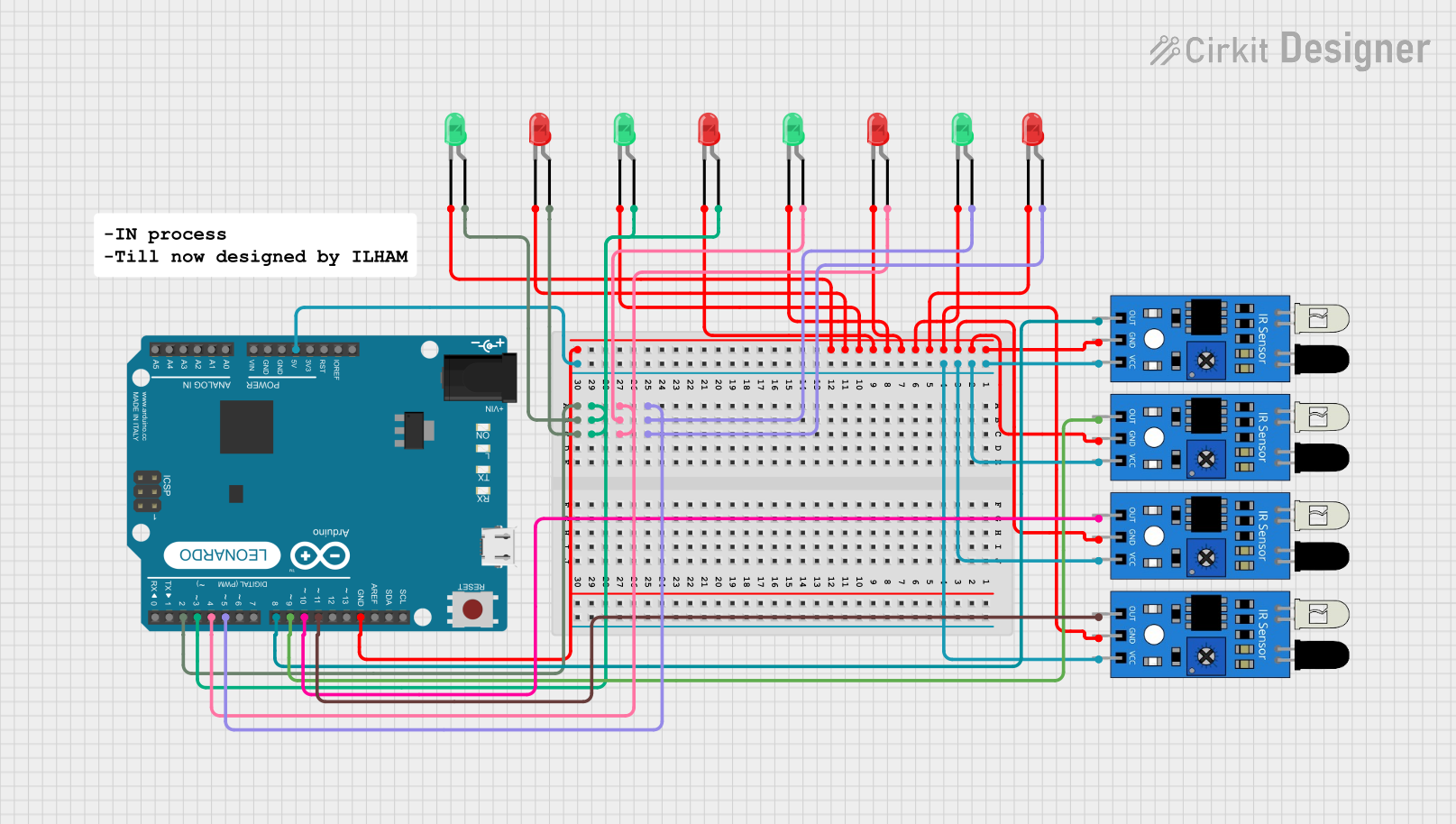
This circuit involves an Arduino Leonardo microcontroller interfacing with multiple IR sensors and LEDs. The IR sensors detect objects, and the LEDs provide visual feedback. The Arduino Leonardo controls the LEDs based on the input from the IR sensors.
Component List
Arduino Leonardo (Rev3b)
- Description: A microcontroller board based on the ATmega32u4.
- Pins: D0/RX, D1/TX, D2/SDA, D3 PWM/SCL, D4/A6, D5 PWM, D6 PWM/A7, D7, n.c., IOREF, RESET, 3V3, 5V, GND, VIN, A0, A1, A2, A3, A4, A5, D8/A8, D9 PWM/A9, D10 PWM/A10, D11 PWM, D12/A11, D13 PWM, AREF, SDA, SCL
IR Sensor
- Description: Infrared sensor for object detection.
- Pins: out, gnd, vcc
LED: Two Pin (red)
- Description: Red LED with two pins.
- Pins: cathode, anode
LED: Two Pin (green)
- Description: Green LED with two pins.
- Pins: cathode, anode
Wiring Details
Arduino Leonardo (Rev3b)
D5 PWM is connected to:
- Anode of Red LED
- Anode of Green LED
D4/A6 is connected to:
- Anode of Red LED
- Anode of Green LED
D3 PWM/SCL is connected to:
- Anode of Green LED
- Anode of Red LED
D2/SDA is connected to:
- Anode of Red LED
- Anode of Green LED
GND is connected to:
- Cathode of all LEDs
- GND of all IR sensors
5V is connected to:
- VCC of all IR sensors
D8/A8 is connected to:
- Out of one IR sensor
D9 PWM/A9 is connected to:
- Out of one IR sensor
D10 PWM/A10 is connected to:
- Out of one IR sensor
D11 PWM is connected to:
- Out of one IR sensor
IR Sensor
GND is connected to:
- GND of Arduino Leonardo
VCC is connected to:
- 5V of Arduino Leonardo
Out is connected to:
- D8/A8 of Arduino Leonardo (for one sensor)
- D9 PWM/A9 of Arduino Leonardo (for one sensor)
- D10 PWM/A10 of Arduino Leonardo (for one sensor)
- D11 PWM of Arduino Leonardo (for one sensor)
LED: Two Pin (red)
Anode is connected to:
- D5 PWM of Arduino Leonardo
- D4/A6 of Arduino Leonardo
- D3 PWM/SCL of Arduino Leonardo
- D2/SDA of Arduino Leonardo
Cathode is connected to:
- GND of Arduino Leonardo
LED: Two Pin (green)
Anode is connected to:
- D5 PWM of Arduino Leonardo
- D4/A6 of Arduino Leonardo
- D3 PWM/SCL of Arduino Leonardo
- D2/SDA of Arduino Leonardo
Cathode is connected to:
- GND of Arduino Leonardo
Code Documentation
Arduino Leonardo (Rev3b) Code
void setup() {
  // put your setup code here, to run once:

}

void loop() {
  // put your main code here, to run repeatedly:

}
This code is a basic template for the Arduino Leonardo. The setup() function is where you initialize your components, and the loop() function is where you place the main logic that runs repeatedly.