
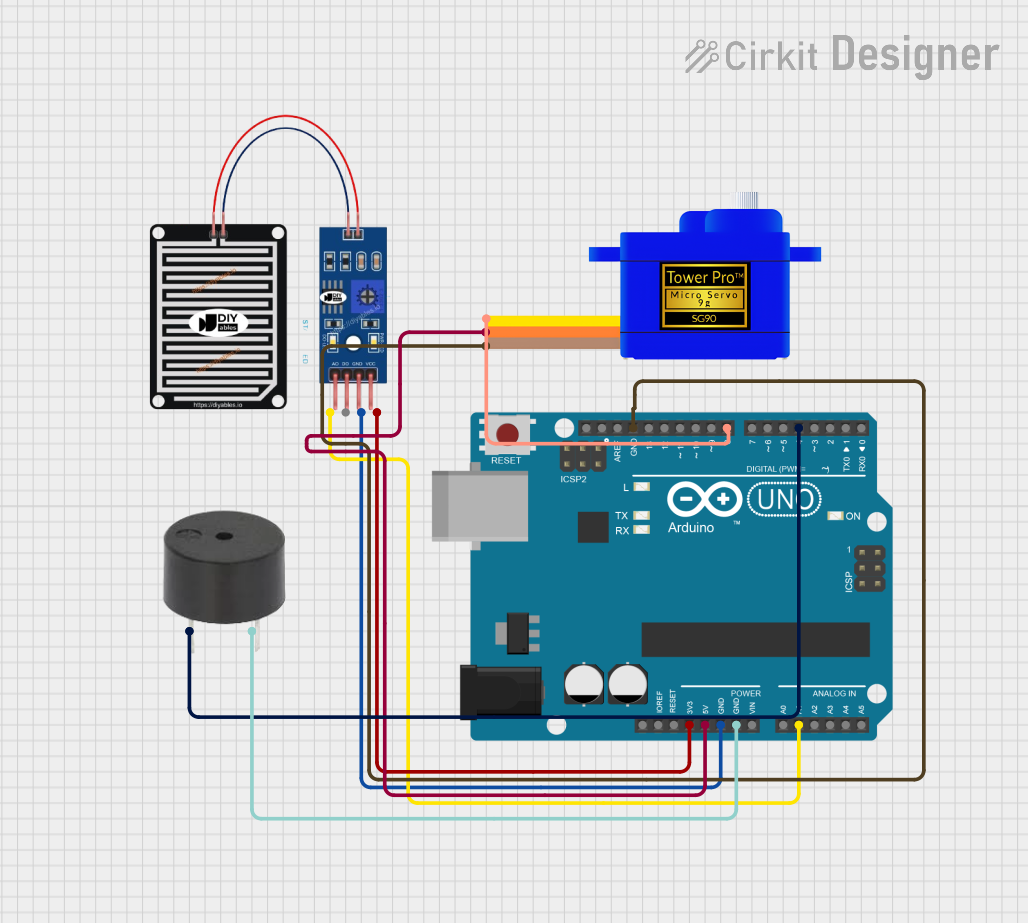
Circuit Documentation
Summary
This circuit is designed to monitor rainfall using a rain sensor and respond accordingly by actuating a servomotor and activating a buzzer. The core of the circuit is an Arduino UNO microcontroller, which reads the analog output from the rain sensor to detect the presence of rain. Upon detection, the Arduino drives a servomotor to a specified position and sounds a buzzer to alert the user. The servomotor returns to its original position when no rain is detected.
Component List
RAIN SENSOR
- Pins: AO (Analog Output), DO (Digital Output), GRD (Ground), VCC (Power Supply)
- Description: A sensor that detects rain by measuring the resistance of raindrops across its surface.
Servomotor SG90
- Pins: SIG (Signal), VCC (Power Supply), GND (Ground)
- Description: A small and lightweight servo that is capable of precise control and is used to actuate a mechanism in response to rain detection.
Buzzer
- Pins: PIN (Signal Input), GND (Ground)
- Description: An audible signaling device that emits a tone when powered, used here to alert users to the detection of rain.
Arduino UNO
- Pins: Various digital and analog I/O, power, and ground pins.
- Description: A microcontroller board based on the ATmega328P, used to control the logic and actions of the circuit.
Wiring Details
RAIN SENSOR
- AO (Analog Output) connected to Arduino UNO A1
- GRD (Ground) connected to Arduino UNO GND
- VCC (Power Supply) connected to Arduino UNO 3.3V
Servomotor SG90
- SIG (Signal) connected to Arduino UNO D8
- VCC (Power Supply) connected to Arduino UNO 5V
- GND (Ground) connected to Arduino UNO GND
Buzzer
- PIN (Signal Input) connected to Arduino UNO D4
- GND (Ground) connected to Arduino UNO GND
Documented Code
#include <Servo.h>

// Define the pin for the rain sensor
const int rainSensorPin = A1; // You can change this pin as per your wiring

// Define the pin for the servo motor
const int servoPin = 8; // You can change this pin as per your wiring

// Define the pin for the buzzer
const int buzzerPin = 4;

Servo myServo;

// Function to slowly rotate the servo to a target angle
void slowRotate(int targetAngle) {
  int currentAngle = myServo.read(); // Read the current angle of the servo

  // Determine the step direction
  int step = (targetAngle > currentAngle) ? 1 : -1;

  // Rotate the servo to the target angle in small steps
  while (currentAngle != targetAngle) {
    currentAngle += step; // Increment or decrement the angle
    myServo.write(currentAngle); // Set the servo to the new angle
    delay(15); // Adjust this delay for speed; smaller = faster
  }
}

void setup() {
  // Set up the rain sensor pin as an input
  pinMode(rainSensorPin, INPUT);

  // Set up the buzzer pin as an output
  pinMode(buzzerPin, OUTPUT);

  // Set up the servo motor
  myServo.attach(servoPin);
}

void loop() {
  // Read the state of the rain sensor
  int rainState = digitalRead(rainSensorPin);

  // If the rain sensor detects rain (LOW), rotate the servo motor to 180 degrees
  if (rainState == LOW) {
    digitalWrite(buzzerPin, HIGH); // Turn on the buzzer before moving
    slowRotate(180); // Slowly rotate to 180 degrees
    digitalWrite(buzzerPin, LOW); // Turn off the buzzer after reaching 180 degrees
  } else {
    // If no rain is detected, rotate the servo motor to 0 degrees
    slowRotate(0); // Slowly rotate back to 0 degrees
  }

  // Add a small delay for stability
  delay(100);
}
This code is designed to be uploaded to the Arduino UNO microcontroller. It initializes the rain sensor, servomotor, and buzzer, and contains the main logic for detecting rain and actuating the servo and buzzer accordingly. The slowRotate function is used to move the servo to the desired angle in small increments, providing a smoother motion.