
ESP32-Based Environmental Monitoring System with I2C LCD Display
View and Edit Project In Cirkit Designer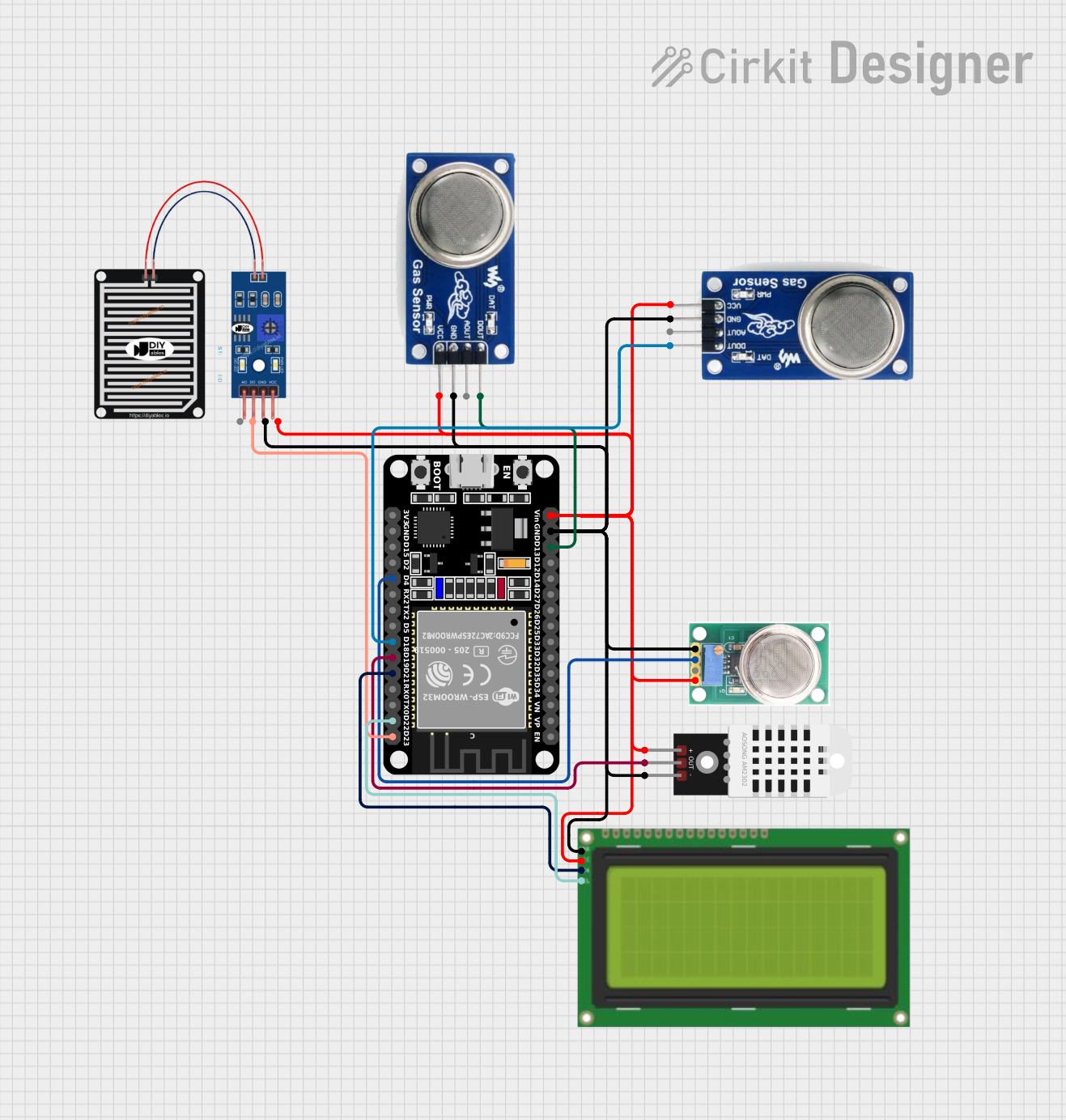
Circuit Documentation
Summary
This circuit is designed to read values from multiple sensors including MQ-135 for CO2, MQ-135 for NH3, MQ-136 for SO2, a rain sensor, and a DHT22 temperature and humidity sensor. The readings are displayed on a 20x4 I2C LCD. The central microcontroller used in this circuit is an ESP32 (30 pin).
Component List
ESP32 (30 pin)
- Description: Microcontroller with Wi-Fi and Bluetooth capabilities.
- Pins: EN, VP, VN, D34, D35, D32, D33, D25, D26, D27, D14, D12, D13, GND, Vin, D23, D22, TX0, RX0, D21, D19, D18, D5, TX2, RX2, D4, D2, D15, 3V3
MQ-135
- Description: Gas sensor for CO2 and NH3 detection.
- Pins: D OUT, A OUT, GND, VCC
MQ-136
- Description: Gas sensor for SO2 detection.
- Pins: GND, OUT1, OUT2, VCC
DHT22
- Description: Temperature and humidity sensor.
- Pins: +, Out, -
Rain Sensor
- Description: Sensor to detect rain.
- Pins: AO, DO, GRD, VCC
Lcd 20x4 i2c
- Description: 20x4 character LCD with I2C interface.
- Pins: GND, 5v, SCA, SCL
Wiring Details
ESP32 (30 pin)
GND connected to:
- MQ-135 (GND)
- MQ-135 (GND)
- MQ-136 (GND)
- DHT22 (-)
- Rain Sensor (GRD)
- Lcd 20x4 i2c (GND)
Vin connected to:
- MQ-135 (VCC)
- MQ-135 (VCC)
- MQ-136 (VCC)
- DHT22 (+)
- Rain Sensor (VCC)
- Lcd 20x4 i2c (5v)
D13 connected to:
- MQ-135 (D OUT)
D18 connected to:
- MQ-135 (D OUT)
D4 connected to:
- MQ-136 (OUT1)
D19 connected to:
- DHT22 (Out)
D23 connected to:
- Rain Sensor (DO)
D22 connected to:
- Lcd 20x4 i2c (SCL)
D21 connected to:
- Lcd 20x4 i2c (SCA)
MQ-135 (CO2)
D OUT connected to:
- ESP32 (D18)
GND connected to:
- ESP32 (GND)
VCC connected to:
- ESP32 (Vin)
MQ-135 (NH3)
D OUT connected to:
- ESP32 (D13)
GND connected to:
- ESP32 (GND)
VCC connected to:
- ESP32 (Vin)
MQ-136
OUT1 connected to:
- ESP32 (D4)
GND connected to:
- ESP32 (GND)
VCC connected to:
- ESP32 (Vin)
DHT22
Out connected to:
- ESP32 (D19)
- connected to:
- ESP32 (GND)
+ connected to:
- ESP32 (Vin)
Rain Sensor
DO connected to:
- ESP32 (D23)
GRD connected to:
- ESP32 (GND)
VCC connected to:
- ESP32 (Vin)
Lcd 20x4 i2c
SCL connected to:
- ESP32 (D22)
SCA connected to:
- ESP32 (D21)
GND connected to:
- ESP32 (GND)
5v connected to:
- ESP32 (Vin)
Code Documentation
/*
 * This Arduino sketch is designed to read values from multiple sensors including
 * MQ-135 for CO2, MQ-135 for NH3, MQ-136 for SO2, a rain sensor, and a DHT22
 * temperature and humidity sensor. The readings are displayed on a 20x4 I2C LCD.
 */

#include <Wire.h>
#include <LiquidCrystal_I2C.h>
#include <DHT.h>

// Pin definitions
#define MQ135_CO2_PIN 18
#define MQ135_NH3_PIN 13
#define MQ136_SO2_PIN 4
#define RAIN_SENSOR_PIN 23
#define DHT22_PIN 19

// DHT22 setup
#define DHTTYPE DHT22
DHT dht(DHT22_PIN, DHTTYPE);

// LCD setup
LiquidCrystal_I2C lcd(0x27, 20, 4);

void setup() {
  // Initialize serial communication
  Serial.begin(115200);

  // Initialize sensors
  pinMode(MQ135_CO2_PIN, INPUT);
  pinMode(MQ135_NH3_PIN, INPUT);
  pinMode(MQ136_SO2_PIN, INPUT);
  pinMode(RAIN_SENSOR_PIN, INPUT);
  dht.begin();

  // Initialize LCD
  lcd.init();
  lcd.backlight();
}

void loop() {
  // Read sensor values
  int co2Value = digitalRead(MQ135_CO2_PIN);
  int nh3Value = digitalRead(MQ135_NH3_PIN);
  int so2Value = digitalRead(MQ136_SO2_PIN);
  int rainValue = digitalRead(RAIN_SENSOR_PIN);
  float h = dht.readHumidity();
  float t = dht.readTemperature();

  // Print values to serial monitor
  Serial.print("CO2: ");
  Serial.println(co2Value);
  Serial.print("NH3: ");
  Serial.println(nh3Value);
  Serial.print("SO2: ");
  Serial.println(so2Value);
  Serial.print("Rain: ");
  Serial.println(rainValue);
  Serial.print("Humidity: ");
  Serial.println(h);
  Serial.print("Temperature: ");
  Serial.println(t);

  // Display values on LCD
  lcd.clear();
  lcd.setCursor(0, 0);
  lcd.print("CO2: ");
  lcd.print(co2Value);
  lcd.setCursor(0, 1);
  lcd.print("NH3: ");
  lcd.print(nh3Value);
  lcd.setCursor(0, 2);
  lcd.print("SO2: ");
  lcd.print(so2Value);
  lcd.setCursor(0, 3);
  lcd.print("Rain: ");
  lcd.print(rainValue);
  lcd.setCursor(10, 0);
  lcd.print("Hum: ");
  lcd.print(h);
  lcd.setCursor(10, 1);
  lcd.print("Temp: ");
  lcd.print(t);

  // Wait before next loop
  delay(2000);
}
This code initializes the sensors and the LCD, reads the sensor values, prints them to the serial monitor, and displays them on the LCD. The loop runs continuously, updating the readings every 2 seconds.