
Circuit Documentation
Summary
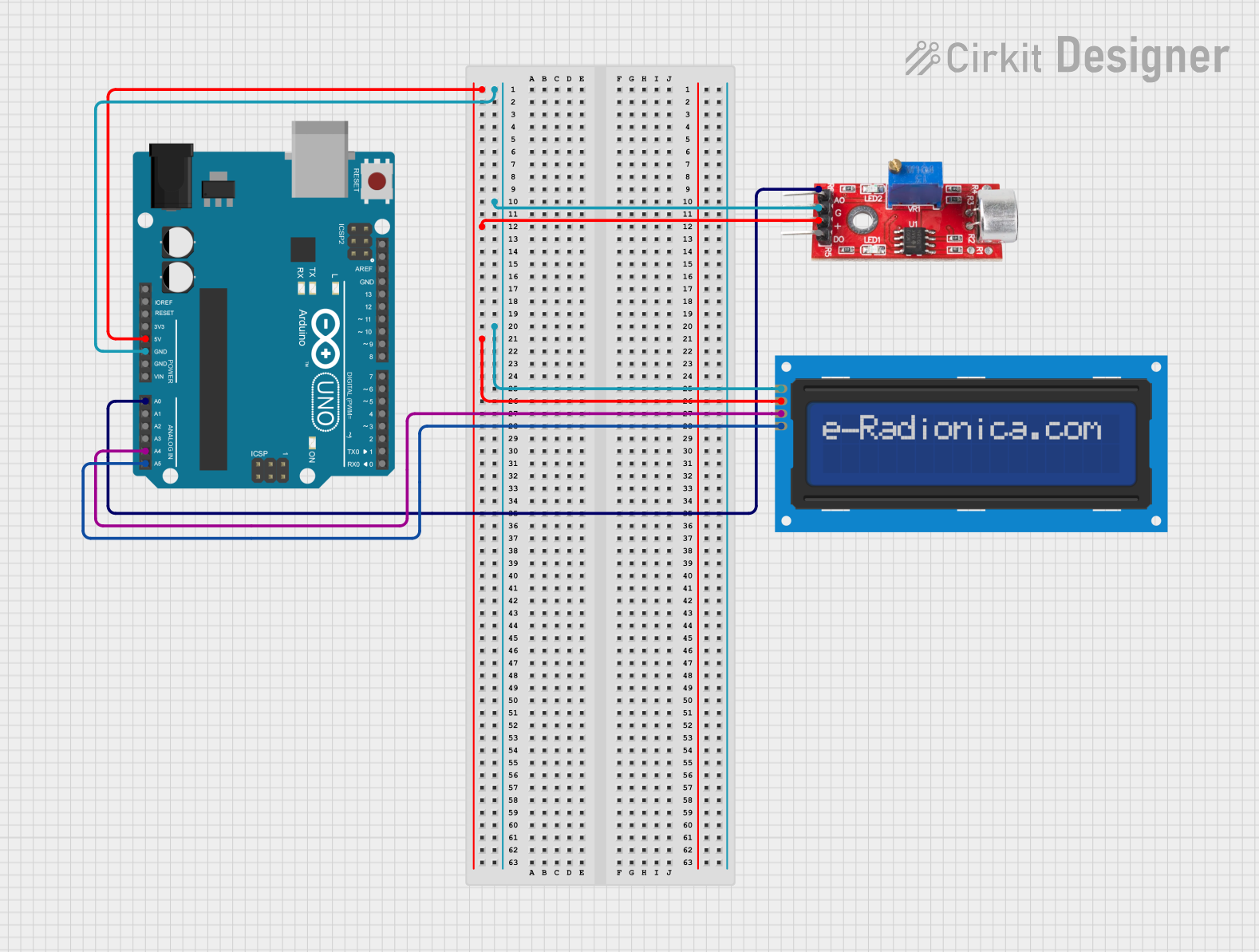
This circuit consists of an Arduino UNO microcontroller, a sound sensor, and an LCD screen (16x2) with I2C interface. The sound sensor detects sound levels and sends the data to the Arduino, which processes the data and displays the sound level and intensity on the LCD screen.
Component List
Arduino UNO
- Description: A microcontroller board based on the ATmega328P.
- Pins: UNUSED, IOREF, Reset, 3.3V, 5V, GND, Vin, A0, A1, A2, A3, A4, A5, SCL, SDA, AREF, D13, D12, D11, D10, D9, D8, D7, D6, D5, D4, D3, D2, D1, D0
- Purpose: Acts as the main controller for the circuit, processing data from the sound sensor and controlling the LCD display.
Sound Sensor
- Description: A sensor that detects sound levels and outputs an analog signal.
- Pins: Analog, GND, VCC, Digital
- Purpose: Measures sound levels and sends an analog signal to the Arduino for processing.
LCD Screen 16x2 I2C
- Description: A 16x2 character LCD display with I2C interface.
- Pins: SCL, SDA, VCC, GND
- Purpose: Displays the sound level and intensity as processed by the Arduino.
Wiring Details
Arduino UNO
- 5V: Connected to VCC of the Sound Sensor and VCC of the LCD screen.
- GND: Connected to GND of the Sound Sensor and GND of the LCD screen.
- A0: Connected to Analog pin of the Sound Sensor.
- A4: Connected to SDA pin of the LCD screen.
- A5: Connected to SCL pin of the LCD screen.
Sound Sensor
- VCC: Connected to 5V of the Arduino UNO.
- GND: Connected to GND of the Arduino UNO.
- Analog: Connected to A0 of the Arduino UNO.
LCD Screen 16x2 I2C
- VCC: Connected to 5V of the Arduino UNO.
- GND: Connected to GND of the Arduino UNO.
- SDA: Connected to A4 of the Arduino UNO.
- SCL: Connected to A5 of the Arduino UNO.
Code Documentation
#include <Wire.h>
#include <LiquidCrystal_I2C.h>

// Initialize the LCD (I2C address: 0x27, 16 columns, 2 rows)
LiquidCrystal_I2C lcd(0x27, 16, 2);

int num_Measure = 128; // Number of measurements for averaging
int pinSignal = A0;    // Sound sensor signal pin
long Sound_signal;     // Variable to store sound sensor readings
long sum = 0;          // Sum of measurements for averaging
long level = 0;        // Average sound level
int soundlow = 40;     // Threshold for low intensity
int soundmedium = 500; // Threshold for medium intensity

void setup() {
  pinMode(pinSignal, INPUT);  // Set the sound sensor pin as input
  Serial.begin(9600);         // Initialize serial communication

  // Initialize the LCD
  lcd.init();
  lcd.backlight();
}

void loop() {
  // Perform 128 readings from the sound sensor
  for (int i = 0; i < num_Measure; i++) {
    Sound_signal = analogRead(pinSignal);
    sum += Sound_signal;
  }

  // Calculate the average sound level
  level = sum / num_Measure;

  // Display the sound level on the LCD
  lcd.setCursor(0, 0);          // Set cursor to the first row
  lcd.print("Sound Level= ");
  lcd.print(level - 33);        // Display the adjusted sound level

  // Display the intensity description
  lcd.setCursor(0, 1);          // Set cursor to the second row
  if (level - 33 < soundlow) {
    lcd.print("Intensity= Low  ");
  } else if (level - 33 >= soundlow && level - 33 < soundmedium) {
    lcd.print("Intensity=Medium");
  } else {
    lcd.print("Intensity= High ");
  }

  // Reset the sum and add a short delay
  sum = 0;
  delay(200);
}
This code initializes the LCD and sound sensor, reads the sound levels, calculates the average sound level, and displays the sound level and intensity on the LCD screen. The sound intensity is categorized into low, medium, and high based on predefined thresholds.