
Arduino UNO Controlled Stepper Motor with LED Indicators and Limit Switch
View and Edit Project In Cirkit Designer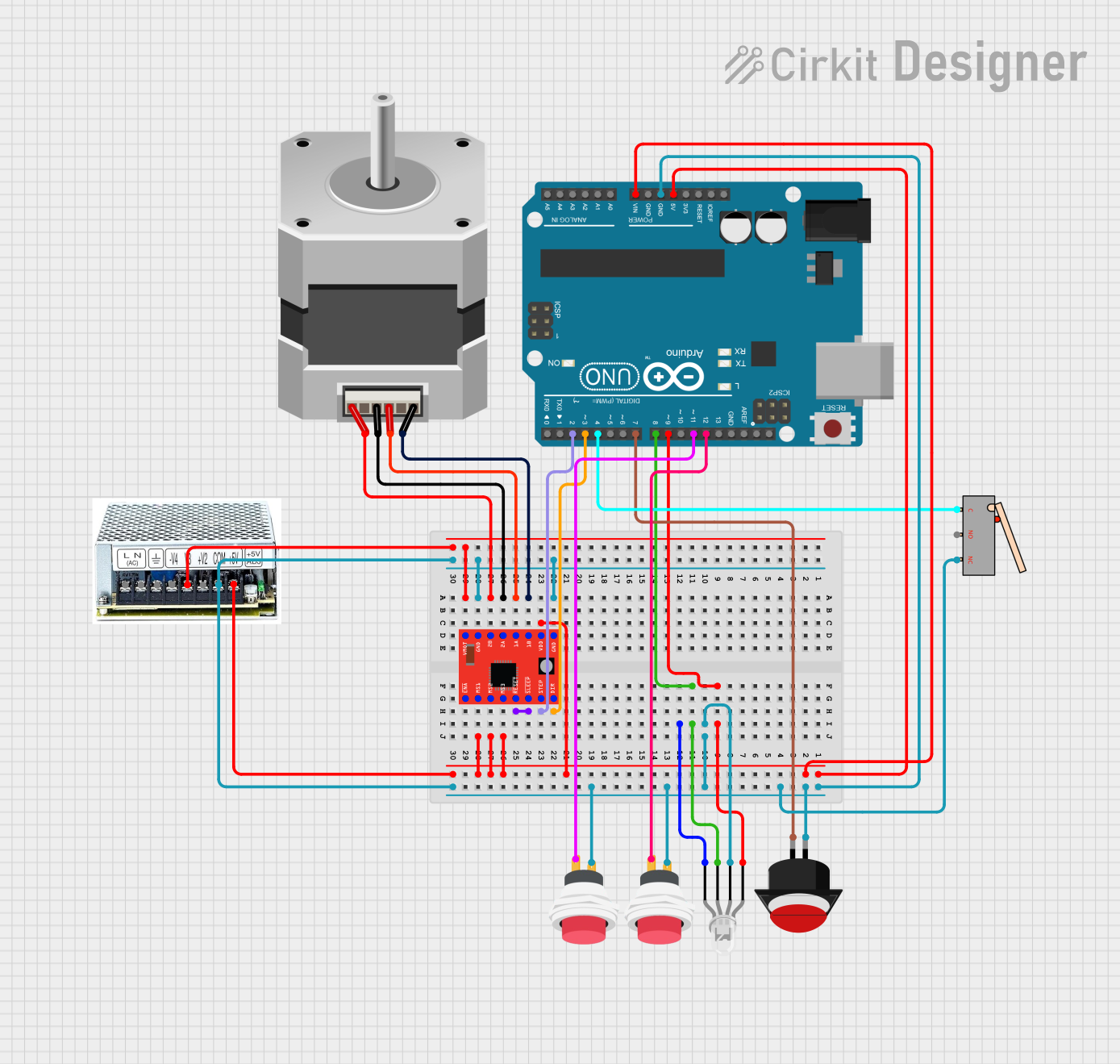
Circuit Documentation
Summary
This circuit involves an Arduino UNO microcontroller controlling a stepper motor via an A4988 stepper motor driver. The circuit also includes a four-pin LED, push buttons, limit switches, and a quad output power supply. The Arduino UNO is programmed to control the stepper motor and LEDs based on input from the push buttons and limit switches.
Component List
Stepper Motor (Bipolar)
- Description: A bipolar stepper motor with four pins.
- Pins: D, B, C, A
A4988 Stepper Motor Driver (Red)
- Description: A stepper motor driver with multiple control and power pins.
- Pins: ENABLE, MS1, MS2, MS3, RESET, SLEEP, STEP, DIR, VMOT, GND, 2B, 2A, 1A, 1B, VDD
Arduino UNO
- Description: A microcontroller board based on the ATmega328P.
- Pins: UNUSED, IOREF, Reset, 3.3V, 5V, GND, Vin, A0, A1, A2, A3, A4, A5, SCL, SDA, AREF, D13, D12, D11, D10, D9, D8, D7, D6, D5, D4, D3, D2, D1, D0
LED: Four Pin (Common Cathode)
- Description: A four-pin LED with common cathode configuration.
- Pins: red anode, common cathode, green anode, blue anode
2Pin Push Switch
- Description: A two-pin push switch.
- Pins: Input +, Output +
Limit Switch
- Description: A limit switch with three pins.
- Pins: C, NO, NC
Push Button Round
- Description: A round push button with two pins.
- Pins: leg0, leg1
Quad Output Power Supply
- Description: A power supply with multiple outputs.
- Pins: None
Wiring Details
Stepper Motor (Bipolar)
- Pin D connected to A4988 Stepper Motor Driver (Red) Pin 1B
- Pin B connected to A4988 Stepper Motor Driver (Red) Pin 1A
- Pin C connected to A4988 Stepper Motor Driver (Red) Pin 2A
- Pin A connected to A4988 Stepper Motor Driver (Red) Pin 2B
A4988 Stepper Motor Driver (Red)
- Pin DIR connected to Arduino UNO Pin D3
- Pin STEP connected to Arduino UNO Pin D2
- Pin VDD connected to Arduino UNO Pin 5V
- Pin GND connected to Arduino UNO Pin GND
- Pin VMOT connected to Quad Output Power Supply
- Pin SLEEP connected to A4988 Stepper Motor Driver (Red) Pin RESET
Arduino UNO
- Pin D9 connected to LED: Four Pin (Common Cathode) Pin red anode
- Pin D8 connected to LED: Four Pin (Common Cathode) Pin green anode
- Pin GND connected to LED: Four Pin (Common Cathode) Pin common cathode
- Pin D12 connected to 2Pin Push Switch Pin Output +
- Pin D11 connected to 2Pin Push Switch Pin Output +
- Pin D7 connected to Push Button Round Pin leg1
- Pin D4 connected to Limit Switch Pin C
- Pin Vin connected to Quad Output Power Supply
LED: Four Pin (Common Cathode)
- Pin red anode connected to Arduino UNO Pin D9
- Pin green anode connected to Arduino UNO Pin D8
- Pin common cathode connected to Arduino UNO Pin GND
2Pin Push Switch
- Pin Input + connected to Quad Output Power Supply
- Pin Output + connected to Arduino UNO Pin D12
- Pin Output + connected to Arduino UNO Pin D11
Limit Switch
- Pin C connected to Arduino UNO Pin D4
- Pin NC connected to Quad Output Power Supply
Push Button Round
- Pin leg0 connected to Quad Output Power Supply
- Pin leg1 connected to Arduino UNO Pin D7
Quad Output Power Supply
- Connected to:
- Arduino UNO Pin Vin
- A4988 Stepper Motor Driver (Red) Pin VMOT
- 2Pin Push Switch Pin Input +
- Limit Switch Pin NC
- Push Button Round Pin leg0
Documented Code
Arduino UNO Code
#include <AccelStepper.h> //adds the AccelStepper Library

//define motor pins
const int stepPin = 2;
const int dirPin = 3;

//sets the pins for the stepper motor
AccelStepper stepper(AccelStepper::DRIVER, stepPin, dirPin);

//define led pins
const int greenLED = 8;
const int redLED = 9;

//define button/switch pins
const int latchingButton = 7;
const int limitSwitch = 4;

//define movement pins
const int backwardPin = 11;
const int forwardPin = 12;

//declare variables for input values
int buttonValue;
int switchValue;
int backValue;
int forwardValue;

//define changeable variables
float diameter = 18.89;        //diameter of syringe (mm)
float volFlowRate = 5;         //Flow rate of pump (ml/min)

//constant variables for calculations
const float pi = 3.14;                  //defining pi
const int rotationSteps = 3200;         //(steps/revolution) for motor (sixteenth step resolution microstepping)
const int distancePerRotation = 8;      //(mm/rotation) for lead screw

//calculating values for other variables
float radius = diameter / 2;                                     //convert diameter to radius
float area = pi * radius * radius;                               //calculates cross-secitonal area of syringe
float velocity = (volFlowRate * 1000 / 60) / area;               //calculates linear velocity of the syringe (mm/s) from the flow rate
float speed = (velocity / distancePerRotation) * rotationSteps;  //converts velocity from mm/s to steps/s

void setup() {
  //set green and red LED pins to output
  pinMode(greenLED, OUTPUT);
  pinMode(redLED, OUTPUT);
  //set the input components to input pullups
  pinMode(latchingButton, INPUT_PULLUP);
  pinMode(limitSwitch, INPUT_PULLUP);
  pinMode(forwardPin, INPUT_PULLUP);
  pinMode(backwardPin, INPUT_PULLUP);

  stepper.setAcceleration(100);         //sets the acceleration of motor to 100 steps/s^2
  stepper.setMaxSpeed(1000);            //sets stepper motor max speed
  /* max speed = 1000 steps/s but motor goes 3200 steps/rotation*/
}

void loop() {
  //defining previously declared variables by reading the input values
  buttonValue = digitalRead(latchingButton);
  switchValue = digitalRead(limitSwitch);
  backValue = digitalRead(backwardPin);
  forwardValue = digitalRead(forwardPin);

  if (buttonValue == 0 && switchValue == 0) {         //if latching button is pressed and the switch is not pressed
    stepper.setSpeed(speed);                          //sets the speed of the stepper motor based on calculation
    stepper.runSpeed();                               //runs the speed set for motor
    digitalWrite(greenLED, 1);                        //turns green LED on
    digitalWrite(redLED, 0);                          //turns red LED off
    stepper.runSpeed();                               //runs the speed again to ensure motor is working at correct speed
  } else if (buttonValue == 0 && switchValue == 1) {  //if latching button on and switch is pressed stop motor
    digitalWrite(greenLED, 0);                        //turn green LED off
    digitalWrite(redLED, 1);                          //turn red LED on
  } else {                                            //if previous conditions are not met pause motor
    digitalWrite(greenLED, 1);                        //turn on green LED
    digitalWrite(redLED, 1);                          //turn on red LED
    if (forwardValue == 0 && buttonValue == 1) {      //while paused, if forward button is pressed move carriage forwards
      stepper.setSpeed(1000);                         //sets the speed of the stepper motor to max speed (steps/s)
      stepper.runSpeed();                             //runs the speed
    } else if (backValue == 0 && buttonValue == 1) {  //while paused if back buttton is pressed move carriage backwards
      stepper.setSpeed(-