
Arduino UNO-Based Environmental Monitoring System with LCD Display and Stepper Motor
View and Edit Project In Cirkit Designer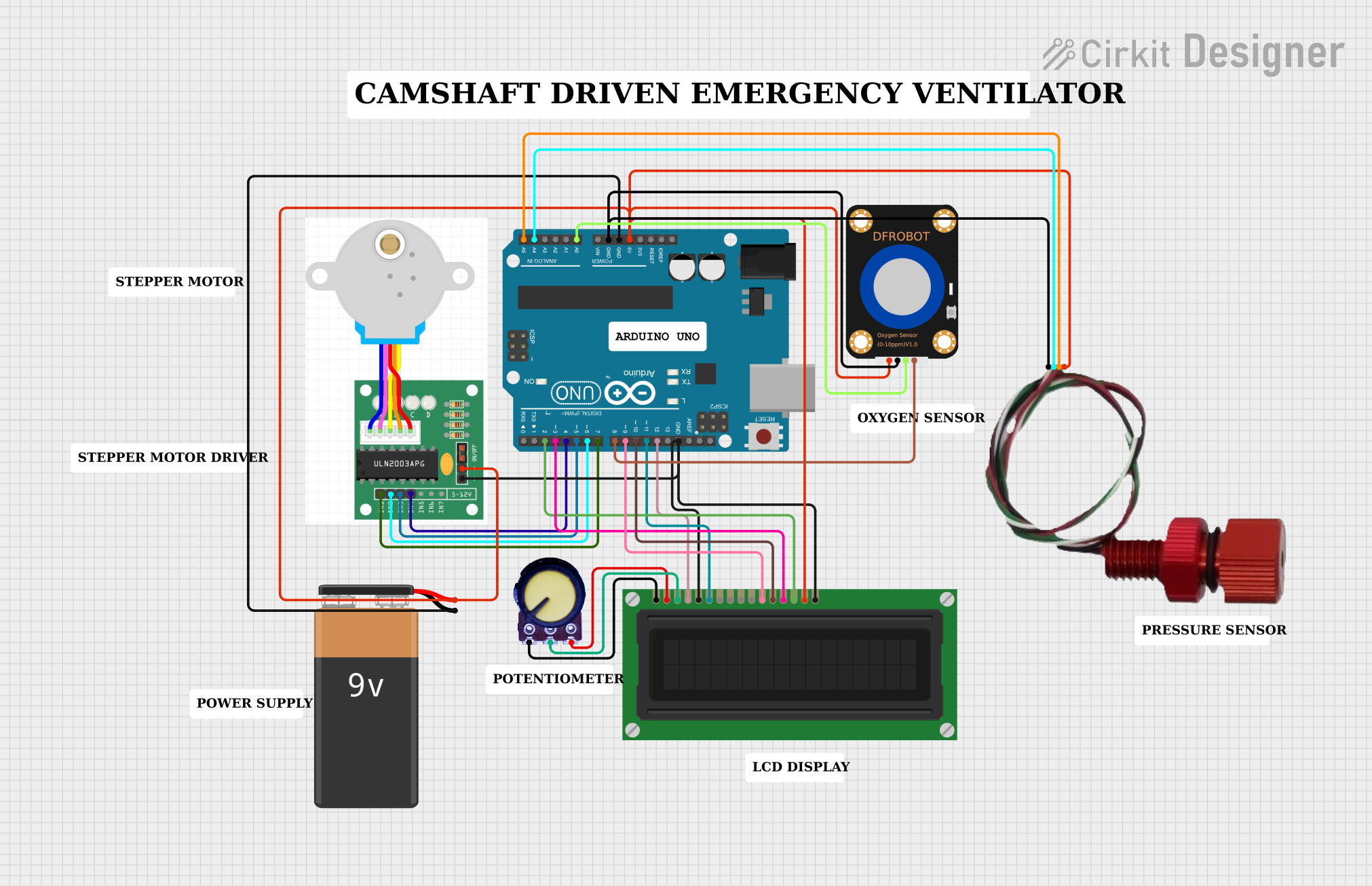
Circuit Documentation
Summary
This circuit integrates an Arduino UNO microcontroller with various sensors and actuators, including a DFRobot Oxygen Sensor, a Bar02 Pressure/Depth Sensor, an LCD Display, a stepper motor, and a potentiometer. The Arduino UNO reads data from the sensors, controls the stepper motor, and displays information on the LCD. The circuit is powered by a 9V battery.
Component List
Arduino UNO
- Description: Microcontroller board based on the ATmega328P.
- Pins: UNUSED, IOREF, Reset, 3.3V, 5V, GND, Vin, A0, A1, A2, A3, A4, A5, SCL, SDA, AREF, D13, D12, D11, D10, D9, D8, D7, D6, D5, D4, D3, D2, D1, D0
DFRobot Oxygen Sensor
- Description: Sensor for measuring oxygen levels.
- Pins: Pin 1, Pin 2, Pin 3, Pin 4
LCD Display (16 pin)
- Description: 16x2 character LCD display.
- Pins: VSS, VDD, VO, RS, R_W, E, DB0, DB1, DB2, DB3, DB4, DB5, DB6, DB7, A, K
Stepper Motor
- Description: Stepper motor for precise control of rotation.
- Pins: IN1, IN2, IN3, IN4, +, -
9V Battery
- Description: Power source for the circuit.
- Pins: -, +
Potentiometer
- Description: Variable resistor for adjusting voltage.
- Pins: GND, Output, VCC
Bar02 Pressure/Depth Sensor
- Description: Sensor for measuring pressure and depth.
- Pins: GND, SDA, SCL, VCC
Wiring Details
Arduino UNO
- 5V: Connected to the 9V Battery (+), Stepper Motor (+), LCD Display (A), DFRobot Oxygen Sensor (Pin 1), Bar02 Pressure/Depth Sensor (VCC)
- GND: Connected to the 9V Battery (-), DFRobot Oxygen Sensor (Pin 2), Bar02 Pressure/Depth Sensor (GND), Stepper Motor (-), LCD Display (K), LCD Display (R_W)
- A0: Connected to DFRobot Oxygen Sensor (Pin 3)
- A4: Connected to Bar02 Pressure/Depth Sensor (SDA)
- A5: Connected to Bar02 Pressure/Depth Sensor (SCL)
- D12: Connected to LCD Display (RS)
- D11: Connected to LCD Display (E)
- D10: Connected to LCD Display (DB5)
- D9: Connected to LCD Display (DB4)
- D8: Connected to DFRobot Oxygen Sensor (Pin 4)
- D7: Connected to Stepper Motor (IN1)
- D6: Connected to Stepper Motor (IN2)
- D5: Connected to Stepper Motor (IN3)
- D4: Connected to Stepper Motor (IN4)
- D3: Connected to LCD Display (DB6)
- D2: Connected to LCD Display (DB7)
DFRobot Oxygen Sensor
- Pin 1: Connected to Arduino UNO (5V)
- Pin 2: Connected to Arduino UNO (GND)
- Pin 3: Connected to Arduino UNO (A0)
- Pin 4: Connected to Arduino UNO (D8)
LCD Display (16 pin)
- VSS: Connected to Potentiometer (GND)
- VDD: Connected to Potentiometer (VCC)
- VO: Connected to Potentiometer (Output)
- RS: Connected to Arduino UNO (D12)
- R_W: Connected to Arduino UNO (GND)
- E: Connected to Arduino UNO (D11)
- DB4: Connected to Arduino UNO (D9)
- DB5: Connected to Arduino UNO (D10)
- DB6: Connected to Arduino UNO (D3)
- DB7: Connected to Arduino UNO (D2)
- A: Connected to Arduino UNO (5V)
- K: Connected to Arduino UNO (GND)
Stepper Motor
- +: Connected to Arduino UNO (5V)
- -: Connected to Arduino UNO (GND)
- IN1: Connected to Arduino UNO (D7)
- IN2: Connected to Arduino UNO (D6)
- IN3: Connected to Arduino UNO (D5)
- IN4: Connected to Arduino UNO (D4)
9V Battery
- +: Connected to Arduino UNO (5V)
- -: Connected to Arduino UNO (GND)
Potentiometer
- GND: Connected to LCD Display (VSS)
- Output: Connected to LCD Display (VO)
- VCC: Connected to LCD Display (VDD)
Bar02 Pressure/Depth Sensor
- GND: Connected to Arduino UNO (GND)
- SDA: Connected to Arduino UNO (A4)
- SCL: Connected to Arduino UNO (A5)
- VCC: Connected to Arduino UNO (5V)
Code Documentation
#include <Wire.h>
#include <LiquidCrystal.h>
#include <Stepper.h>

// Constants for the stepper motor
const int stepsPerRevolution = 200; // Change this value based on your stepper motor's specifications
const int rpm = 16;

// Initialize the stepper library on pins 4 through 7
Stepper myStepper(stepsPerRevolution, 4, 5, 6, 7);

// Initialize the LCD library with the numbers of the interface pins
LiquidCrystal lcd(12, 11, 9, 10, 3, 2);

// Pin definitions for sensors
const int oxygenSensorPin = A0;
const int pressureSensorSDA = A4;
const int pressureSensorSCL = A5;

void setup() {
  // Set the speed of the stepper motor
  myStepper.setSpeed(rpm);

  // Initialize the LCD
  lcd.begin(16, 2);
  lcd.print("Initializing...");

  // Initialize I2C communication for the pressure sensor
  Wire.begin();

  // Initialize serial communication for debugging
  Serial.begin(9600);
}

void loop() {
  // Stepper motor control
  myStepper.step(stepsPerRevolution); // Rotate one full revolution
  delay(3750); // Delay to achieve 16 RPM (60 seconds / 16 RPM = 3.75 seconds per revolution)

  // Read oxygen sensor value
  int oxygenValue = analogRead(oxygenSensorPin);

  // Read pressure sensor value
  float pressureValue = readPressureSensor();

  // Display values on the LCD
  lcd.clear();
  lcd.setCursor(0, 0);
  lcd.print("Oxygen: ");
  lcd.print(oxygenValue);
  lcd.setCursor(0, 1);
  lcd.print("Pressure: ");
  lcd.print(pressureValue);

  // Print values to the serial monitor for debugging
  Serial.print("Oxygen: ");
  Serial.print(oxygenValue);
  Serial.print(" Pressure: ");
  Serial.println(pressureValue);

  delay(1000); // Delay before the next loop iteration
}

float readPressureSensor() {
  // Placeholder function to read pressure sensor value
  // Replace this with actual code to read from the Bar02 Pressure/Depth Sensor
  Wire.beginTransmission(pressureSensorSDA);
  Wire.write(0x00); // Replace with actual register address
  Wire.endTransmission();
  Wire.requestFrom(pressureSensorSDA, 2);
  if (Wire.available() == 2) {
    int highByte = Wire.read();
    int lowByte = Wire.read();
    int pressure = (highByte << 8) | lowByte;
    return pressure / 100.0; // Convert to appropriate units
  }
  return 0.0;
}
This code initializes the stepper motor, LCD, and sensors. It reads data from the oxygen and pressure sensors, controls the stepper motor, and displays the sensor values on the LCD and serial monitor. The readPressureSensor function is a placeholder and should be replaced with the actual code to read from the Bar02 Pressure/Depth Sensor.