
Arduino UNO-Based Cherry Sorting System with Color and Proximity Sensors
View and Edit Project In Cirkit Designer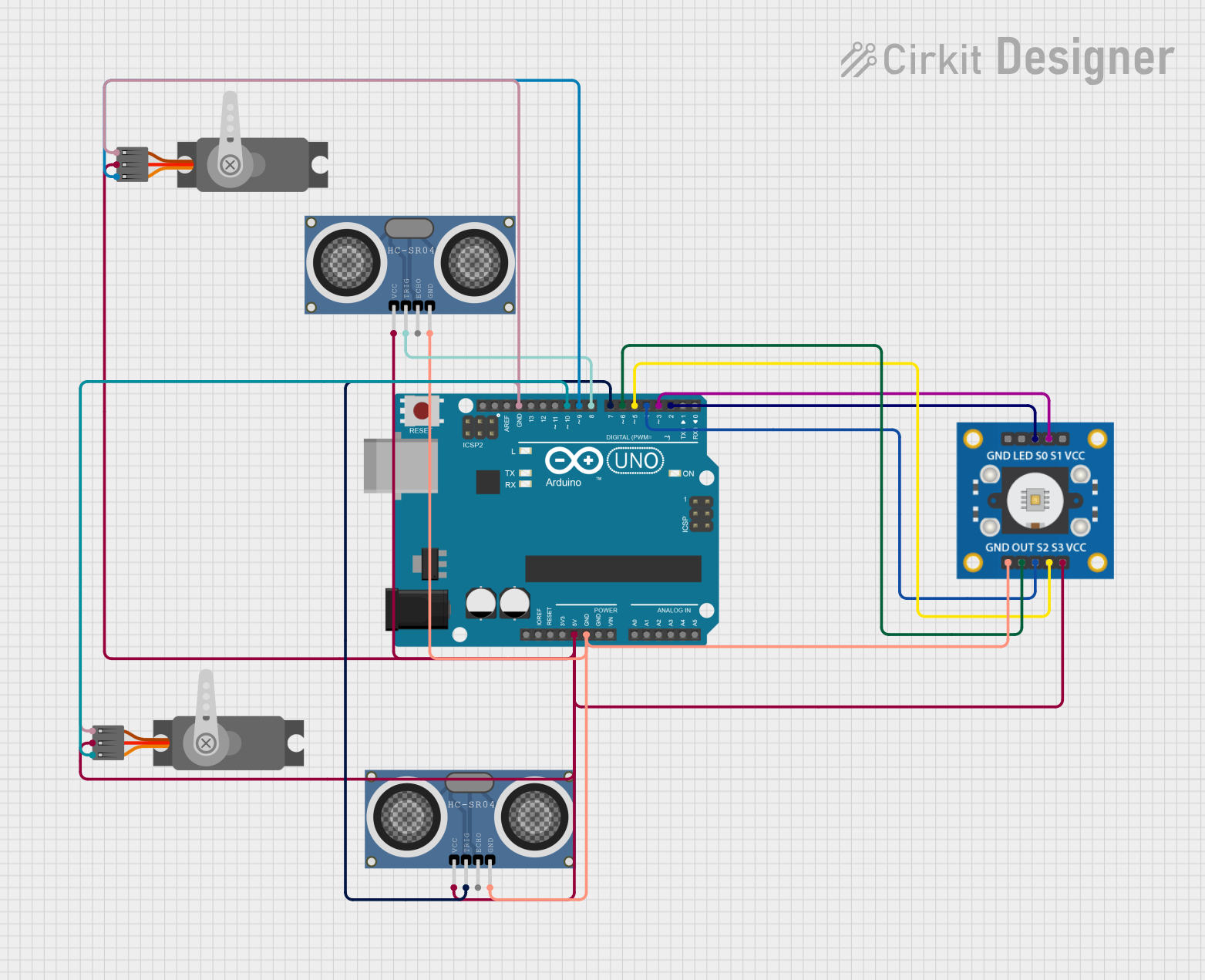
Circuit Documentation
Summary
This circuit is designed to sort cherries based on their color using a TCS3200 color sensor, two HC-SR04 ultrasonic distance sensors, and two servo motors. The Arduino UNO microcontroller is used to control the sensors and servos. The TCS3200 color sensor detects the color of the cherries, and the ultrasonic sensors detect the presence of cherries. Based on the detected color, the corresponding servo motor is activated to sort the cherries.
Component List
Arduino UNO
- Description: A microcontroller board based on the ATmega328P.
- Pins: UNUSED, IOREF, Reset, 3.3V, 5V, GND, Vin, A0, A1, A2, A3, A4, A5, SCL, SDA, AREF, D13, D12, D11, D10, D9, D8, D7, D6, D5, D4, D3, D2, D1, D0
TCS3200 Color Sensor
- Description: A color sensor that can detect the color of objects.
- Pins: GND, OUT, S2, S3, VCC, LED, S0, S1
HC-SR04 Ultrasonic Distance Sensor (x2)
- Description: An ultrasonic sensor used to measure distance.
- Pins: VCC, TRIG, ECHO, GND
Servo Motor (x2)
- Description: A servo motor used for precise control of angular position.
- Pins: GND, V+, PWM
Wiring Details
Arduino UNO
- 5V: Connected to V+ of both Servo Motors, VCC of both HC-SR04 Ultrasonic Distance Sensors, and VCC of TCS3200 Color Sensor.
- GND: Connected to GND of both Servo Motors, GND of both HC-SR04 Ultrasonic Distance Sensors, and GND of TCS3200 Color Sensor.
- D10: Connected to PWM of the second Servo Motor.
- D9: Connected to PWM of the first Servo Motor.
- D8: Connected to TRIG of the second HC-SR04 Ultrasonic Distance Sensor.
- D7: Connected to TRIG of the first HC-SR04 Ultrasonic Distance Sensor.
- D6: Connected to OUT of TCS3200 Color Sensor.
- D5: Connected to S3 of TCS3200 Color Sensor.
- D4: Connected to S2 of TCS3200 Color Sensor.
- D3: Connected to S1 of TCS3200 Color Sensor.
- D2: Connected to S0 of TCS3200 Color Sensor.
TCS3200 Color Sensor
- VCC: Connected to 5V of Arduino UNO.
- GND: Connected to GND of Arduino UNO.
- OUT: Connected to D6 of Arduino UNO.
- S3: Connected to D5 of Arduino UNO.
- S2: Connected to D4 of Arduino UNO.
- S1: Connected to D3 of Arduino UNO.
- S0: Connected to D2 of Arduino UNO.
HC-SR04 Ultrasonic Distance Sensor (1)
- VCC: Connected to 5V of Arduino UNO.
- GND: Connected to GND of Arduino UNO.
- TRIG: Connected to D7 of Arduino UNO.
- ECHO: Not connected in this circuit.
HC-SR04 Ultrasonic Distance Sensor (2)
- VCC: Connected to 5V of Arduino UNO.
- GND: Connected to GND of Arduino UNO.
- TRIG: Connected to D8 of Arduino UNO.
- ECHO: Not connected in this circuit.
Servo Motor (1)
- V+: Connected to 5V of Arduino UNO.
- GND: Connected to GND of Arduino UNO.
- PWM: Connected to D9 of Arduino UNO.
Servo Motor (2)
- V+: Connected to 5V of Arduino UNO.
- GND: Connected to GND of Arduino UNO.
- PWM: Connected to D10 of Arduino UNO.
Documented Code
#include <Servo.h>

// Pin definitions
#define S0 2               // TCS3200 pin S0
#define S1 3               // TCS3200 pin S1
#define S2 4               // TCS3200 pin S2
#define S3 5               // TCS3200 pin S3
#define OUT_PIN 6          // TCS3200 output pin
#define PROXIMITY1_PIN 7   // First proximity sensor
#define PROXIMITY2_PIN 8   // Second proximity sensor
#define SERVO1_PIN 9       // First servo motor
#define SERVO2_PIN 10      // Second servo motor

// Servo objects
Servo servo1;
Servo servo2;

// Variables for TCS3200
int redValue = 0;
int greenValue = 0;
int blueValue = 0;
const int thresholdReddish = 200;  // Example threshold for reddish color
const int thresholdGreenish = 200; // Example threshold for greenish color

void setup() {
  // Initialize serial communication
  Serial.begin(9600);

  // Initialize TCS3200 pins
  pinMode(S0, OUTPUT);
  pinMode(S1, OUTPUT);
  pinMode(S2, OUTPUT);
  pinMode(S3, OUTPUT);
  pinMode(OUT_PIN, INPUT);

  // Set frequency scaling to 20% (adjust as needed)
  digitalWrite(S0, HIGH);
  digitalWrite(S1, LOW);

  // Initialize proximity sensor pins
  pinMode(PROXIMITY1_PIN, INPUT);
  pinMode(PROXIMITY2_PIN, INPUT);

  // Attach servos
  servo1.attach(SERVO1_PIN);
  servo2.attach(SERVO2_PIN);

  // Move servos to initial position
  servo1.write(0);
  servo2.write(0);
}

void loop() {
  // Read color sensor values
  redValue = readColor(LOW, LOW);   // Red
  greenValue = readColor(HIGH, HIGH); // Green
  blueValue = readColor(LOW, HIGH);  // Blue

  // Display color values (for debugging)
  Serial.print("Red: ");
  Serial.print(redValue);
  Serial.print(" Green: ");
  Serial.print(greenValue);
  Serial.print(" Blue: ");
  Serial.println(blueValue);

  // Determine color and activate sorting mechanism
  if (redValue > thresholdReddish && greenValue < thresholdGreenish) {
    // Reddish cherry detected
    if (digitalRead(PROXIMITY1_PIN) == HIGH) {
      servo1.write(90);  // Activate first servo
      delay(1000);       // Wait for sorting
      servo1.write(0);   // Reset servo
    }
  } else if (greenValue > thresholdGreenish && redValue < thresholdReddish) {
    // Greenish cherry detected
    if (digitalRead(PROXIMITY2_PIN) == HIGH) {
      servo2.write(90);  // Activate second servo
      delay(1000);       // Wait for sorting
      servo2.write(0);   // Reset servo
    }
  } else {
    // Biased or undetectable color, do nothing
    Serial.println("Biased or undetectable color.");
  }

  delay(500); // Small delay for stability
}

// Function to read color value from TCS3200
int readColor(int s2State, int s3State) {
  digitalWrite(S2, s2State);
  digitalWrite(S3, s3State);
  return pulseIn(OUT_PIN, LOW);
}
This code initializes the TCS3200 color sensor, the HC-SR04 ultrasonic distance sensors, and the servo motors. It reads the color values from the TCS3200 sensor and activates the corresponding servo motor based on the detected color and the presence of a cherry detected by the ultrasonic sensors.