
Circuit Documentation
Summary
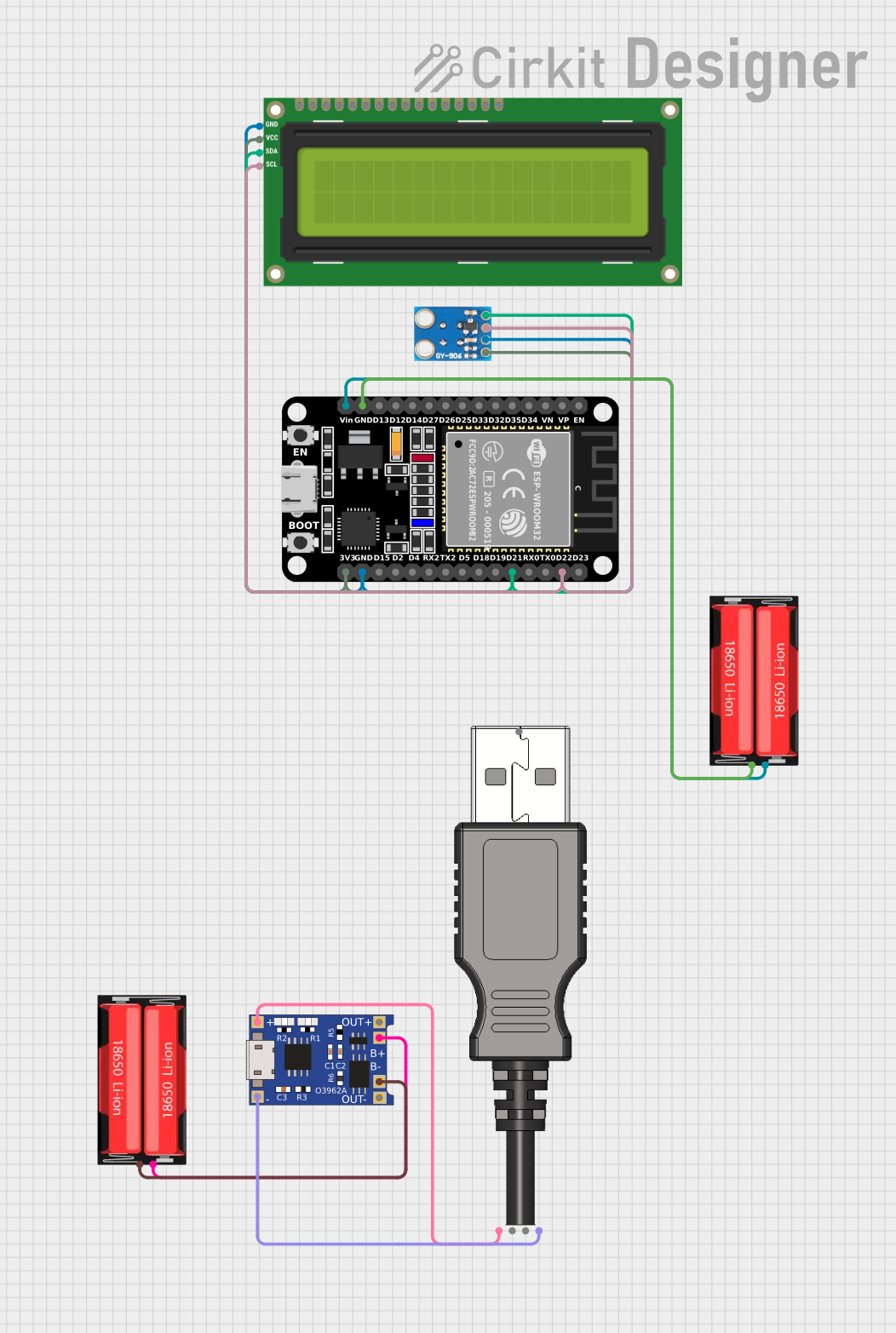
The circuit in question is designed to measure and display temperature readings using an infrared temperature sensor and an I2C LCD screen. The core of the circuit is an ESP32 microcontroller, which interfaces with an MLX90614 infrared temperature sensor and a 16x2 I2C LCD screen to display ambient and object temperatures. The circuit is powered by a 18650 Li-Ion battery, which is charged through a TP4056 charging module connected to a USB plug. The ESP32 also manages the I2C communication between the sensor and the LCD.
Component List
ESP32 (30 pin)
- Description: A microcontroller with Wi-Fi and Bluetooth capabilities, featuring a wide range of GPIO pins.
- Purpose: Acts as the central processing unit, managing sensor data acquisition and display on the LCD.
MLX90614
- Description: An infrared temperature sensor for non-contact temperature measurements.
- Purpose: Measures ambient and object temperatures to be displayed on the LCD.
18650 Li-Ion Battery
- Description: A rechargeable lithium-ion battery cell.
- Purpose: Provides power to the circuit.
I2C LCD 16x2 Screen
- Description: A liquid crystal display with a 16x2 character format, interfaced via I2C.
- Purpose: Displays the temperature readings from the MLX90614 sensor.
TP4056
- Description: A lithium-ion battery charger with a micro USB input.
- Purpose: Charges the 18650 Li-Ion battery.
USB Plug
- Description: A USB connector for power input.
- Purpose: Provides a power source for the TP4056 to charge the battery.
Wiring Details
ESP32 (30 pin)
GNDconnected to the negative terminal of the 18650 Li-Ion battery.Vinconnected to the positive terminal of the 18650 Li-Ion battery.D22(SCL) connected to the SCL pin of the MLX90614 and the SCL pin of the I2C LCD.D21(SDA) connected to the SDA pin of the MLX90614 and the SDA pin of the I2C LCD.3V3connected to the VIN pin of the MLX90614 and the VCC (5V) pin of the I2C LCD.
MLX90614
VINconnected to the 3V3 output of the ESP32.GNDconnected to the GND of the ESP32.SCLconnected to the D22 pin of the ESP32 and the SCL pin of the I2C LCD.SDAconnected to the D21 pin of the ESP32 and the SDA pin of the I2C LCD.
18650 Li-Ion Battery
Positiveterminal connected to the Vin of the ESP32 and the B+ of the TP4056.Negativeterminal connected to the GND of the ESP32 and the B- of the TP4056.
I2C LCD 16x2 Screen
SCLconnected to the D22 pin of the ESP32 and the SCL pin of the MLX90614.SDAconnected to the D21 pin of the ESP32 and the SDA pin of the MLX90614.VCC (5V)connected to the 3V3 output of the ESP32.GNDconnected to the GND of the ESP32.
TP4056
B-connected to the negative terminal of the 18650 Li-Ion battery.B+connected to the positive terminal of the 18650 Li-Ion battery.IN-connected to the GND pin of the USB Plug.IN+connected to the 5V+ pin of the USB Plug.
USB Plug
GNDconnected to the IN- of the TP4056.5V+connected to the IN+ of the TP4056.
Documented Code
Code for ESP32 (30 pin)
#include <Wire.h>
#include <LiquidCrystal_I2C.h>
#include <Adafruit_MLX90614.h>

// Create an instance of the LCD and MLX90614
LiquidCrystal_I2C lcd(0x27, 16, 2);  // Change 0x27 to your LCD's I2C address if necessary
Adafruit_MLX90614 mlx = Adafruit_MLX90614();

void setup() {
  // Initialize I2C
  Wire.begin();

  // Initialize the LCD
  lcd.begin();
  lcd.backlight(); // Turn on the backlight

  // Initialize the MLX90614
  if (!mlx.begin()) {
    lcd.print("MLX90614 Error");
    while (1); // Stop the program if the sensor is not found
  }

  // Welcome message
  lcd.setCursor(0, 0);
  lcd.print("Infrared Temp");
}

void loop() {
  // Read temperatures
  float ambientTemp = mlx.readAmbientTempC();  // Get ambient temperature in Celsius
  float objectTemp = mlx.readObjectTempC();    // Get object temperature in Celsius

  // Display on LCD
  lcd.setCursor(0, 1);  // Move cursor to the second line
  lcd.print("Amb: ");
  lcd.print(ambientTemp);
  lcd.print((char)223); // Degree symbol
  lcd.print("C Obj: ");
  lcd.print(objectTemp);
  lcd.print((char)223); // Degree symbol
  lcd.print("C");

  // Wait for a bit before the next reading
  delay(1000); // 1-second delay
}
This code is responsible for initializing the I2C communication, setting up the LCD and MLX90614 sensor, and continuously reading and displaying the temperature data on the LCD. The ambient and object temperatures are displayed with a 1-second delay between updates.