
Circuit Documentation
Summary
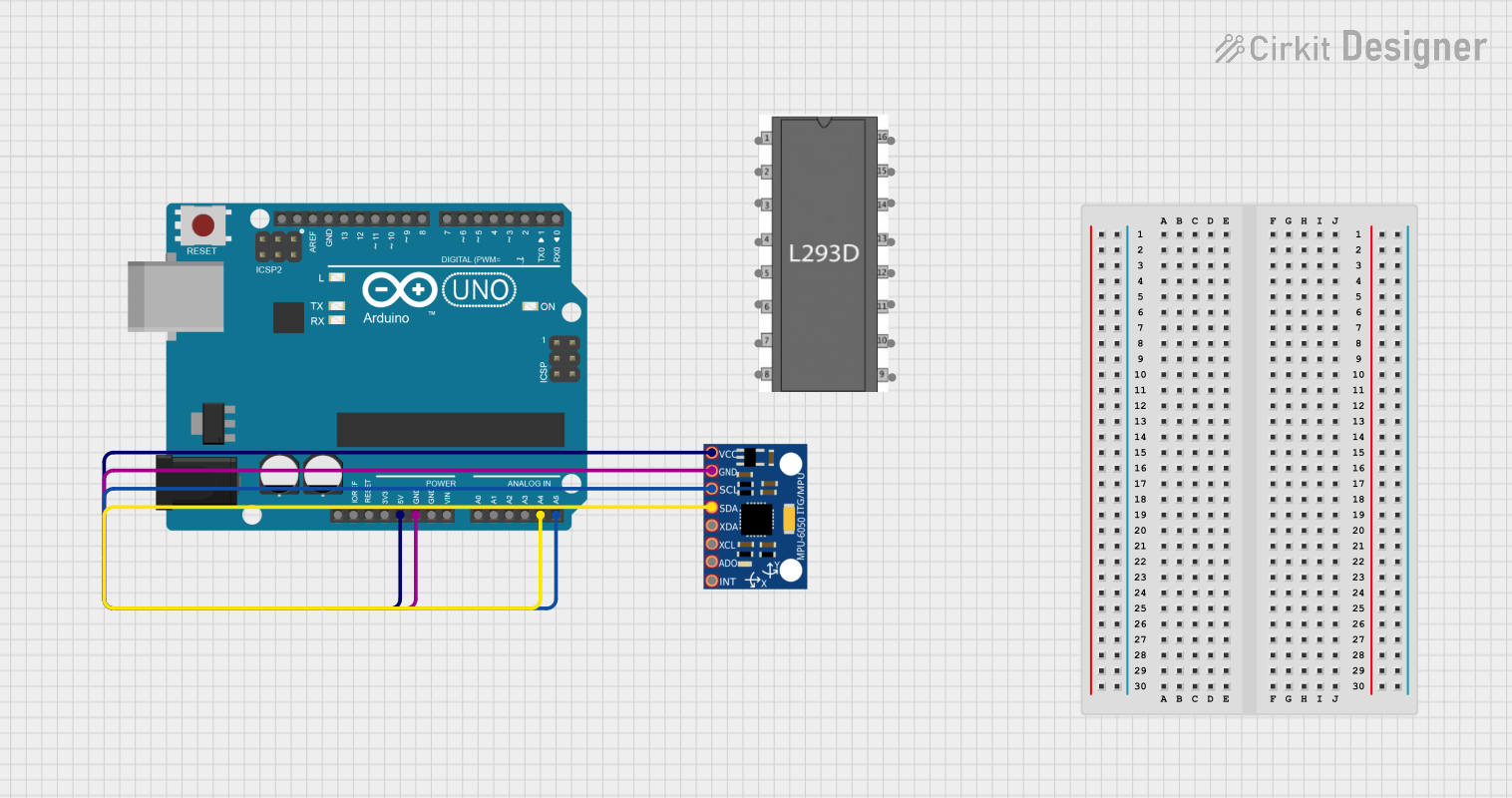
This circuit involves an Arduino UNO microcontroller interfaced with an MPU-6050 accelerometer and gyroscope sensor. The Arduino UNO reads data from the MPU-6050 and processes it to output the accelerometer readings on the serial monitor.
Component List
Arduino UNO
- Description: A microcontroller board based on the ATmega328P.
- Pins: UNUSED, IOREF, Reset, 3.3V, 5V, GND, Vin, A0, A1, A2, A3, A4, A5, SCL, SDA, AREF, D13, D12, D11, D10, D9, D8, D7, D6, D5, D4, D3, D2, D1, D0
MPU-6050
- Description: A 3-axis accelerometer and 3-axis gyroscope sensor.
- Pins: VCC, GND, SCL, SDA, XDA, XCL, AD0, INT
L293D Motor Driver
- Description: A quadruple high-current half-H driver.
- Pins: enable 1, input 1, output 1, gnd, output 2, input 2, vs, vss, input 4, output 4, output 3, input 3, enable 2
Wiring Details
Arduino UNO
- 5V: Connected to VCC of MPU-6050
- GND: Connected to GND of MPU-6050
- A4: Connected to SDA of MPU-6050
- A5: Connected to SCL of MPU-6050
MPU-6050
- VCC: Connected to 5V of Arduino UNO
- GND: Connected to GND of Arduino UNO
- SDA: Connected to A4 of Arduino UNO
- SCL: Connected to A5 of Arduino UNO
L293D Motor Driver
- No connections specified in the provided net list.
Code Documentation
Arduino UNO Code
#include "Wire.h"
#include "I2Cdev.h"
#include "MPU6050.h"

MPU6050 mpu;
int16_t ax, ay, az;
int16_t gx, gy, gz;

struct MyData {
  byte X;
  byte Y;
  byte Z;
};

MyData data;

void setup()
{
  Serial.begin(9600);
  Wire.begin();
  mpu.initialize();
  //pinMode(LED_BUILTIN, OUTPUT);
}

void loop()
{
  mpu.getMotion6(&ax, &ay, &az, &gx, &gy, &gz);
  data.X = map(ax, -17000, 17000, 0, 255 ); // X axis data
  data.Y = map(ay, -17000, 17000, 0, 255);
  data.Z = map(az, -17000, 17000, 0, 255);  // Y axis data
  delay(500);
  Serial.print("Axis X = ");
  Serial.print(data.X);
  Serial.print("  ");
  Serial.print("Axis Y = ");
  Serial.print(data.Y);
  Serial.print("  ");
  Serial.print("Axis Z  = ");
  Serial.println(data.Z);
}
This code initializes the MPU-6050 sensor and reads the accelerometer data in the loop. The data is then mapped to a range of 0 to 255 and printed to the serial monitor.