
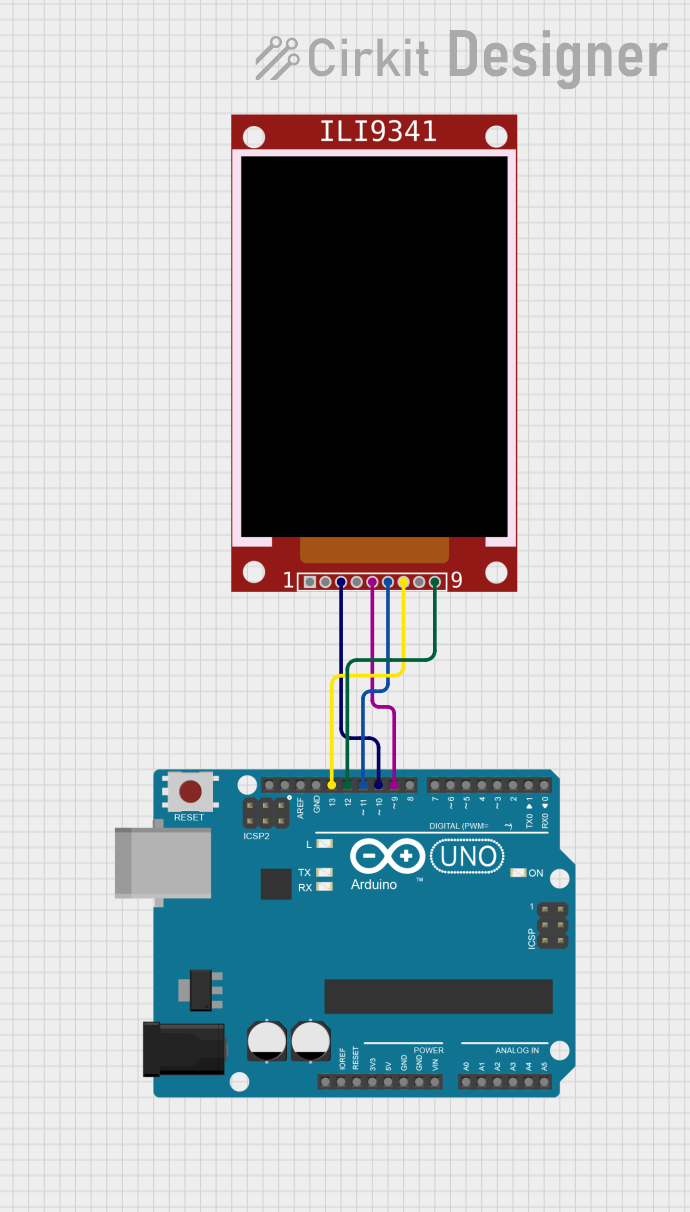
Circuit Documentation
Summary
This document provides a detailed overview of a circuit that interfaces an Arduino UNO microcontroller with an ILI9341 TFT display. The Arduino UNO is used to control the display, and the provided code generates a Mandelbrot fractal on the TFT screen.
Component List
ILI9341
- Description: The ILI9341 is a 2.8" TFT LCD display with a resolution of 240x320 pixels. It supports both SPI and 8-bit parallel interfaces.
- Pins: VCC, GND, CS, RST, D/C, MOSI, SCK, LED, MISO
Arduino UNO
- Description: The Arduino UNO is a microcontroller board based on the ATmega328P. It has 14 digital input/output pins, 6 analog inputs, a 16 MHz quartz crystal, a USB connection, a power jack, an ICSP header, and a reset button.
- Pins: UNUSED, IOREF, Reset, 3.3V, 5V, GND, Vin, A0, A1, A2, A3, A4, A5, SCL, SDA, AREF, D13, D12, D11, D10, D9, D8, D7, D6, D5, D4, D3, D2, D1, D0
Wiring Details
ILI9341
- VCC: Connect to 5V on Arduino UNO
- GND: Connect to GND on Arduino UNO
- CS: Connect to D10 on Arduino UNO
- RST: Not connected (handled in code)
- D/C: Connect to D9 on Arduino UNO
- MOSI: Connect to D11 on Arduino UNO
- SCK: Connect to D13 on Arduino UNO
- LED: Not connected (optional for backlight control)
- MISO: Connect to D12 on Arduino UNO
Arduino UNO
- D10: Connect to CS on ILI9341
- D9: Connect to D/C on ILI9341
- D11: Connect to MOSI on ILI9341
- D13: Connect to SCK on ILI9341
- D12: Connect to MISO on ILI9341
Code Documentation
Mandelbrot Drawer Code
// Source: https://github.com/adafruit/Adafruit_ILI9341/tree/master/examples/mandelbrot

#include <Adafruit_ILI9341.h>

#ifdef ADAFRUIT_PYPORTAL
  #define TFT_D0        34 // Data bit 0 pin (MUST be on PORT byte boundary)
  #define TFT_WR        26 // Write-strobe pin (CCL-inverted timer output)
  #define TFT_DC        10 // Data/command pin
  #define TFT_CS        11 // Chip-select pin
  #define TFT_RST       24 // Reset pin
  #define TFT_RD         9 // Read-strobe pin
  #define TFT_BACKLIGHT 25
  // ILI9341 with 8-bit parallel interface:
  Adafruit_ILI9341 tft = Adafruit_ILI9341(tft8bitbus, TFT_D0, TFT_WR, TFT_DC, TFT_CS, TFT_RST, TFT_RD);
  #define USE_BUFFER   // buffer all 155 KB of data for bliting - uses passive ram but looks nicer?
#else
  // Use SPI
  #define STMPE_CS 6
  #define TFT_CS   10
  #define TFT_DC   9
  #define SD_CS    5
  Adafruit_ILI9341 tft = Adafruit_ILI9341(TFT_CS, TFT_DC);
#endif

const int16_t
  bits        = 12,   // Fractional resolution
  pixelWidth  = 320,  // TFT dimensions
  pixelHeight = 240,
  iterations  = 20;  // Fractal iteration limit or 'dwell'
float
  centerReal  = -0.6, // Image center point in complex plane
  centerImag  =  0.0,
  rangeReal   =  3.0, // Image coverage in complex plane
  rangeImag   =  3.0;

#if defined(USE_BUFFER)
  uint16_t buffer[pixelWidth * pixelHeight];
#endif

void setup(void) {
  Serial.begin(115200);
  Serial.print("Mandelbrot drawer!");

  tft.begin();
  tft.setRotation(1);
  tft.fillScreen(ILI9341_BLACK);

  // Turn on backlight (required on PyPortal)
#if defined(TFT_BACKLIGHT)
  pinMode(TFT_BACKLIGHT, OUTPUT);
  digitalWrite(TFT_BACKLIGHT, HIGH);
#endif
}

void loop() {
  int64_t       n, a, b, a2, b2, posReal, posImag;
  uint32_t      startTime,elapsedTime;

  int32_t
    startReal   = (int64_t)((centerReal - rangeReal * 0.5)   * (float)(1 << bits)),
    startImag   = (int64_t)((centerImag + rangeImag * 0.5)   * (float)(1 << bits)),
    incReal     = (int64_t)((rangeReal / (float)pixelWidth)  * (float)(1 << bits)),
    incImag     = (int64_t)((rangeImag / (float)pixelHeight) * (float)(1 << bits));

  startTime = millis();
  posImag = startImag;
  for (int y = 0; y < pixelHeight; y++) {
    posReal = startReal;
    for (int x = 0; x < pixelWidth; x++) {
      a = posReal;
      b = posImag;
      for (n = iterations; n > 0 ; n--) {
        a2 = (a * a) >> bits;
        b2 = (b * b) >> bits;
        if ((a2 + b2) >= (4 << bits))
          break;
        b  = posImag + ((a * b) >> (bits - 1));
        a  = posReal + a2 - b2;
      }
      #if defined(USE_BUFFER)
        buffer[y * pixelWidth + x] = (n * 29)<<8 | (n * 67);
      #else
        tft.drawPixel(x, y, (n * 29)<<8 | (n * 67)); // takes 500ms with individual pixel writes
      #endif
      posReal += incReal;
    }
    posImag -= incImag;
  }
  #if defined(USE_BUFFER)
    tft.drawRGBBitmap(0, 0, buffer, pixelWidth, pixelHeight); // takes 169 ms
  #endif
  elapsedTime = millis()-startTime;
  Serial.print("Took "); Serial.print(elapsedTime); Serial.println(" ms");

  rangeReal *= 0.95;
  rangeImag *= 0.95;
}
This code initializes the ILI9341 TFT display and generates a Mandelbrot fractal. The fractal is drawn pixel by pixel, and the display is updated in real-time. The code also includes an option to buffer the entire display for faster updates.