
Arduino UNO Based Temperature Monitoring System with DS18B20 Sensor
View and Edit Project In Cirkit Designer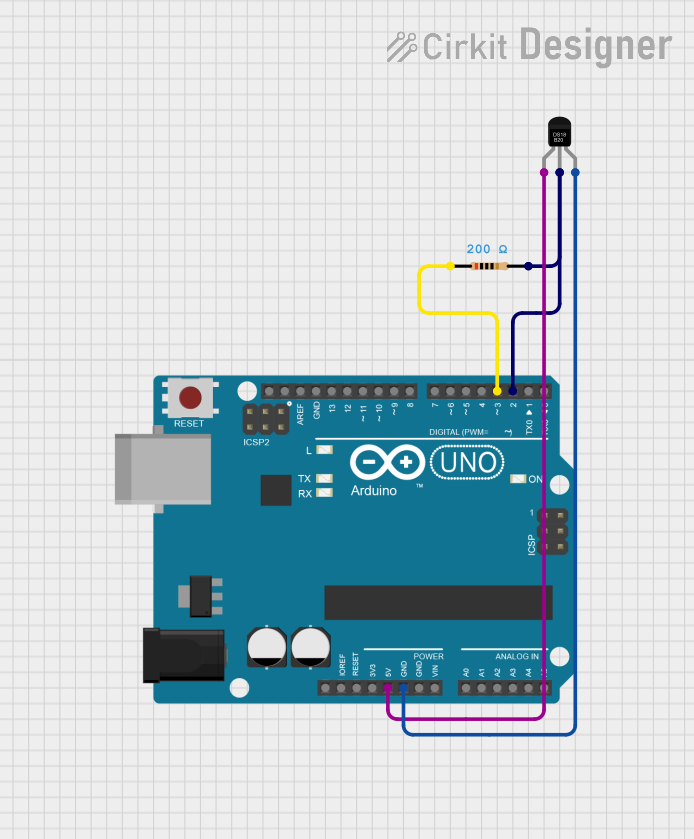
Circuit Documentation
Summary
This circuit consists of an Arduino UNO microcontroller interfaced with a DS18B20 temperature sensor. The DS18B20 sensor is connected to the Arduino UNO via a digital input pin with a pull-up resistor. The purpose of this circuit is to measure temperature data and output the readings to the serial console. The Arduino UNO is programmed to read the temperature data from the DS18B20 sensor and print the temperature in Celsius to the serial console.
Component List
Arduino UNO
- Description: A microcontroller board based on the ATmega328P.
- Purpose: Acts as the central processing unit for the circuit, reading temperature data from the DS18B20 sensor and sending it to the serial console.
- Pins:
UNUSEDIOREFReset3.3V5VGNDVinA0toA5SCLSDAAREFD13toD0
DS18B20
- Description: A 1-Wire digital temperature sensor.
- Purpose: Measures temperature and provides data to the Arduino UNO.
- Pins:
VDDDQGND
Resistor
- Description: A passive two-terminal electrical component that implements electrical resistance as a circuit element.
- Purpose: Acts as a pull-up resistor for the DS18B20 data line.
- Properties:
Resistance: 200 Ohms
Wiring Details
Arduino UNO
5Vconnected to DS18B20VDDGNDconnected to DS18B20GNDD3connected to one end of the ResistorD2connected to DS18B20DQand the other end of the Resistor
DS18B20
VDDconnected to Arduino UNO5VDQconnected to Arduino UNOD2and ResistorGNDconnected to Arduino UNOGND
Resistor
- One end connected to Arduino UNO
D3 - The other end connected to DS18B20
DQand Arduino UNOD2
Documented Code
The embedded code for the Arduino UNO is written in C++ and is used to interface with the DS18B20 temperature sensor. The code utilizes the OneWire and DallasTemperature libraries to communicate with the sensor and read temperature data. The temperature is then printed to the serial console in Celsius.
The code is divided into several files:
sketch.ino: The main Arduino sketch that sets up the sensor and serial communication, then enters a loop where it reads and prints the temperature.DallasTemperature.handDallasTemperature.cpp: These files define theDallasTemperatureclass, which provides functions for interacting with the DS18B20 sensor.OneWire.handOneWire.cpp: These files define theOneWireclass, which handles the low-level 1-Wire communication protocol used by the sensor.OneWire_direct_gpio.handOneWire_direct_regtype.h: These header files contain platform-specific definitions for direct GPIO access, used by theOneWirelibrary for optimized communication.
The code is structured to first configure the Arduino digital pins for communication with the sensor, then enter a loop where the temperature is read and printed to the serial console every second. The DallasTemperature library is used to abstract the details of the sensor communication, making the main sketch simpler and more readable.