
Arduino UNO and DS3231 RTC Based Digital Weighing Scale with 7-Segment Display
View and Edit Project In Cirkit Designer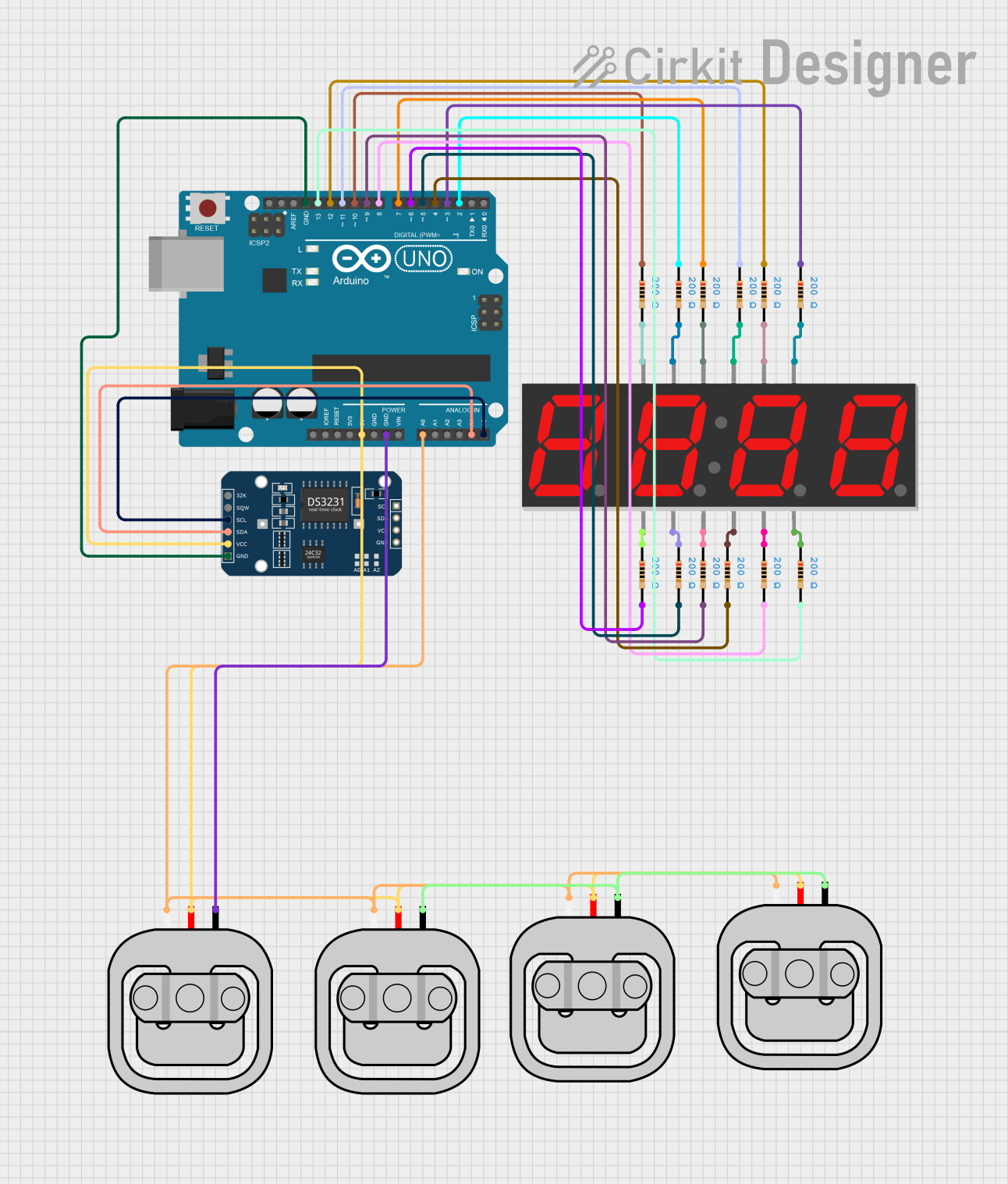
Circuit Documentation
Summary
This circuit involves an Arduino UNO microcontroller interfacing with a DS3231 RTC module, multiple load sensors, a 7-segment display, and several resistors. The Arduino UNO serves as the central controller, managing data from the load sensors and the RTC module, and displaying information on the 7-segment display.
Component List
Arduino UNO
- Description: A microcontroller board based on the ATmega328P.
- Pins: UNUSED, IOREF, Reset, 3.3V, 5V, GND, Vin, A0, A1, A2, A3, A4, A5, SCL, SDA, AREF, D13, D12, D11, D10, D9, D8, D7, D6, D5, D4, D3, D2, D1, D0
DS3231 RTC
- Description: A real-time clock module with an I2C interface.
- Pins: 32K, SQW, SCL, SDA, VCC, GND
Resistor
- Description: A passive electrical component that implements electrical resistance.
- Pins: pin1, pin2
- Properties: Resistance: 200 Ohms
7 Segment Display (4 Digit)
- Description: A display module used to show numerical data.
- Pins: 1, A, F, 2, 3, B, G, 4, C, DP, D, E
Load Sensor - 50kg
- Description: A sensor used to measure weight up to 50kg.
- Pins: W, R, B
Wiring Details
Arduino UNO
- 5V: Connected to R pins of all Load Sensors and VCC pin of DS3231 RTC.
- GND: Connected to B pin of one Load Sensor and GND pin of DS3231 RTC.
- A0: Connected to W pins of all Load Sensors.
- A4: Connected to SDA pin of DS3231 RTC.
- A5: Connected to SCL pin of DS3231 RTC.
- D13: Connected to pin2 of one Resistor.
- D12: Connected to pin1 of one Resistor.
- D11: Connected to pin1 of one Resistor.
- D10: Connected to pin1 of one Resistor.
- D9: Connected to pin2 of one Resistor.
- D8: Connected to pin2 of one Resistor.
- D7: Connected to pin1 of one Resistor.
- D6: Connected to pin2 of one Resistor.
- D5: Connected to pin2 of one Resistor.
- D4: Connected to pin2 of one Resistor.
- D3: Connected to pin1 of one Resistor.
- D2: Connected to pin1 of one Resistor.
DS3231 RTC
- VCC: Connected to 5V pin of Arduino UNO.
- GND: Connected to GND pin of Arduino UNO.
- SDA: Connected to A4 pin of Arduino UNO.
- SCL: Connected to A5 pin of Arduino UNO.
Resistor
- pin1: Connected to D12, D11, D10, D7, D3, D2 pins of Arduino UNO, and G, 4, C, DP, D, E pins of 7 Segment Display.
- pin2: Connected to D13, D9, D8, D6, D5, D4 pins of Arduino UNO, and 1, A, F, 2, 3, B pins of 7 Segment Display.
7 Segment Display (4 Digit)
- 1: Connected to pin2 of one Resistor.
- A: Connected to pin2 of one Resistor.
- F: Connected to pin2 of one Resistor.
- 2: Connected to pin2 of one Resistor.
- 3: Connected to pin2 of one Resistor.
- B: Connected to pin2 of one Resistor.
- G: Connected to pin1 of one Resistor.
- 4: Connected to pin1 of one Resistor.
- C: Connected to pin1 of one Resistor.
- DP: Connected to pin1 of one Resistor.
- D: Connected to pin1 of one Resistor.
- E: Connected to pin1 of one Resistor.
Load Sensor - 50kg
- R: Connected to 5V pin of Arduino UNO.
- B: Connected to GND pin of Arduino UNO.
- W: Connected to A0 pin of Arduino UNO.
Documented Code
Arduino UNO Code
void setup() {
  // put your setup code here, to run once:

}

void loop() {
  // put your main code here, to run repeatedly:

}
Additional Code for Resistor
void setup() {
  // put your setup code here, to run once:

}

void loop() {
  // put your main code here, to run repeatedly:

}
This documentation provides a comprehensive overview of the circuit, including a summary, detailed component list, wiring details, and documented code.