
Arduino UNO Based RFID Door Lock System with GSM Notification
View and Edit Project In Cirkit Designer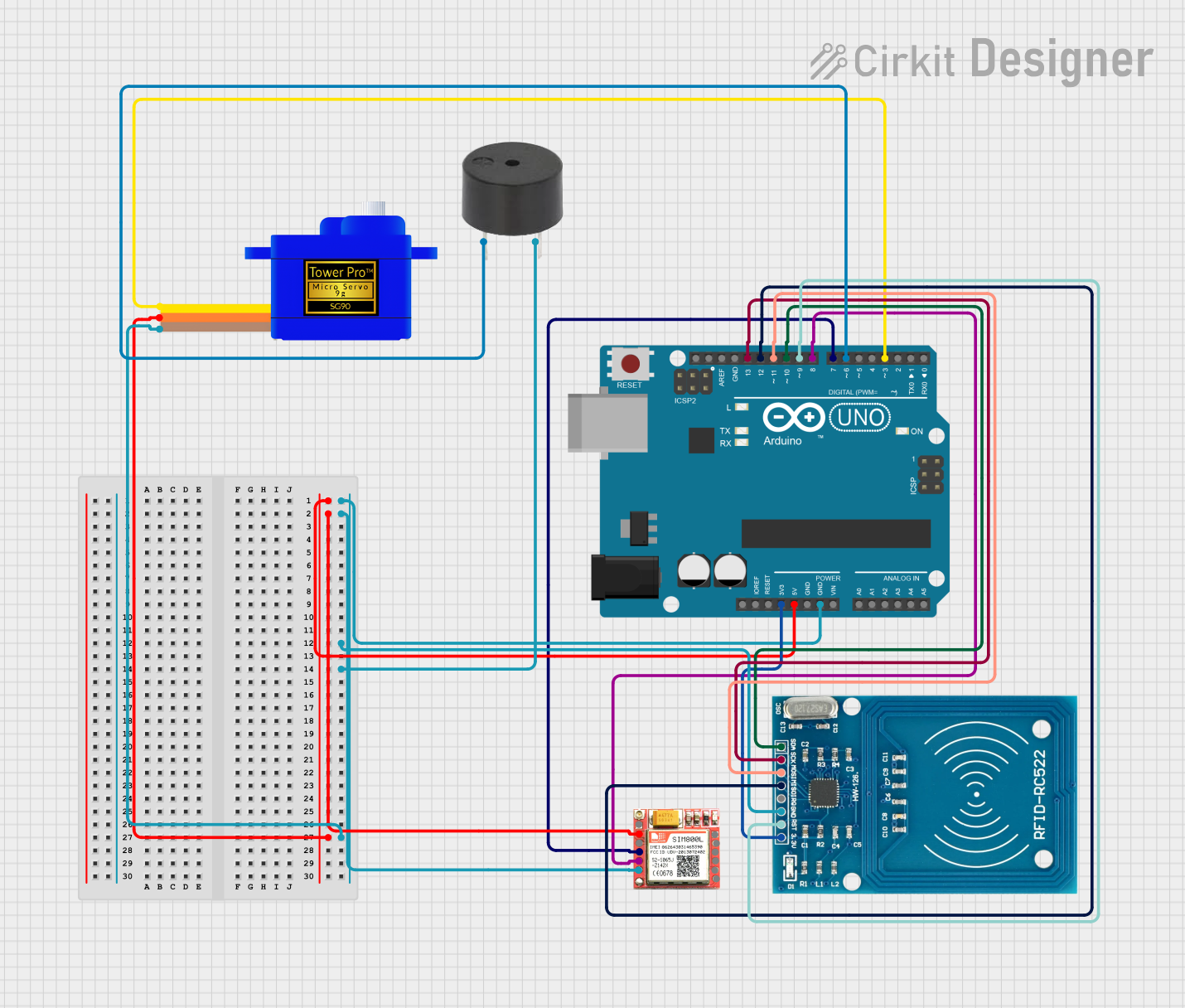
Circuit Documentation
Summary
The circuit in question is designed to incorporate an Arduino UNO as the central microcontroller unit, interfaced with several peripheral devices including a SIM800L GSM module, an RFID-RC522 reader, a Servomotor SG90, and a buzzer. The Arduino UNO is responsible for controlling the peripherals, reading RFID tags, operating the servo motor, sending SMS messages through the GSM module, and triggering the buzzer. The circuit is likely intended for a security or access control system where authorized RFID tags can trigger actions such as unlocking a door (represented by the servo motor) and sending notifications or logging events via SMS.
Component List
Arduino UNO
- Microcontroller board based on the ATmega328P
- Provides digital and analog I/O pins
- Can be powered via USB or an external power supply
SIM800L GSM Module
- GSM/GPRS module for cellular communication
- Supports sending/receiving SMS messages and making/receiving voice calls
RFID-RC522
- RFID reader/writer for 13.56 MHz cards
- Interfaces with microcontrollers via SPI
Servomotor SG90
- Small and lightweight servo motor
- Suitable for applications requiring simple motion control
Buzzer
- An electromechanical component that produces sound
- Can be used for audible alerts or alarms
Wiring Details
Arduino UNO
5Vconnected to SIM800L VCC and Servomotor SG90 VCCGNDconnected to SIM800L GND, RFID-RC522 GND, buzzer GND, and Servomotor SG90 GND3.3Vconnected to RFID-RC522 VCC (3.3V)D13connected to RFID-RC522 SCKD12connected to RFID-RC522 MISOD11connected to RFID-RC522 MOSID10connected to RFID-RC522 SDAD9connected to RFID-RC522 RSTD8connected to SIM800L TXDD7connected to SIM800L RXDD6connected to buzzer PIND3connected to Servomotor SG90 SIG
SIM800L GSM Module
VCCconnected to Arduino UNO 5VGNDconnected to Arduino UNO GNDTXDconnected to Arduino UNO D8RXDconnected to Arduino UNO D7
RFID-RC522
VCC (3.3V)connected to Arduino UNO 3.3VRSTconnected to Arduino UNO D9GNDconnected to Arduino UNO GNDIRQnot connectedMISOconnected to Arduino UNO D12MOSIconnected to Arduino UNO D11SCKconnected to Arduino UNO D13SDAconnected to Arduino UNO D10
Servomotor SG90
SIGconnected to Arduino UNO D3VCCconnected to Arduino UNO 5VGNDconnected to Arduino UNO GND
Buzzer
PINconnected to Arduino UNO D6GNDconnected to Arduino UNO GND
Documented Code
#include <LiquidCrystal_I2C.h>
#include <SPI.h>
#include <MFRC522.h>
#include <Servo.h>
#include <RTClib.h>
#include <SoftwareSerial.h>

#define RST_PIN 9       // Reset pin for RFID module
#define SS_PIN 10       // Chip select pin for RFID module
#define GSM_RST_PIN 4   // Reset pin for GSM module (optional)
#define GSM_TX_PIN 8    // TX pin for GSM module (connect to Arduino RX)
#define GSM_RX_PIN 7    // RX pin for GSM module (connect to Arduino TX)

byte readCard[4];
byte a = 0;

// Registered UID (this is an example, use your actual registered UID)
byte registeredUID[4] = {0x5C, 0x4E, 0x8C, 0x64};

LiquidCrystal_I2C lcd(0x27, 16, 2); // LCD I2C address 0x27
MFRC522 mfrc522(SS_PIN, RST_PIN); // RFID
Servo doorServo;
RTC_DS3231 rtc; // RTC object
SoftwareSerial gsmSerial(GSM_RX_PIN, GSM_TX_PIN); // RX, TX for GSM
bool doorOpen = false; // Initially the door is closed

void setup() {
  Serial.begin(9600);
  lcd.init();
  lcd.backlight();
  SPI.begin(); // Initialize SPI bus
  mfrc522.PCD_Init(); // Initialize RFID
  rtc.begin(); // Initialize RTC

  // Initialize GSM module
  gsmSerial.begin(9600);
  initializeGSM();

  lcd.setCursor(2, 0);
  lcd.print("Put your card");
  doorServo.attach(3); // Attach the servo to pin 3
  doorServo.write(0);   // Start with the door closed (0 degrees)
}

void initializeGSM() {
  delay(1000);
  gsmSerial.println("AT"); // Check GSM module
  delay(1000);
  gsmSerial.println("AT+CMGF=1"); // Set SMS to text mode
  delay(1000);
  gsmSerial.println("AT+CNMI=1,2,0,0,0"); // Configure to show SMS immediately when received
  delay(1000);
}

void sendSMS(const char* message) {
  gsmSerial.println("AT+CMGS=\"+1234567890\""); // Replace with your phone number
  delay(1000);
  gsmSerial.print(message);
  delay(100);
  gsmSerial.write(26); // ASCII code of CTRL+Z to send SMS
  delay(1000);
}

void logActivity(const char* action, byte* uid) {
  DateTime now = rtc.now(); // Get the current time
  char logMessage[160]; // Prepare log message buffer
  sprintf(logMessage, "%04d/%02d/%02d %02d:%02d:%02d - %s: ",
          now.year(), now.month(), now.day(), now.hour(), now.minute(), now.second(), action);

  for (uint8_t i = 0; i < 4; i++) {
    char uidPart[4];
    sprintf(uidPart, "%02X ", uid[i]);
    strcat(logMessage, uidPart); // Append each byte of the UID
  }

  sendSMS(logMessage); // Send the log message via SMS
  Serial.println(logMessage); // Also print the message in Serial Monitor for debugging
}

void loop() {
  if (!mfrc522.PICC_IsNewCardPresent()) {
    return;
  }
  if (!mfrc522.PICC_ReadCardSerial()) {
    return;
  }

  lcd.clear();
  lcd.setCursor(0, 0);
  lcd.print("Scanned UID");
  a = 0;
  Serial.println(F("Scanned PICC's UID:"));

  bool uidMatched = true;
  for (uint8_t i = 0; i < 4; i++) {
    readCard[i] = mfrc522.uid.uidByte[i];
    Serial.print(readCard[i], HEX);
    Serial.print(" ");
    lcd.setCursor(a, 1);
    lcd.print(readCard[i], HEX);
    lcd.print(" ");
    delay(500);
    a += 3;

    // Check for match
    if (readCard[i] != registeredUID[i]) {
      uidMatched = false;
    }
  }

  Serial.println("");

  if (uidMatched) {
    Serial.println("Registered UID detected!");
    lcd.clear();
    lcd.setCursor(0, 0);
    lcd.print("Registered UID!");

    if (!doorOpen) {
      doorServo.write(160); // Open the door
      doorOpen = true;
      logActivity("Door Opened", readCard); // Log door opening and send SMS
      lcd.setCursor(0, 1);
      lcd.print("Door OPENED");
    } else {
      doorServo.write(0); // Close the door
      doorOpen = false;
      logActivity("Door Closed", readCard); // Log door closing and send SMS
      lcd.setCursor(0, 1);
      lcd.print("Door CLOSED");
    }

    delay(2000); // Keep message on LCD for 2 seconds
  } else {
    Serial.println("Unregistered UID.");
    lcd.clear();
    lcd.setCursor(0, 0);
    lcd.print("Unregistered UID.");
    delay(2000); // Keep message on LCD for 2 seconds
  }

  mfrc522.PICC_HaltA(); // Halt the RFID reader
}
This code is designed to run on the Arduino UNO and controls the various components in the circuit. It includes libraries for interfacing with the LCD, RFID reader, servo motor, real-time clock, and GSM module. The code initializes these components, reads RFID tags, compares them to a registered UID, and takes action based on the