
Arduino UNO Motion Detector with PIR Sensor and LED Indicator
View and Edit Project In Cirkit Designer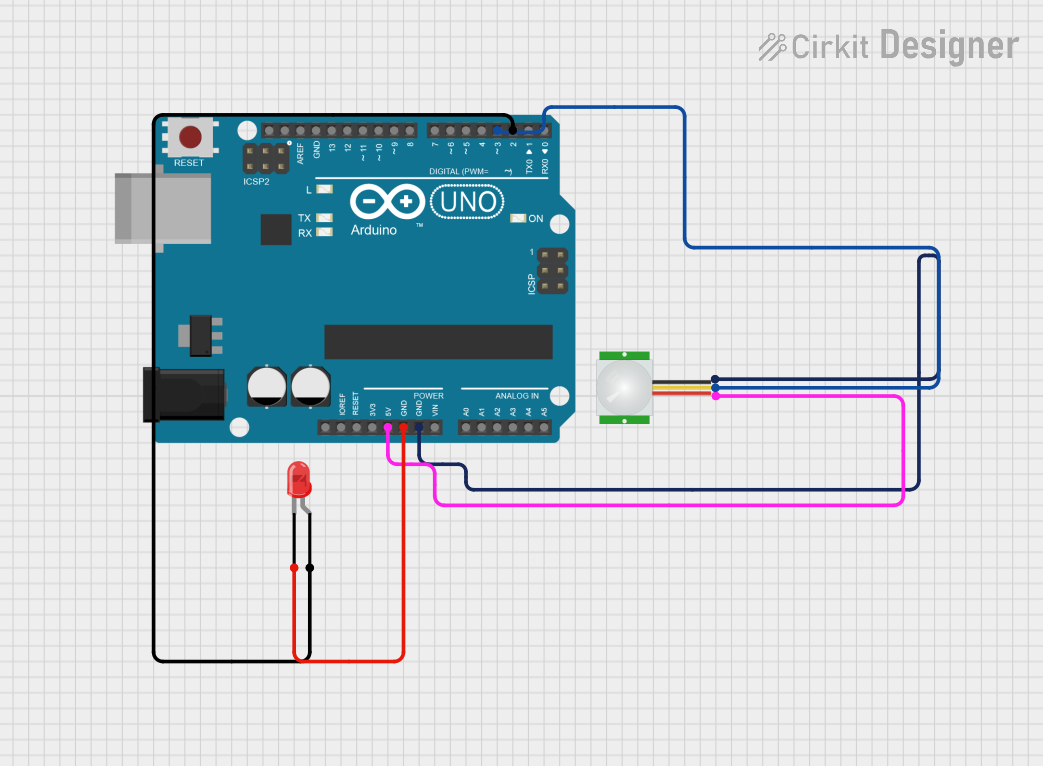
Circuit Documentation
Summary
This document describes a motion detector system using an Arduino UNO, a PIR sensor, and a red LED. The system is designed to turn on the LED when motion is detected by the PIR sensor.
Component List
Arduino UNO
- Description: A microcontroller board based on the ATmega328P.
- Pins: UNUSED, IOREF, Reset, 3.3V, 5V, GND, Vin, A0, A1, A2, A3, A4, A5, SCL, SDA, AREF, D13, D12, D11, D10, D9, D8, D7, D6, D5, D4, D3, D2, D1, D0
PIR Sensor
- Description: A passive infrared sensor used to detect motion.
- Pins: VDD, SIG, GND
LED: Two Pin (red)
- Description: A red light-emitting diode.
- Pins: cathode, anode
Wiring Details
Arduino UNO
- 5V connected to VDD of PIR sensor
- GND connected to GND of PIR sensor
- GND connected to cathode of LED
- D3 connected to SIG of PIR sensor
- D2 connected to anode of LED
PIR Sensor
- VDD connected to 5V of Arduino UNO
- GND connected to GND of Arduino UNO
- SIG connected to D3 of Arduino UNO
LED: Two Pin (red)
- cathode connected to GND of Arduino UNO
- anode connected to D2 of Arduino UNO
Code
/*
 * This Arduino sketch is designed to create a motion detector system using a
 * PIR sensor and an LED. When motion is detected by the PIR sensor, the LED
 * will turn on automatically.
 */

// Define pin connections
const int pirPin = 3; // PIR sensor signal pin connected to D3
const int ledPin = 2; // LED anode pin connected to D2

void setup() {
  // Initialize the PIR sensor pin as an input
  pinMode(pirPin, INPUT);
  // Initialize the LED pin as an output
  pinMode(ledPin, OUTPUT);
  // Start with the LED off
  digitalWrite(ledPin, LOW);
}

void loop() {
  // Read the PIR sensor value
  int pirValue = digitalRead(pirPin);
  // If motion is detected, turn on the LED
  if (pirValue == HIGH) {
    digitalWrite(ledPin, HIGH);
  } else {
    // If no motion is detected, turn off the LED
    digitalWrite(ledPin, LOW);
  }
  // Small delay to avoid bouncing
  delay(100);
}
This code initializes the PIR sensor and LED pins, reads the PIR sensor value, and turns the LED on or off based on the sensor's input. The LED will light up when motion is detected and turn off when no motion is detected.