
Circuit Documentation
Summary of the Circuit
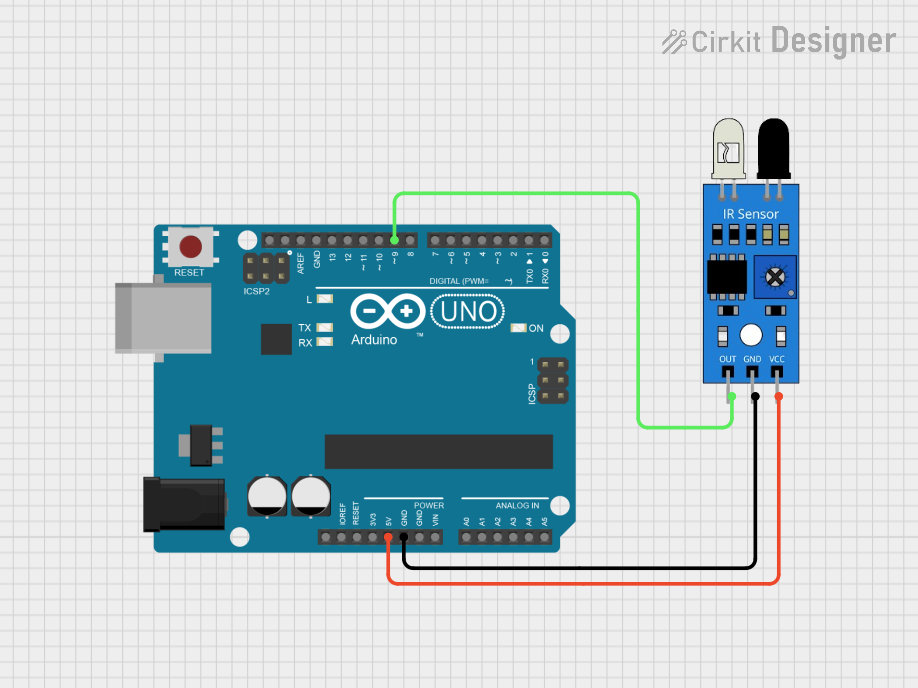
The circuit described in the provided inputs consists of an Arduino UNO microcontroller board interfaced with an infrared (IR) sensor. The Arduino UNO is responsible for controlling the IR sensor and processing its output. The IR sensor is powered by the 5V output from the Arduino and is grounded to the Arduino's ground (GND). The sensor's output signal is connected to one of the digital pins (D9) on the Arduino UNO, allowing the microcontroller to read the sensor's output.
Component List
Arduino UNO
- Description: A microcontroller board based on the ATmega328P.
- Pins: UNUSED, IOREF, Reset, 3.3V, 5V, GND, Vin, A0-A5, SCL, SDA, AREF, D0-D13.
- Purpose: Acts as the central processing unit of the circuit, reading sensor data and executing embedded code.
IR Sensor
- Description: A sensor that detects infrared light.
- Pins: out, gnd, vcc.
- Purpose: Provides an output signal to the Arduino UNO when it detects infrared light.
Wiring Details
Arduino UNO
- 5V: Provides power to the IR sensor.
- GND: Common ground with the IR sensor.
- D9: Reads the output signal from the IR sensor.
IR Sensor
- vcc: Connected to the 5V pin on the Arduino UNO for power.
- gnd: Connected to the GND pin on the Arduino UNO to complete the circuit.
- out: Sends the output signal to the D9 pin on the Arduino UNO.
Documented Code
Arduino UNO Code (sketch.ino)
void setup() {
  // put your setup code here, to run once:

}

void loop() {
  // put your main code here, to run repeatedly:

}
Additional Notes
- The provided code for the Arduino UNO is a template with empty
setup()andloop()functions. The actual implementation should be added based on the specific requirements of the application using the IR sensor. - The
setup()function is used to initialize variables, pin modes, start using libraries, etc. The code in thesetup()function will only run once, after each powerup or reset of the Arduino board. - The
loop()function is called repeatedly and is used for actively controlling the Arduino board.
Please note that the actual behavior of the circuit will depend on the code that is written and uploaded to the Arduino UNO. The code should be developed to read the output of the IR sensor from the D9 pin and perform the desired actions based on the sensor's readings.