
ESP32-Based Environmental Monitoring System with DHT11, LDR, and Rain Sensor
View and Edit Project In Cirkit Designer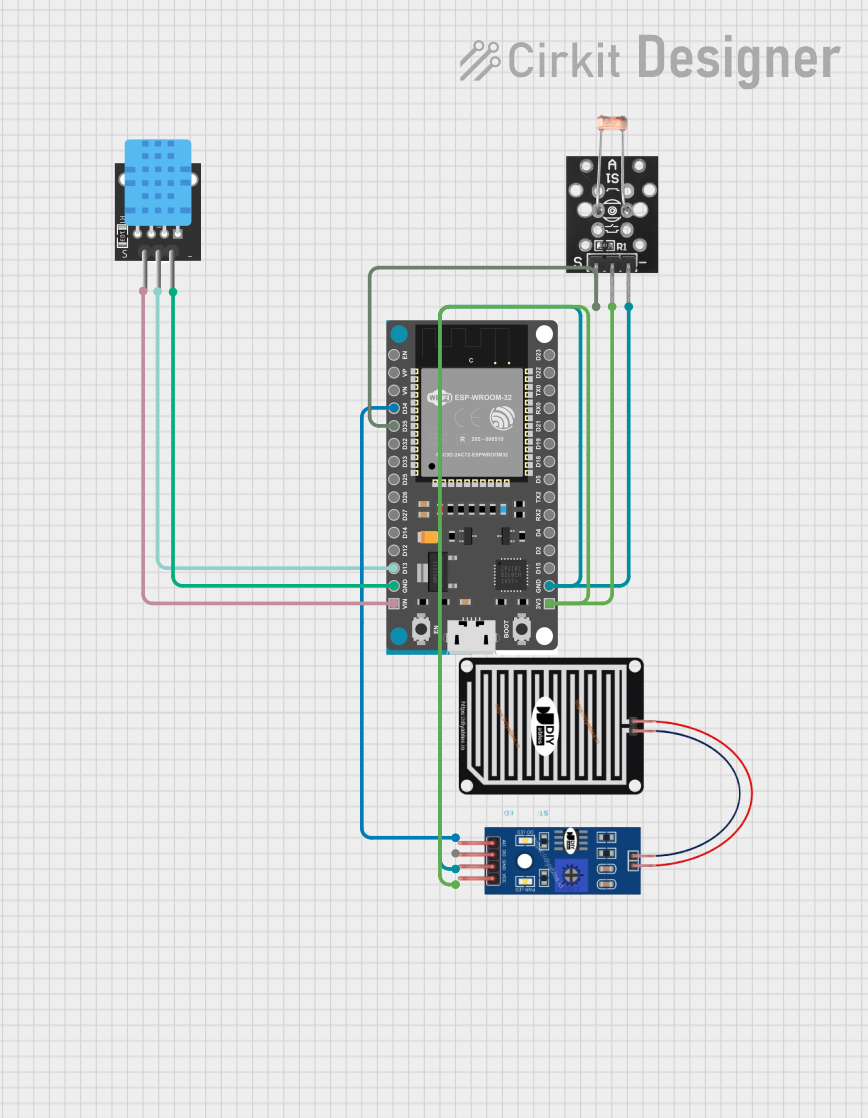
Circuit Documentation
Summary
The circuit in question is designed to interface an ESP32 Devkit V1 microcontroller with a set of sensors including a KY-015 DHT11 temperature and humidity sensor, a KY-018 LDR photoresistor for light detection, and a generic rain sensor. The ESP32 Devkit V1 is responsible for reading data from these sensors and processing it. The DHT11 sensor provides ambient temperature and humidity readings, the LDR photoresistor measures light intensity, and the rain sensor detects the presence of water. The ESP32 is programmed to read and interpret signals from these sensors, providing a serial output of the environmental conditions.
Component List
ESP32 Devkit V1
- Description: A microcontroller board based on the ESP32 chip, featuring Wi-Fi and Bluetooth connectivity, a wide range of GPIOs, and support for analog and digital inputs.
- Purpose: Acts as the central processing unit for the circuit, reading sensor data, and executing the embedded code to provide output.
KY-015 DHT11 Temperature and Humidity Sensor
- Description: A basic, low-cost digital temperature and humidity sensor.
- Purpose: Measures the ambient temperature and humidity.
KY-018 LDR Photo Resistor
- Description: A light-dependent resistor whose resistance varies based on the light intensity it is exposed to.
- Purpose: Senses the level of light in the environment.
Rain Sensor
- Description: A sensor that detects the presence of water by measuring the electrical conductivity between traces on the sensor board.
- Purpose: Determines whether it is raining or not based on the conductivity changes when water is present.
Wiring Details
ESP32 Devkit V1
- VIN connected to KY-015 DHT11 (5V)
- D13 connected to KY-015 DHT11 (S)
- GND connected to KY-015 DHT11 (GND), KY-018 LDR Photo Resistor (Ground), and RAIN SENSOR (GRD)
- D35 connected to KY-018 LDR Photo Resistor (Signal)
- 3V3 connected to RAIN SENSOR (VCC) and KY-018 LDR Photo Resistor (VCC)
- D34 connected to RAIN SENSOR (AO)
KY-015 DHT11 Temperature and Humidity Sensor
- 5V connected to ESP32 Devkit V1 (VIN)
- S connected to ESP32 Devkit V1 (D13)
- GND connected to ESP32 Devkit V1 (GND)
KY-018 LDR Photo Resistor
- Signal connected to ESP32 Devkit V1 (D35)
- VCC connected to ESP32 Devkit V1 (3V3)
- Ground connected to ESP32 Devkit V1 (GND)
Rain Sensor
- AO connected to ESP32 Devkit V1 (D34)
- DO (Not connected in this circuit)
- GRD connected to ESP32 Devkit V1 (GND)
- VCC connected to ESP32 Devkit V1 (3V3)
Documented Code
#include <DHT.h>

// Pin assignments for ESP32
#define DHTPIN 13             // DHT11 connected to GPIO13
#define DHTTYPE DHT11         // Define the type of DHT sensor (DHT11)
#define RAIN_SENSOR_PIN 34    // Rain sensor connected to GPIO34 (ADC1_CH6)
#define PHOTORESISTOR_PIN 35  // Photoresistor connected to GPIO35 (ADC1_CH7)

// Initialize DHT sensor
DHT dht(DHTPIN, DHTTYPE);

void setup() {
  Serial.begin(115200);          // Initialize serial communication
  dht.begin();                   // Start the DHT sensor
  pinMode(RAIN_SENSOR_PIN, INPUT); // Set rain sensor pin as input
  pinMode(PHOTORESISTOR_PIN, INPUT); // Set photoresistor pin as input

  Serial.println("ESP32 Sensors: Rain, DHT11, Photoresistor");
}

void loop() {
  // DHT11 readings
  float temperature = dht.readTemperature();  // Read temperature in Celsius
  float humidity = dht.readHumidity();        // Read humidity

  // Rain sensor reading (analog)
  int rainValue = analogRead(RAIN_SENSOR_PIN);  // Read rain sensor value

  // Define a threshold for rain detection
  int rainThreshold = 200;  // Adjust this value based on your sensor's readings

  // Check if it is raining based on the threshold
  String rainStatus = rainValue < rainThreshold ? "Rain detected" : "No rain";
  Serial.print("Rain Status: ");
  Serial.println(rainStatus);

  // Read light level from the photoresistor
  int lightValue = analogRead(PHOTORESISTOR_PIN); // Read light level from photoresistor

  // Normalize lightValue to a percentage (1-100)
  int normalizedLightValue = map(lightValue, 0, 4095, 0, 100); // ESP32 has 12-bit ADC (0-4095)

  // Print DHT and light sensor data
  if (!isnan(temperature) && !isnan(humidity)) {
    Serial.print("Temperature: ");
    Serial.print(temperature);
    Serial.println("°C");

    Serial.print("Humidity: ");
    Serial.print(humidity);
    Serial.println("%");
  } else {
    Serial.println("Failed to read from DHT sensor!");
  }

  // Print photoresistor data with status
  Serial.print("Photoresistor Light Level: ");
  Serial.print(normalizedLightValue);
  Serial.println("%");

  // Delay between readings
  delay(2000);
}
This code is designed to run on the ESP32 Devkit V1 microcontroller. It initializes the DHT11 sensor and configures the pins for the rain sensor and photoresistor. The loop function reads the temperature and humidity from the DHT11, the analog value from the rain sensor, and the light level from the photoresistor. It then prints these values to the serial monitor, along with a message indicating whether rain is detected. The light level is normalized to a percentage for easier interpretation. The code includes error handling for failed DHT11 readings and a delay between each set of readings.