
Arduino UNO-Based Smart Blind Stick with GPS, GSM, and Ultrasonic Sensors
View and Edit Project In Cirkit Designer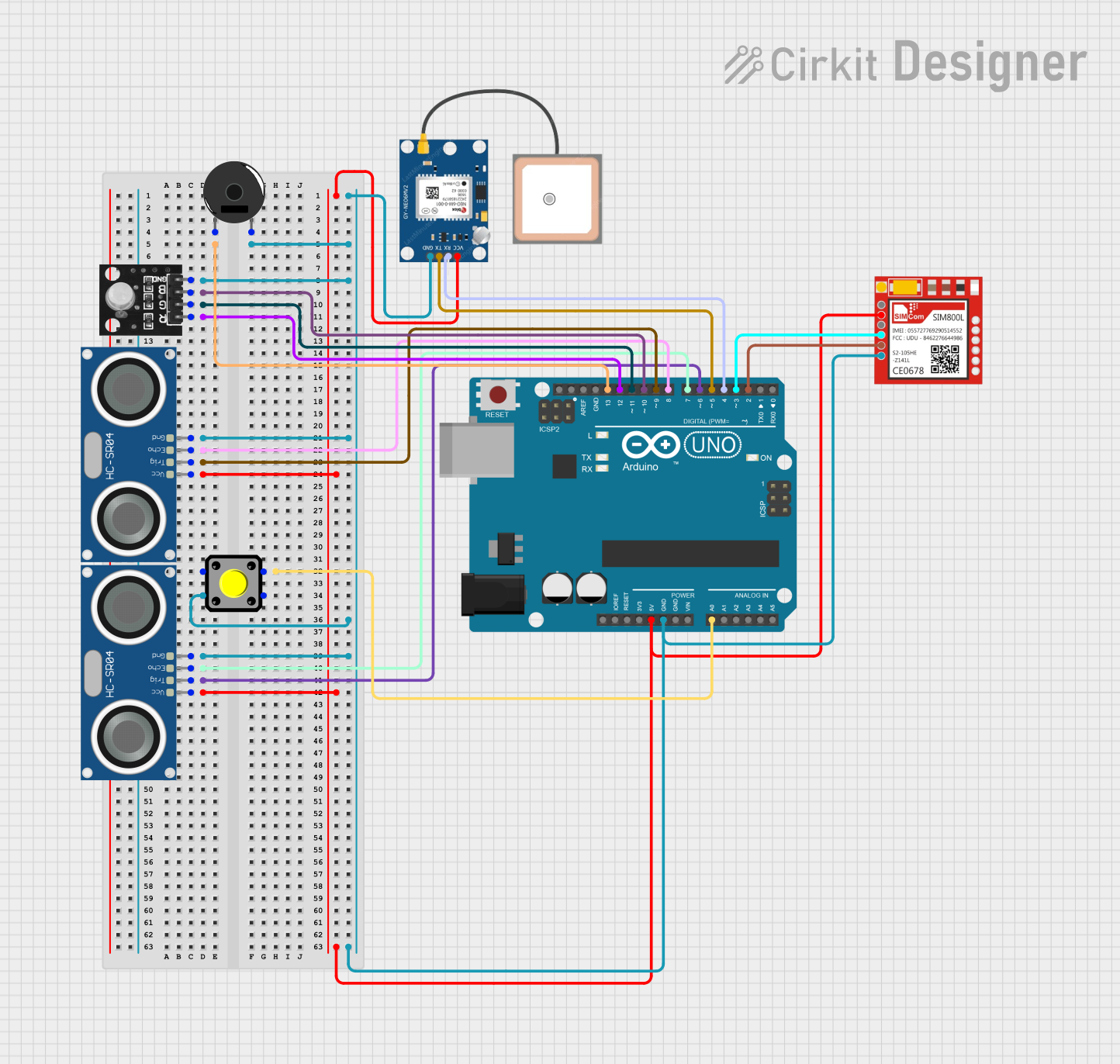
Blind Stick Project Documentation
Summary
This project involves the design and implementation of a smart blind stick using an Arduino UNO microcontroller. The stick integrates various sensors and modules to provide functionalities such as location tracking, communication, obstacle detection, visual alerts, audio alerts, and emergency alerts. The key components used in this project include a GPS module, GSM module, ultrasonic sensors, RGB LED, piezo buzzer, and a pushbutton.
Component List
Arduino UNO
- Description: Microcontroller board based on the ATmega328P.
- Pins: UNUSED, IOREF, Reset, 3.3V, 5V, GND, Vin, A0, A1, A2, A3, A4, A5, SCL, SDA, AREF, D13, D12, D11, D10, D9, D8, D7, D6, D5, D4, D3, D2, D1, D0
Sim800l
- Description: GSM/GPRS module for communication.
- Pins: NET, RST, VCC, RXD, TXD, GND
GPS NEO 6M
- Description: GPS module for location tracking.
- Pins: VCC, RX, TX, GND
Piezo Buzzer
- Description: Buzzer for audio alerts.
- Pins: pin 1, pin 2
RGB LED Module
- Description: RGB LED for visual alerts.
- Pins: +VCC Red, +VCC Green, +VCC Blue, GND
HC-SR04 Ultrasonic Sensor
- Description: Ultrasonic sensor for obstacle detection.
- Pins: VCC, TRIG, ECHO, GND
Pushbutton
- Description: Button for emergency alerts.
- Pins: Pin 2, Pin 1, Pin 3, Pin 4
Wiring Details
Arduino UNO
- D13: Not connected
- GND: Connected to GND of RGB LED Module, HC-SR04 Ultrasonic Sensor (both instances), Pushbutton, GPS NEO 6M, and Sim800l
- D10: Connected to +VCC Blue of RGB LED Module
- D11: Connected to +VCC Green of RGB LED Module
- D12: Connected to +VCC Red of RGB LED Module
- D8: Connected to ECHO of HC-SR04 Ultrasonic Sensor (first instance)
- D9: Connected to TRIG of HC-SR04 Ultrasonic Sensor (first instance)
- 5V: Connected to VCC of HC-SR04 Ultrasonic Sensor (both instances), GPS NEO 6M, and Sim800l
- A0: Connected to Pin 3 of Pushbutton
- D7: Connected to ECHO of HC-SR04 Ultrasonic Sensor (second instance)
- D6: Connected to TRIG of HC-SR04 Ultrasonic Sensor (second instance)
- D5: Connected to TX of GPS NEO 6M
- D4: Connected to RX of GPS NEO 6M
- D3: Connected to RXD of Sim800l
- D2: Connected to TXD of Sim800l
Sim800l
- GND: Connected to GND of Arduino UNO
- VCC: Connected to 5V of Arduino UNO
- RXD: Connected to D3 of Arduino UNO
- TXD: Connected to D2 of Arduino UNO
GPS NEO 6M
- GND: Connected to GND of Arduino UNO
- VCC: Connected to 5V of Arduino UNO
- RX: Connected to D4 of Arduino UNO
- TX: Connected to D5 of Arduino UNO
Piezo Buzzer
- pin 1: Not connected
- pin 2: Not connected
RGB LED Module
- GND: Connected to GND of Arduino UNO
- +VCC Blue: Connected to D10 of Arduino UNO
- +VCC Green: Connected to D11 of Arduino UNO
- +VCC Red: Connected to D12 of Arduino UNO
HC-SR04 Ultrasonic Sensor (First Instance)
- GND: Connected to GND of Arduino UNO
- VCC: Connected to 5V of Arduino UNO
- TRIG: Connected to D9 of Arduino UNO
- ECHO: Connected to D8 of Arduino UNO
HC-SR04 Ultrasonic Sensor (Second Instance)
- GND: Connected to GND of Arduino UNO
- VCC: Connected to 5V of Arduino UNO
- TRIG: Connected to D6 of Arduino UNO
- ECHO: Connected to D7 of Arduino UNO
Pushbutton
- Pin 1: Connected to GND of Arduino UNO
- Pin 3: Connected to A0 of Arduino UNO
- Pin 2: Not connected
- Pin 4: Not connected
Documented Code
/*
 * Blind Stick Project
 * This code is designed for an Arduino UNO to interface with various sensors and
 * modules to create a smart blind stick. The stick includes a GPS module for
 * location tracking, a GSM module for communication, an ultrasonic sensor for
 * obstacle detection, an RGB LED for visual alerts, a piezo buzzer for audio
 * alerts, and a pushbutton for emergency alerts.
 */

#include <SoftwareSerial.h>
#include <TinyGPS++.h>

// Pin configurations for GSM and GPS modules
SoftwareSerial gsmSerial(2, 3);  // RX, TX for GSM module
SoftwareSerial gpsSerial(4, 5);  // RX, TX for GPS module

TinyGPSPlus gps;

// Pin configuration for emergency button
const int buttonPin = A0;  // Emergency button pin

// Pin configurations for ultrasonic sensors
const int trigPin1 = 6;
const int echoPin1 = 7;
const int trigPin2 = 9;
const int echoPin2 = 8;

// Pin configurations for RGB LED
const int redPin = 12;
const int greenPin = 11;
const int bluePin = 10;

// Server URL for sending data
const char* serverURL = "https://cuboid-rigorous-red.glitch.me/";

bool buttonPressed = false;

void setup() {
  pinMode(buttonPin, INPUT_PULLUP);   // Configure button pin as input with pull-up
  pinMode(trigPin1, OUTPUT);
  pinMode(echoPin1, INPUT);
  pinMode(trigPin2, OUTPUT);
  pinMode(echoPin2, INPUT);
  pinMode(redPin, OUTPUT);
  pinMode(greenPin, OUTPUT);
  pinMode(bluePin, OUTPUT);
  gsmSerial.begin(9600);              // Initialize GSM serial communication
  gpsSerial.begin(9600);              // Initialize GPS serial communication
  Serial.begin(9600);                 // Start the serial monitor for debugging

  // Send SMS to confirm system startup
  sendSMS("System started. GPS tracking enabled.");
}

void loop() {
  // Process incoming GPS data
  while (gpsSerial.available() > 0) {
    gps.encode(gpsSerial.read());

    // Check if new GPS location is available
    if (gps.location.isUpdated()) {
      float latitude = gps.location.lat();
      float longitude = gps.location.lng();
      Serial.print("Latitude= "); Serial.print(latitude, 6);
      Serial.print(" Longitude= "); Serial.println(longitude, 6);

      // Send the location to the server
      sendLocationToServer(latitude, longitude);
    }
  }

  // Check if the emergency button is pressed
  if (digitalRead(buttonPin) == LOW) {
    buttonPressed = true;
    delay(200);  // Debounce delay
  }

  if (buttonPressed) {
    // Trigger emergency alert
    sendEmergencyAlert();
    buttonPressed = false;  // Reset button pressed flag
  }

  // Check for obstacles using ultrasonic sensors
  checkObstacle(trigPin1, echoPin1);
  checkObstacle(trigPin2, echoPin2);
}

// Function to check for obstacles
void checkObstacle(int trigPin, int echoPin) {
  digitalWrite(trigPin, LOW);
  delayMicroseconds(2);
  digitalWrite(trigPin, HIGH);
  delayMicroseconds(10);
  digitalWrite(trigPin, LOW);

  long duration = pulseIn(echoPin, HIGH);
  int distance = duration * 0.034 / 2;

  if (distance < 50) {  // If obstacle is closer than 50 cm
    digitalWrite(redPin, HIGH);
    digitalWrite(greenPin, LOW);
    digitalWrite(bluePin, LOW);
  } else {
    digitalWrite(redPin, LOW);
    digitalWrite(greenPin, HIGH);
    digitalWrite(bluePin, LOW);
  }
}

// Function to send GPS location to the server
void sendLocationToServer(float lat, float lng) {
  String postData = "lat=" + String(lat, 6) + "&lng=" + String(lng, 6);
  sendHTTPPostRequest("/update-location