
Arduino Pro Mini Smart Watch with Heart Pulse, Humidity, Temperature, and Motion Sensors
View and Edit Project In Cirkit Designer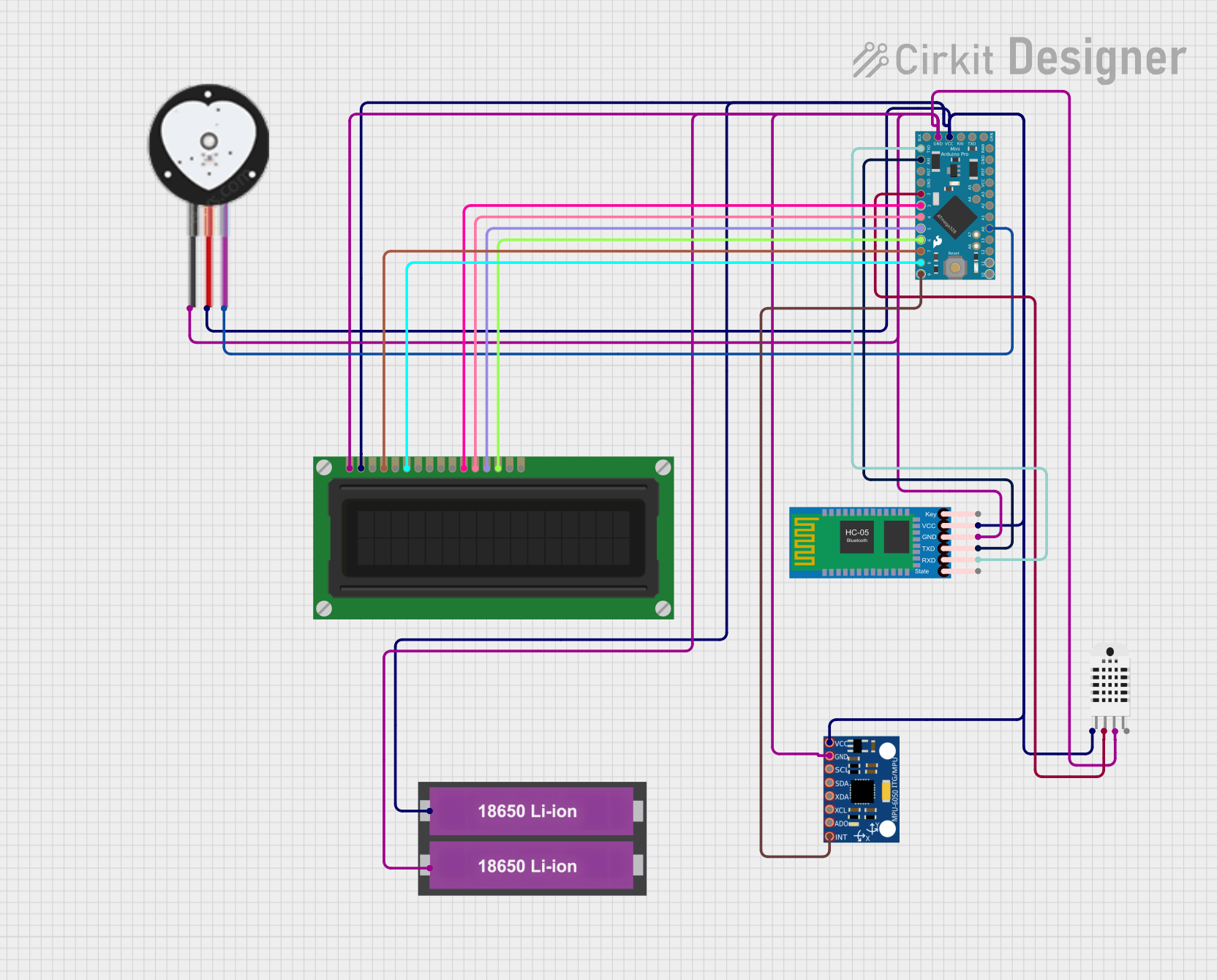
Smart Watch for Elderly Users
Summary
This project involves the design and implementation of a smart watch tailored for elderly users. The watch integrates multiple sensors and modules to provide comprehensive health monitoring, emergency response, and communication capabilities. The main components include an Arduino Pro Mini, a heart pulse sensor, a humidity and temperature sensor, an MPU-6050 accelerometer and gyroscope, an HC-05 Bluetooth module, an LCD display, and a 18650 Li-ion battery pack.
Component List
Arduino Pro Mini
- Description: A compact microcontroller board based on the ATmega328P.
- Pins: DTR, TXO, RXI, VCC, GND, A4, A5, RAW, RESET, A3, A2, A1, A0, SCK, MISO, MOSI, D10, D9, D8, D7, D6, D5, D4, D3, D2
Heart Pulse Sensor
- Description: A sensor used to measure the heart rate.
- Pins: GND, VCC, SIGNAL
Humidity and Temperature Sensor (RHT03)
- Description: A sensor used to measure humidity and temperature.
- Pins: Vcc, Data-signal, GND 1, GND 2
MPU-6050
- Description: A 3-axis accelerometer and gyroscope.
- Pins: VCC, GND, SCL, SDA, XDA, XCL, AD0, INT
HC-05 Bluetooth Module
- Description: A Bluetooth module used for wireless communication.
- Pins: Key, VCC, GND, TXD, RXD, State
18650 Li-ion Battery x 2
- Description: A battery pack providing power to the circuit.
- Pins: +, -
LCD Display (16 pin)
- Description: A 16-pin LCD display used to show information.
- Pins: VSS, VDD, VO, RS, R_W, E, DB0, DB1, DB2, DB3, DB4, DB5, DB6, DB7, A, K
Wiring Details
Arduino Pro Mini
- VCC: Connected to VCC of the Heart Pulse Sensor, Humidity and Temperature Sensor, MPU-6050, HC-05 Bluetooth Module, and LCD Display.
- GND: Connected to GND of the Heart Pulse Sensor, Humidity and Temperature Sensor, MPU-6050, HC-05 Bluetooth Module, and LCD Display.
- A0: Connected to SIGNAL of the Heart Pulse Sensor.
- D2: Connected to Data-signal of the Humidity and Temperature Sensor.
- D3: Connected to DB4 of the LCD Display.
- D4: Connected to DB5 of the LCD Display.
- D5: Connected to DB6 of the LCD Display.
- D6: Connected to DB7 of the LCD Display.
- D7: Connected to RS of the LCD Display.
- D8: Connected to E of the LCD Display.
- D9: Connected to INT of the MPU-6050.
- TXO: Connected to RXD of the HC-05 Bluetooth Module.
- RXI: Connected to TXD of the HC-05 Bluetooth Module.
Heart Pulse Sensor
- VCC: Connected to VCC of the Arduino Pro Mini.
- GND: Connected to GND of the Arduino Pro Mini.
- SIGNAL: Connected to A0 of the Arduino Pro Mini.
Humidity and Temperature Sensor (RHT03)
- Vcc: Connected to VCC of the Arduino Pro Mini.
- GND 1: Connected to GND of the Arduino Pro Mini.
- Data-signal: Connected to D2 of the Arduino Pro Mini.
MPU-6050
- VCC: Connected to VCC of the Arduino Pro Mini.
- GND: Connected to GND of the Arduino Pro Mini.
- INT: Connected to D9 of the Arduino Pro Mini.
HC-05 Bluetooth Module
- VCC: Connected to VCC of the Arduino Pro Mini.
- GND: Connected to GND of the Arduino Pro Mini.
- TXD: Connected to RXI of the Arduino Pro Mini.
- RXD: Connected to TXO of the Arduino Pro Mini.
18650 Li-ion Battery x 2
- +: Connected to VCC of the Arduino Pro Mini.
- -: Connected to GND of the Arduino Pro Mini.
LCD Display (16 pin)
- VDD: Connected to VCC of the Arduino Pro Mini.
- VSS: Connected to GND of the Arduino Pro Mini.
- RS: Connected to D7 of the Arduino Pro Mini.
- E: Connected to D8 of the Arduino Pro Mini.
- DB4: Connected to D3 of the Arduino Pro Mini.
- DB5: Connected to D4 of the Arduino Pro Mini.
- DB6: Connected to D5 of the Arduino Pro Mini.
- DB7: Connected to D6 of the Arduino Pro Mini.
Code Documentation
/*
 * Smart Watch for Elderly Users
 * This Arduino sketch integrates multiple sensors and modules to create a
 * comprehensive wearable device for health monitoring, emergency response,
 * and communication. Components:
 * - Heart Pulse Sensor (A0)
 * - Humidity and Temperature Sensor (D2)
 * - MPU-6050 Accelerometer and Gyroscope (D9)
 * - HC-05 Bluetooth Module (TXO, RXI)
 * - LCD Display (D3, D4, D5, D6, D7, D8)
 */

#include <Wire.h>
#include <DHT.h>
#include <MPU6050.h>
#include <LiquidCrystal.h>

#define DHTPIN 2
#define DHTTYPE DHT22
#define PULSE_PIN A0
#define MPU_INT_PIN 9
#define LCD_RS 7
#define LCD_E 8
#define LCD_D4 3
#define LCD_D5 4
#define LCD_D6 5
#define LCD_D7 6

DHT dht(DHTPIN, DHTTYPE);
MPU6050 mpu;
LiquidCrystal lcd(LCD_RS, LCD_E, LCD_D4, LCD_D5, LCD_D6, LCD_D7);

void setup() {
  Serial.begin(9600);
  dht.begin();
  Wire.begin();
  mpu.initialize();
  pinMode(MPU_INT_PIN, INPUT);
  lcd.begin(16, 2);
  lcd.print("Smart Watch Init");
  Serial.println("Smart Watch Initialized");
}

void loop() {
  // Read heart pulse sensor
  int pulseValue = analogRead(PULSE_PIN);
  Serial.print("Pulse: ");
  Serial.println(pulseValue);
  lcd.setCursor(0, 0);
  lcd.print("Pulse: ");
  lcd.print(pulseValue);

  // Read humidity and temperature sensor
  float h = dht.readHumidity();
  float t = dht.readTemperature();
  if (isnan(h) || isnan(t)) {
    Serial.println("Failed to read from DHT sensor!");
    lcd.setCursor(0, 1);
    lcd.print("DHT Error");
  } else {
    Serial.print("Humidity: ");
    Serial.print(h);
    Serial.print(" %\t");
    Serial.print("Temperature: ");
    Serial.print(t);
    Serial.println(" *C");
    lcd.setCursor(0, 1);
    lcd.print("H:");
    lcd.print(h);
    lcd.print("% T:");
    lcd.print(t);
    lcd.print("C");
  }

  // Read MPU-6050 sensor
  if (mpu.testConnection()) {
    int16_t ax, ay, az;
    mpu.getAcceleration(&ax, &ay, &az);
    Serial.print("Accel: ");
    Serial.print(ax); Serial.print(", ");
    Serial.print(ay); Serial.print(", ");
    Serial.println(az);
  } else {
    Serial.println("MPU6050 connection failed");
  }

  delay(1000); // Delay for 1 second
}
This code initializes and reads data from the heart pulse sensor, humidity and temperature sensor, and MPU-6050 accelerometer and gyroscope. It also displays the data on the LCD display and sends it to the serial monitor. The HC-05 Bluetooth module is used for wireless communication, although its specific functionality is not detailed in this code.