
Circuit Documentation
Summary
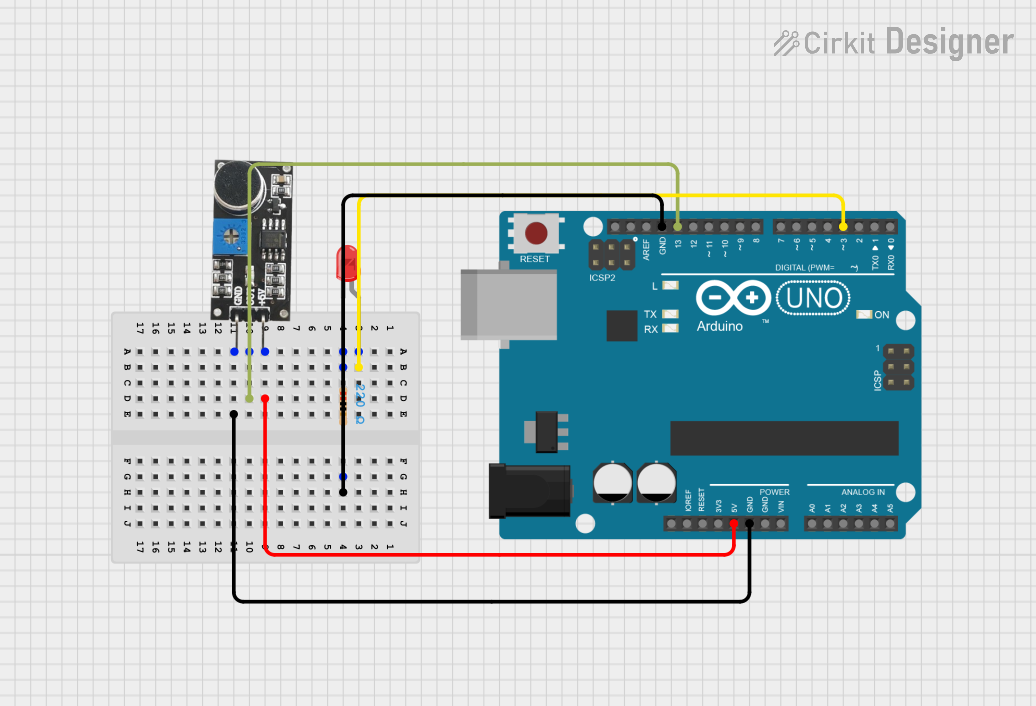
This circuit consists of an Arduino UNO microcontroller, a sound sensor, a red LED, and a resistor. The sound sensor detects sound levels and sends a signal to the Arduino. Based on the sound sensor's output, the Arduino controls the LED, turning it on or off.
Component List
Arduino UNO
- Description: A microcontroller board based on the ATmega328P.
- Pins: UNUSED, IOREF, Reset, 3.3V, 5V, GND, Vin, A0, A1, A2, A3, A4, A5, SCL, SDA, AREF, D13, D12, D11, D10, D9, D8, D7, D6, D5, D4, D3, D2, D1, D0
Sound Sensor
- Description: A sensor module that detects sound levels.
- Pins: 5V +, OUT, GND
LED: Two Pin (red)
- Description: A red light-emitting diode.
- Pins: cathode, anode
Resistor
- Description: A 220 Ohm resistor.
- Pins: pin1, pin2
- Properties:
- Resistance: 220 Ohms
Wiring Details
Arduino UNO
- D3: Connected to the anode of the LED.
- GND: Connected to pin2 of the resistor and GND of the sound sensor.
- 5V: Connected to 5V + of the sound sensor.
- D13: Connected to OUT of the sound sensor.
Sound Sensor
- 5V +: Connected to 5V of the Arduino UNO.
- OUT: Connected to D13 of the Arduino UNO.
- GND: Connected to GND of the Arduino UNO.
LED: Two Pin (red)
- anode: Connected to D3 of the Arduino UNO.
- cathode: Connected to pin1 of the resistor.
Resistor
- pin1: Connected to the cathode of the LED.
- pin2: Connected to GND of the Arduino UNO.
Code Documentation
Arduino UNO Code
int soundsensor = 13;
int led = 3;

void setup() {
    pinMode(soundsensor, INPUT);
    pinMode(led, OUTPUT);
}

void loop() {
    int statusSensor = digitalRead(soundsensor);
    if (statusSensor == LOW) {
        digitalWrite(led, HIGH);
    } else {
        digitalWrite(led, LOW);
    }
}
- soundsensor: Pin D13 is used to read the output from the sound sensor.
- led: Pin D3 is used to control the LED.
setup()
- pinMode(soundsensor, INPUT): Configures the sound sensor pin as an input.
- pinMode(led, OUTPUT): Configures the LED pin as an output.
loop()
- statusSensor = digitalRead(soundsensor): Reads the status of the sound sensor.
- if (statusSensor == LOW): If the sound sensor detects a low signal, the LED is turned on.
- else: If the sound sensor does not detect a low signal, the LED is turned off.