
Arduino UNO and ILI9341 TFT Display Complex Graphics Generator
View and Edit Project In Cirkit Designer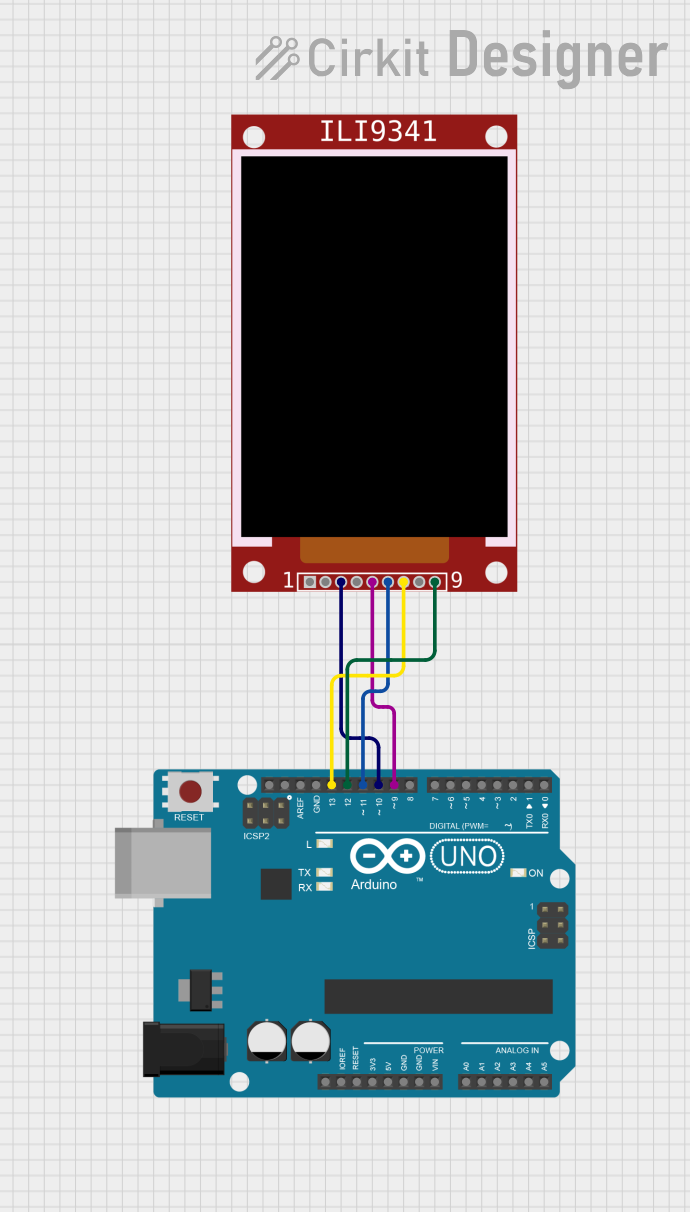
Circuit Documentation
Summary
This circuit involves an Arduino UNO microcontroller interfacing with an ILI9341 TFT display. The Arduino UNO controls the display to generate complex graphics patterns. The connections between the Arduino and the display are made through specific digital pins, and the code uploaded to the Arduino handles the initialization and drawing operations on the display.
Component List
ILI9341 TFT Display
- Description: A 2.8" TFT LCD display with a resolution of 240x320 pixels, capable of displaying 262,000 different colors. It uses the ILI9341 driver and communicates via SPI.
- Pins: VCC, GND, CS, RST, D/C, MOSI, SCK, LED, MISO
Arduino UNO
- Description: A microcontroller board based on the ATmega328P. It has 14 digital input/output pins, 6 analog inputs, a 16 MHz quartz crystal, a USB connection, a power jack, an ICSP header, and a reset button.
- Pins: UNUSED, IOREF, Reset, 3.3V, 5V, GND, Vin, A0, A1, A2, A3, A4, A5, SCL, SDA, AREF, D13, D12, D11, D10, D9, D8, D7, D6, D5, D4, D3, D2, D1, D0
Wiring Details
ILI9341 TFT Display
- CS: Connected to Arduino UNO pin D10
- D/C: Connected to Arduino UNO pin D9
- MOSI: Connected to Arduino UNO pin D11
- SCK: Connected to Arduino UNO pin D13
- MISO: Connected to Arduino UNO pin D12
Arduino UNO
- D10: Connected to ILI9341 TFT Display pin CS
- D9: Connected to ILI9341 TFT Display pin D/C
- D11: Connected to ILI9341 TFT Display pin MOSI
- D13: Connected to ILI9341 TFT Display pin SCK
- D12: Connected to ILI9341 TFT Display pin MISO
Code Documentation
Arduino UNO Code
/*
  Fingerprint - generating a complex graphics pattern with little code.

  Try changing line 27 and experimenting with the patterns, e.g.:
  tft.drawPixel(x, y, (x + y) * sin(x * y));

  https://wokwi.com/arduino/projects/307567963154678338
*/

#include <Adafruit_ILI9341.h>

#define TFT_CS   10
#define TFT_DC   9
Adafruit_ILI9341 tft = Adafruit_ILI9341(TFT_CS, TFT_DC);

#define WIDTH 320
#define HEIGHT 240

void setup(void) {
  tft.begin();
  tft.setRotation(1);
}

void loop() {
  for (int y = 0; y < HEIGHT; y++) {
    for (int x = 0; x < WIDTH; x++) {
      tft.drawPixel(x, y, x * y);
    }
  }
}
This code initializes the ILI9341 TFT display and sets its rotation. In the loop function, it iterates over each pixel on the display and draws a pixel with a color value based on the product of its x and y coordinates. This creates a complex pattern on the display.