
Arduino UNO Based GPS Tracker with GSM Module and Emergency Alert System
View and Edit Project In Cirkit Designer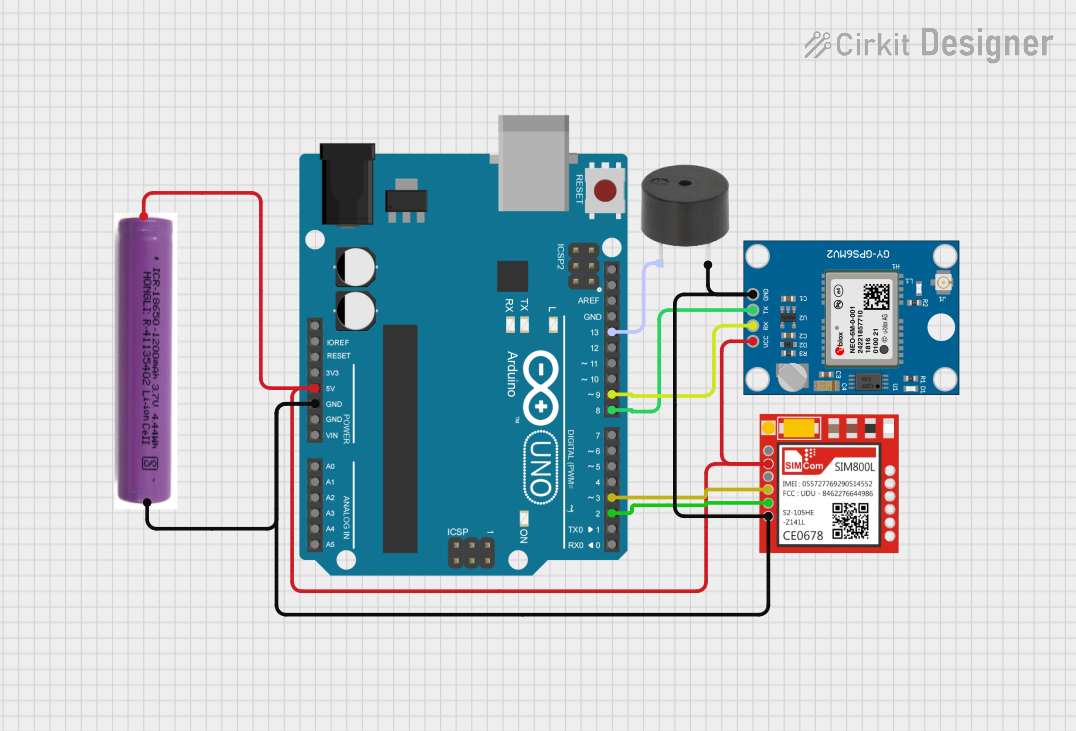
Circuit Documentation
Summary of the Circuit
The circuit in question is designed to interface an Arduino UNO with a Sim800l GSM module, a Neo 6M GPS module, and a buzzer. It is powered by a 3.7V battery. The Arduino UNO is responsible for controlling the GSM and GPS modules, as well as driving the buzzer based on certain conditions. The GSM module allows the system to communicate over cellular networks, enabling capabilities such as sending SMS messages and making calls. The GPS module provides location data, which can be processed by the Arduino and sent over the GSM network. The buzzer serves as an audible indicator or alarm.
Component List
Arduino UNO
- Microcontroller board based on the ATmega328P
- Provides digital and analog I/O pins
- Used for controlling the GSM and GPS modules, and driving the buzzer
Sim800l
- GSM/GPRS module
- Capable of sending SMS, making calls, and providing internet connectivity
- Interfaced with the Arduino for cellular communication tasks
Neo 6M GPS Module
- GPS receiver module
- Provides accurate location data
- Connected to the Arduino to retrieve and process GPS coordinates
3.7V Battery
- Power source for the circuit
- Provides the necessary voltage to the components
Buzzer
- Audible signaling device
- Used to generate sound alerts under certain conditions
Wiring Details
Arduino UNO
5Vconnected to the 3.7V battery's+terminal, Neo 6M GPS Module'sVCC, and Sim800l'sVCCGNDconnected to the 3.7V battery's-terminal, Neo 6M GPS Module'sGND, Sim800l'sGND, and buzzer'sGNDD13connected to the buzzer'sPIND9connected to the Neo 6M GPS Module'sRXD8connected to the Neo 6M GPS Module'sTXD3connected to the Sim800l'sRXDD2connected to the Sim800l'sTXD
Sim800l
VCCconnected to the 3.7V battery's+terminal and Arduino UNO's5VGNDconnected to the 3.7V battery's-terminal and Arduino UNO'sGNDRXDconnected to Arduino UNO'sD3TXDconnected to Arduino UNO'sD2
Neo 6M GPS Module
VCCconnected to the 3.7V battery's+terminal and Arduino UNO's5VGNDconnected to the 3.7V battery's-terminal and Arduino UNO'sGNDRXconnected to Arduino UNO'sD9TXconnected to Arduino UNO'sD8
3.7V Battery
+terminal connected to Arduino UNO's5V, Neo 6M GPS Module'sVCC, and Sim800l'sVCC-terminal connected to Arduino UNO'sGND, Neo 6M GPS Module'sGND, Sim800l'sGND, and buzzer'sGND
Buzzer
PINconnected to Arduino UNO'sD13GNDconnected to the 3.7V battery's-terminal and Arduino UNO'sGND
Documented Code
The code provided is intended for the Arduino UNO and is written in C++ using the Arduino IDE. It includes libraries for software serial communication and GPS data parsing. The code is structured to initialize the GSM and GPS modules, process GPS data, and handle an emergency button press to send an SMS and make a call.
#include <SoftwareSerial.h>
#include <TinyGPS++.h>

// Pin configurations for GSM and GPS modules
SoftwareSerial gsmSerial(10, 11);  // RX, TX for GSM module
SoftwareSerial gpsSerial(3, 4);    // RX, TX for GPS module

TinyGPSPlus gps;

// Pin configuration for emergency button
const int buttonPin = 2;  // Emergency button pin

// Server URL for sending data
const char* serverURL = "https://cuboid-rigorous-red.glitch.me/"; // Replace with your server URL

bool buttonPressed = false;

void setup() {
  pinMode(buttonPin, INPUT_PULLUP);   // Configure button pin as input with pull-up resistor
  gsmSerial.begin(9600);              // Initialize GSM serial communication
  gpsSerial.begin(9600);              // Initialize GPS serial communication
  Serial.begin(9600);                 // Start the serial monitor for debugging

  // Send SMS to confirm system startup
  sendSMS("System started. GPS tracking enabled.");
}

void loop() {
  // Process incoming GPS data
  while (gpsSerial.available() > 0) {
    gps.encode(gpsSerial.read());

    // Check if new GPS location is available
    if (gps.location.isUpdated()) {
      float latitude = gps.location.lat();
      float longitude = gps.location.lng();
      Serial.print("Latitude= "); Serial.print(latitude, 6);
      Serial.print(" Longitude= "); Serial.println(longitude, 6);

      // Send the location to the server
      sendLocationToServer(latitude, longitude);
    }
  }

  // Check if the emergency button is pressed
  if (digitalRead(buttonPin) == LOW) {
    buttonPressed = true;
    delay(200);  // Debounce delay
  }

  if (buttonPressed) {
    // Trigger emergency alert
    sendEmergencyAlert();
    buttonPressed = false;  // Reset button pressed flag
  }
}

// Function to send GPS location to the server
void sendLocationToServer(float lat, float lng) {
  String postData = "lat=" + String(lat, 6) + "&lng=" + String(lng, 6);
  sendHTTPPostRequest("/update-location", postData);
}

// Function to trigger an emergency alert
void sendEmergencyAlert() {
  // Send alert message
  sendSMS("Emergency! Sending location to contacts.");

  // Call predefined contact (example number)
  makeCall("+918454044438");

  // Send alert to server
  String postData = "";
  sendHTTPPostRequest("/alert", postData);
}

// Function to send SMS using GSM module
void sendSMS(String message) {
  gsmSerial.println("AT+CMGF=1");    // Set SMS mode to text
  delay(1000);
  gsmSerial.println("AT+CMGS=\"+918454044438\"");  // Replace with predefined emergency contact
  delay(1000);
  gsmSerial.print(message);
  delay(1000);
  gsmSerial.write(26);  // Send CTRL+Z to indicate the end of the message
  delay(5000);
}

// Function to make a call using GSM module
void makeCall(String phoneNumber) {
  gsmSerial.println("ATD" + phoneNumber + ";");  // Dial the phone number
  delay(10000);  // Wait for 10 seconds
  gsmSerial.println("ATH");  // Hang up the call
}

// Function to send an HTTP POST request to the server
void sendHTTPPostRequest(String endpoint, String postData) {
  gsmSerial.println("AT+CGATT=1");  // Attach to GPRS network
  delay(1000);
  gsmSerial.println("AT+CGDCONT=1,\"IP\",\"your-apn\"");  // Set APN (replace with your APN)
  delay(1000);
  gsmSerial.println("AT+CGACT=1,1");  // Activate GPRS context
  delay(1000);

  gsmSerial.println("AT+HTTPINIT");  // Initialize HTTP service
  delay(1000);
  gsmSerial.println("AT+HTTPPARA=\"URL\",\"" + String(serverURL) + endpoint + "\"");  // Set URL
  delay(1000);
  gsmSerial.println("AT+HTTPPARA=\"CONTENT\",\"application/x-www-form-urlencoded\"");  // Set content type
  delay(1000);
  gsmSerial.println("AT+HTTPDATA=" + String(postData.length()) + ",10000");  // Set data length
  delay(1000);
  gsmSerial.print(postData);  // Send POST data
  delay(1000);
  gsmSerial.println("AT+HTTPACTION=1");  // Execute HTTP POST action
  delay(5000);
  gsmSerial.println("AT+HTTPTERM");  // Terminate HTTP service
  delay(1000);
}
Note: The code includes placeholders for the server URL and APN which should be replaced with actual values before deployment. Additionally, the emergency contact number is provided as an example and should be updated accordingly.