
Arduino UNO Bluetooth-Controlled Robot with L298N Motor Driver
View and Edit Project In Cirkit Designer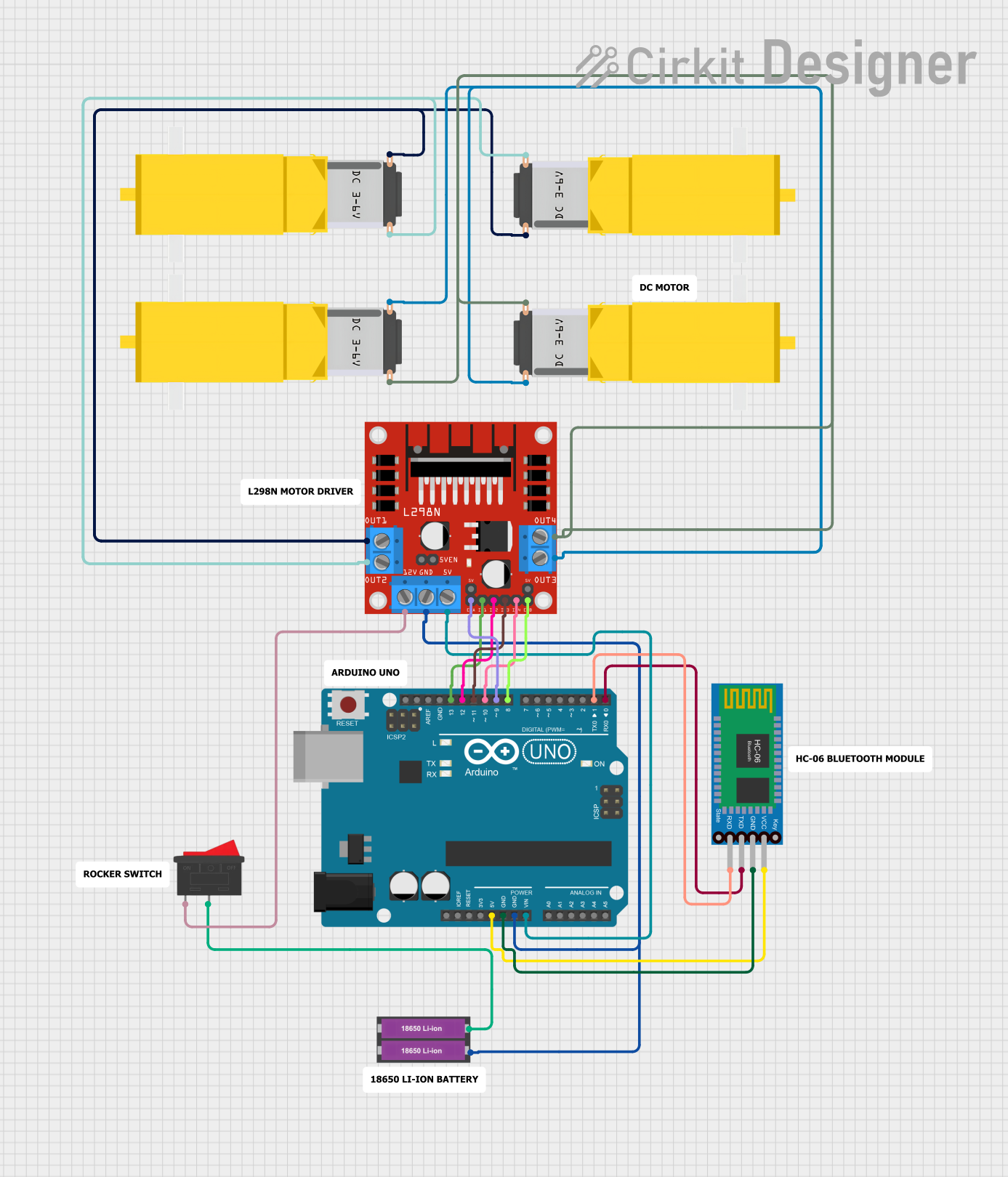
Circuit Documentation
Summary
This circuit is designed to control a pair of DC gearmotors through an L298N motor driver module, with commands received via a Bluetooth HC-06 module. The Arduino UNO serves as the central microcontroller, interfacing with the Bluetooth module for wireless communication and the motor driver to control the motors' speed and direction. The power supply for the motor driver is provided by two 18650 Li-ion batteries, and a rocker switch is included to control the power flow. The circuit is intended for a small robotic vehicle that can move forward, backward, turn left, and right, and adjust its speed.
Component List
- Arduino UNO: A microcontroller board based on the ATmega328P, featuring digital and analog I/O pins.
- 18650 Li-ion Battery x 2: A pair of rechargeable lithium-ion batteries providing the power source for the motor driver.
- L298N DC Motor Driver: A module capable of driving two DC motors with direction and speed control.
- Gearmotor DC / Motorreductor: Four DC gearmotors that act as the actuators for the robotic vehicle's wheels.
- Bluetooth HC-06: A Bluetooth module for wireless serial communication, allowing remote control via Bluetooth-enabled devices.
- Rocker Switch: A switch to control the connection of the power supply to the circuit.
Wiring Details
Arduino UNO
5Vconnected to Bluetooth HC-06VCCGNDconnected to:- Bluetooth HC-06
GND - L298N Motor Driver
GND
- Bluetooth HC-06
Vinconnected to L298N Motor Driver5VD13connected to L298N Motor DriverIN1D12connected to L298N Motor DriverIN2D11connected to L298N Motor DriverIN3D10connected to L298N Motor DriverIN4D9connected to L298N Motor DriverENAD8connected to L298N Motor DriverENBD1connected to Bluetooth HC-06RXDD0connected to Bluetooth HC-06TXD
18650 Li-ion Battery x 2
+connected to Rocker Switch2-connected to L298N Motor DriverGND
L298N DC Motor Driver
12Vconnected to Rocker Switch1OUT1andOUT2connected to two Gearmotor DCPin2andPin1respectivelyOUT3andOUT4connected to the other two Gearmotor DCPin2andPin1respectively
Gearmotor DC / Motorreductor
- Four motors with
Pin1andPin2connected to L298N Motor Driver outputsOUT1,OUT2,OUT3, andOUT4.
Bluetooth HC-06
VCCconnected to Arduino UNO5VGNDconnected to Arduino UNOGNDTXDconnected to Arduino UNOD0RXDconnected to Arduino UNOD1
Rocker Switch
1connected to L298N Motor Driver12V2connected to 18650 Li-ion Battery x 2+
Documented Code
// Define motor driver pins
int IN1 = 13;  // Motor A direction pin 1 (left forward)
int IN2 = 12;  // Motor A direction pin 2 (left backward)
int IN3 = 11;  // Motor B direction pin 1 (right forward)
int IN4 = 10;  // Motor B direction pin 2 (right backward)
int ENA = 9;   // Motor A speed pin (PWM)
int ENB = 8;   // Motor B speed pin (PWM)

// Bluetooth commands
char command;
int speed = 255;  // Default speed (high)

// Speed levels
const int LOW_SPEED = 100;
const int MEDIUM_SPEED = 180;
const int HIGH_SPEED = 255;

void setup() {
  // Set up motor pins as outputs
  pinMode(IN1, OUTPUT);
  pinMode(IN2, OUTPUT);
  pinMode(IN3, OUTPUT);
  pinMode(IN4, OUTPUT);
  pinMode(ENA, OUTPUT);
  pinMode(ENB, OUTPUT);

  // Initialize Bluetooth communication
  Serial.begin(9600);  // HC-06 baud rate

  // Set initial speed
  analogWrite(ENA, speed);
  analogWrite(ENB, speed);
}

void loop() {
  // Check if there's a command from the Bluetooth module
  if (Serial.available() > 0) {
    command = Serial.read();  // Read the command

    // Movement control
    if (command == 'F') {
      moveForward();
    }
    else if (command == 'B') {
      moveBackward();
    }
    else if (command == 'L') {
      turnLeft();
    }
    else if (command == 'R') {
      turnRight();
    }
    else if (command == 'S') {
      stopCar();
    }

    // Speed control
    else if (command == '1') { // Low speed
      setSpeed(LOW_SPEED);
    }
    else if (command == '2') { // Medium speed
      setSpeed(MEDIUM_SPEED);
    }
    else if (command == '3') { // High speed
      setSpeed(HIGH_SPEED);
    }
  }
}

// Movement functions
void moveForward() {
  digitalWrite(IN1, HIGH); // Left motor forward
  digitalWrite(IN2, LOW);  // Left motor backward
  digitalWrite(IN3, HIGH); // Right motor forward
  digitalWrite(IN4, LOW);  // Right motor backward
}

void moveBackward() {
  digitalWrite(IN1, LOW);  // Left motor forward
  digitalWrite(IN2, HIGH); // Left motor backward
  digitalWrite(IN3, LOW);  // Right motor forward
  digitalWrite(IN4, HIGH); // Right motor backward
}

void turnLeft() {
  digitalWrite(IN1, HIGH);  // Left motor backward
  digitalWrite(IN2, LOW); // Left motor forward
  digitalWrite(IN3, LOW); // Right motor forward
  digitalWrite(IN4, HIGH);  // Right motor backward
}

void turnRight() {
  digitalWrite(IN1, LOW); // Left motor forward
  digitalWrite(IN2, HIGH);  // Left motor backward
  digitalWrite(IN3, HIGH);  // Right motor backward
  digitalWrite(IN4, LOW); // Right motor forward
}

void stopCar() {
  digitalWrite(IN1, LOW);
  digitalWrite(IN2, LOW);
  digitalWrite(IN3, LOW);
  digitalWrite(IN4, LOW);
}

// Function to set speed
void setSpeed(int newSpeed) {
  speed = newSpeed;
  analogWrite(ENA, speed);
  analogWrite(ENB, speed);
}
This code is designed to run on the Arduino UNO microcontroller. It initializes the motor driver pins and sets up the Bluetooth communication. The loop function listens for commands from the Bluetooth module to control the movement and speed of the motors. The movement functions moveForward, moveBackward, turnLeft, turnRight, and stopCar control the direction of the motors, while the setSpeed function adjusts the PWM signal to the motor driver for speed control.