
Circuit Documentation
Summary of the Circuit
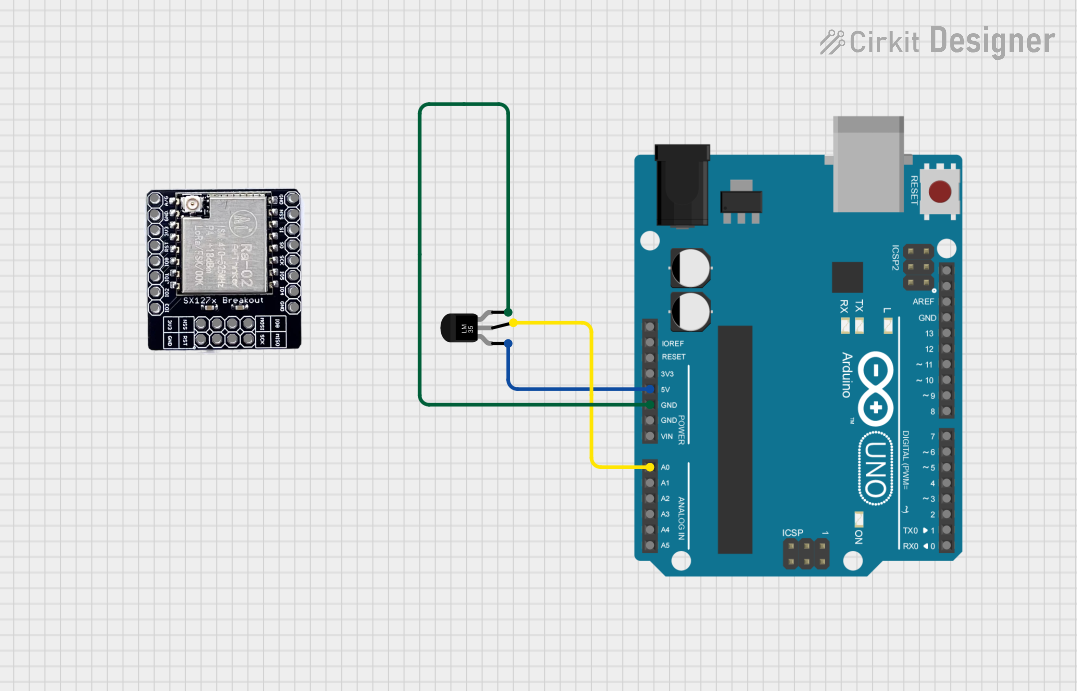
This circuit integrates an Arduino UNO microcontroller with a Temperature Sensor (LM35) and a LoRa module (RA-02). The Arduino UNO reads the analog temperature data from the LM35 sensor and potentially sends data wirelessly via the LoRa module. The LM35 sensor is powered by the 5V output from the Arduino and its ground is connected to the Arduino's ground. The temperature data from the LM35 is read from the A0 analog input pin on the Arduino.
Component List
Arduino UNO
- Description: A microcontroller board based on the ATmega328P.
- Pins: UNUSED, IOREF, Reset, 3.3V, 5V, GND, Vin, A0-A5, SCL, SDA, AREF, D0-D13.
Temperature Sensor (LM35)
- Description: An analog temperature sensor that outputs a voltage linearly proportional to the Celsius temperature.
- Pins: +Vs, Vout, GND.
LORA_RA02
- Description: A LoRa module for long-range communication.
- Pins: A/G, GND, 3V3, RST, IO_0 to IO_5, NSS, MOSI, MISO, SCK.
Wiring Details
Arduino UNO
- 5V connected to LM35 +Vs.
- GND connected to LM35 GND.
- A0 connected to LM35 Vout.
Temperature Sensor (LM35)
- +Vs connected to Arduino UNO 5V.
- Vout connected to Arduino UNO A0.
- GND connected to Arduino UNO GND.
LORA_RA02
Wiring details for the LORA_RA02 module are not provided as there are no connections specified in the electrical net list.
Documented Code
Arduino UNO Code for LM35 Temperature Sensor
// Define the analog pin that the LM35's Vout pin is connected to
const int lm35Pin = A0;

void setup() {
  // Start the serial communication
  Serial.begin(9600);
}

void loop() {
  // Read the voltage from the temperature sensor
  int sensorValue = analogRead(lm35Pin);

  // Convert the analog reading (which goes from 0 - 1023) to a voltage (0 - 5V)
  float voltage = sensorValue * (5.0 / 1023.0);

  // Convert the voltage to temperature in degrees Celsius
  // The LM35 outputs 10 mV per degree Celsius (0.01V/°C)
  float temperatureC = voltage / 0.01;

  // Print the temperature in degrees Celsius
  Serial.print("Temperature: ");
  Serial.print(temperatureC);
  Serial.println(" °C");

  // Delay for a bit before reading the temperature again
  delay(1000);
}
Note: The provided code is responsible for reading the temperature from the LM35 sensor and outputting the temperature in degrees Celsius to the serial monitor. The code is written for the Arduino UNO and assumes that the sensor's Vout pin is connected to the A0 analog input pin.