
Cirkit Designer
Your all-in-one circuit design IDE
Home /
Project Documentation
Bluetooth-Controlled Robotic Car with L293D Motor Driver and HC-05 Module
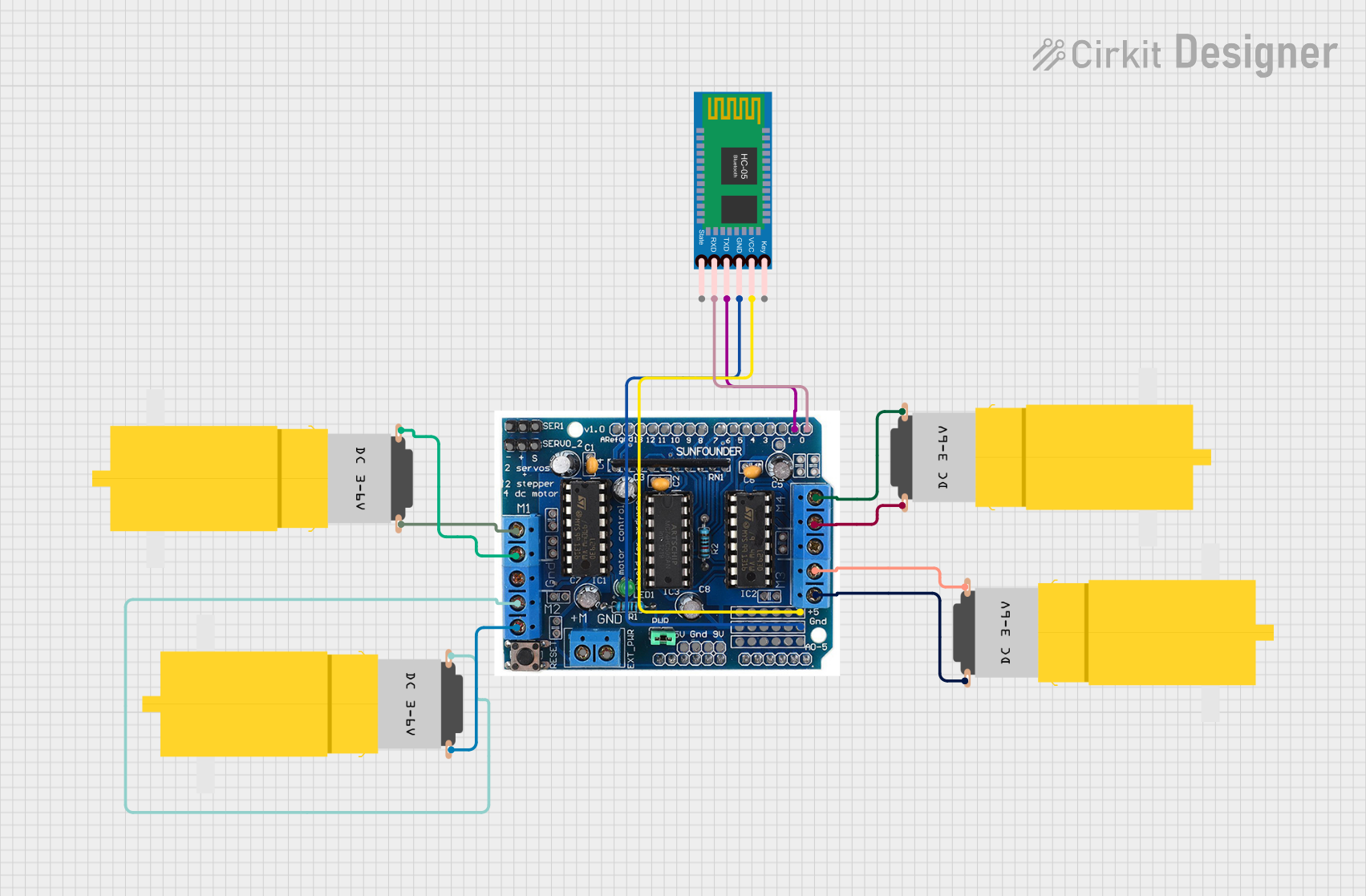
Circuit Documentation
Summary
This document provides a detailed overview of a circuit designed to control four hobby motors using an L293D motor driver shield and an HC-05 Bluetooth module. The circuit allows for remote control of the motors via Bluetooth communication. The L293D driver shield is connected to the motors and the Bluetooth module, which receives commands to control the motors' movements.
Component List
L293D Driver Shield
- Description: Motor driver shield capable of controlling up to four DC motors.
- Pins: 5v, GND, A0, A1, A2, A3, A4, A5, M+, M2, M2, M1, M3, M4, 0, 1, 2, 3, 4, 5, 6, 7, 8, 9, 10, 11, 12, gnd, Aref, ser1, Servo2, +, -, 9v
Motor Amarillo Motorreductor Hobby (4 units)
- Description: Small DC motor with a gearbox, commonly used in hobby projects.
- Pins: vcc, GND
HC-05 Bluetooth Module
- Description: Bluetooth module used for wireless communication.
- Pins: Key, VCC, GND, TXD, RXD, State
Wiring Details
L293D Driver Shield
- 5v: Connected to VCC of HC-05 Bluetooth Module
- GND: Connected to GND of HC-05 Bluetooth Module
- M2: Connected to vcc of Motor 1
- M2: Connected to GND of Motor 1
- M1: Connected to vcc of Motor 2
- M1: Connected to GND of Motor 2
- M3: Connected to vcc of Motor 3
- M3: Connected to GND of Motor 3
- M4: Connected to vcc of Motor 4
- M4: Connected to GND of Motor 4
- 0: Connected to RXD of HC-05 Bluetooth Module
- 1: Connected to TXD of HC-05 Bluetooth Module
Motor Amarillo Motorreductor Hobby (Motor 1)
- vcc: Connected to M2 of L293D Driver Shield
- GND: Connected to M2 of L293D Driver Shield
Motor Amarillo Motorreductor Hobby (Motor 2)
- vcc: Connected to M1 of L293D Driver Shield
- GND: Connected to M1 of L293D Driver Shield
Motor Amarillo Motorreductor Hobby (Motor 3)
- vcc: Connected to M3 of L293D Driver Shield
- GND: Connected to M3 of L293D Driver Shield
Motor Amarillo Motorreductor Hobby (Motor 4)
- vcc: Connected to M4 of L293D Driver Shield
- GND: Connected to M4 of L293D Driver Shield
HC-05 Bluetooth Module
- VCC: Connected to 5v of L293D Driver Shield
- GND: Connected to GND of L293D Driver Shield
- RXD: Connected to 0 of L293D Driver Shield
- TXD: Connected to 1 of L293D Driver Shield
Code Documentation
Sketch Code (sketch.ino)
#include <AFMotor.h>

// Create motor objects
AF_DCMotor motor1(1); // Motor connected to M1
AF_DCMotor motor2(2); // Motor connected to M2
AF_DCMotor motor3(3); // Motor connected to M3
AF_DCMotor motor4(4); // Motor connected to M4

char command = 'S'; // Default command is Stop

void setup() {
  Serial.begin(9600); // Initialize serial communication
  // Set initial motor speed to 0
  motor1.setSpeed(0);
  motor2.setSpeed(0);
  motor3.setSpeed(0);
  motor4.setSpeed(0);
}

void loop() {
  if (Serial.available() > 0) {
    command = Serial.read(); // Read the command from Bluetooth
  }
  // Execute the command
  switch (command) {
    case 'F': // Move forward
      motor1.setSpeed(255);
      motor1.run(FORWARD);
      motor2.setSpeed(255);
      motor2.run(FORWARD);
      motor3.setSpeed(255);
      motor3.run(FORWARD);
      motor4.setSpeed(255);
      motor4.run(FORWARD);
      break;
    case 'B': // Move backward
      motor1.setSpeed(255);
      motor1.run(BACKWARD);
      motor2.setSpeed(255);
      motor2.run(BACKWARD);
      motor3.setSpeed(255);
      motor3.run(BACKWARD);
      motor4.setSpeed(255);
      motor4.run(BACKWARD);
      break;
    case 'L': // Turn left
      motor1.setSpeed(255);
      motor1.run(BACKWARD);
      motor2.setSpeed(255);
      motor2.run(BACKWARD);
      motor3.setSpeed(255);
      motor3.run(FORWARD);
      motor4.setSpeed(255);
      motor4.run(FORWARD);
      break;
    case 'R': // Turn right
      motor1.setSpeed(255);
      motor1.run(FORWARD);
      motor2.setSpeed(255);
      motor2.run(FORWARD);
      motor3.setSpeed(255);
      motor3.run(BACKWARD);
      motor4.setSpeed(255);
      motor4.run(BACKWARD);
      break;
    case 'S': // Stop
      motor1.setSpeed(0);
      motor1.run(RELEASE);
      motor2.setSpeed(0);
      motor2.run(RELEASE);
      motor3.setSpeed(0);
      motor3.run(RELEASE);
      motor4.setSpeed(0);
      motor4.run(RELEASE);
      break;
  }
}
This code initializes the motors and sets up serial communication. It reads commands from the Bluetooth module and controls the motors accordingly. The commands include moving forward, backward, turning left, turning right, and stopping.