
Arduino Nano Bluetooth-Controlled Car with L298N Motor Driver
View and Edit Project In Cirkit Designer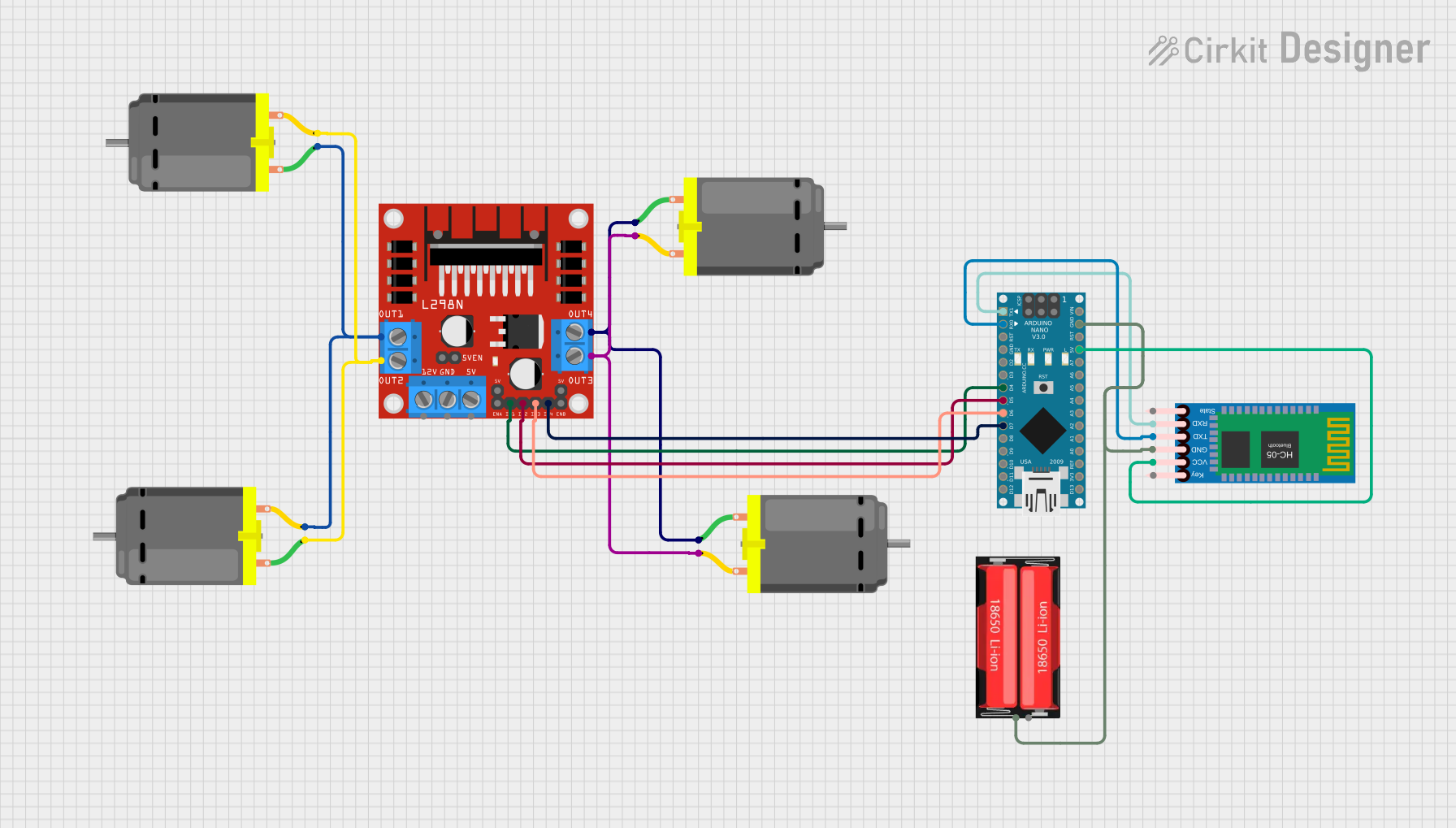
Circuit Documentation
Summary
This document provides a detailed overview of a hand gesture-controlled car circuit. The circuit uses an Arduino Nano microcontroller to interface with an HC-05 Bluetooth module for receiving commands and an L298N motor driver to control four DC motors. The power is supplied by a 18650 Li-Ion battery.
Component List
Arduino Nano
- Description: A compact microcontroller board based on the ATmega328P.
- Pins: D1/TX, D0/RX, RESET, GND, D2, D3, D4, D5, D6, D7, D8, D9, D10, D11/MOSI, D12/MISO, VIN, 5V, A7, A6, A5, A4, A3, A2, A1, A0, AREF, 3V3, D13/SCK
L298N DC Motor Driver
- Description: A dual H-bridge motor driver that allows control of the speed and direction of two DC motors.
- Pins: OUT1, OUT2, 12V, GND, 5V, OUT3, OUT4, 5V-ENA-JMP-I, 5V-ENA-JMP-O, +5V-J1, +5V-J2, ENA, IN1, IN2, IN3, IN4, ENB
HC-05 Bluetooth Module
- Description: A Bluetooth module used for wireless communication.
- Pins: Key, VCC, TXD, RXD, State, GND
DC Motor
- Description: A simple DC motor used for driving the car.
- Pins: pin 1, pin 2
18650 Li-Ion Battery
- Description: A rechargeable lithium-ion battery.
- Pins: Positive, Negative
Wiring Details
Arduino Nano
- D1/TX connected to RXD of HC-05 Bluetooth Module
- D0/RX connected to TXD of HC-05 Bluetooth Module
- D4 connected to IN1 of L298N DC Motor Driver
- D5 connected to IN2 of L298N DC Motor Driver
- D6 connected to IN3 of L298N DC Motor Driver
- D7 connected to IN4 of L298N DC Motor Driver
- GND connected to Negative of 18650 Li-Ion Battery and GND of HC-05 Bluetooth Module
- 5V connected to VCC of HC-05 Bluetooth Module
L298N DC Motor Driver
- IN1 connected to D4 of Arduino Nano
- IN2 connected to D5 of Arduino Nano
- IN3 connected to D6 of Arduino Nano
- IN4 connected to D7 of Arduino Nano
- OUT1 connected to pin 1 of DC Motor and pin 2 of another DC Motor
- OUT2 connected to pin 2 of DC Motor and pin 1 of another DC Motor
- OUT3 connected to pin 2 of DC Motor and pin 2 of another DC Motor
- OUT4 connected to pin 1 of DC Motor and pin 1 of another DC Motor
HC-05 Bluetooth Module
- RXD connected to D1/TX of Arduino Nano
- TXD connected to D0/RX of Arduino Nano
- GND connected to GND of Arduino Nano and Negative of 18650 Li-Ion Battery
- VCC connected to 5V of Arduino Nano
DC Motors
- pin 1 and pin 2 connected to OUT1 and OUT2 of L298N DC Motor Driver
- pin 1 and pin 2 connected to OUT3 and OUT4 of L298N DC Motor Driver
18650 Li-Ion Battery
- Negative connected to GND of Arduino Nano and GND of HC-05 Bluetooth Module
Code Documentation
/*
 * Arduino Sketch for Hand Gesture Controlled Car (Receiver End)
 * This code interfaces with an HC-05 Bluetooth module to receive commands
 * and controls four DC motors via an L298N motor driver.
 */

// Pin definitions for L298N motor driver
const int IN1 = 4;
const int IN2 = 5;
const int IN3 = 6;
const int IN4 = 7;

// Bluetooth module serial communication
const int bluetoothTx = 1; // TX pin of Arduino
const int bluetoothRx = 0; // RX pin of Arduino

void setup() {
  // Initialize motor control pins as outputs
  pinMode(IN1, OUTPUT);
  pinMode(IN2, OUTPUT);
  pinMode(IN3, OUTPUT);
  pinMode(IN4, OUTPUT);

  // Initialize serial communication for Bluetooth module
  Serial.begin(9600);
}

void loop() {
  // Check if data is available from Bluetooth module
  if (Serial.available() > 0) {
    char command = Serial.read();
    // Control motors based on received command
    switch (command) {
      case 'F': // Move forward
        digitalWrite(IN1, HIGH);
        digitalWrite(IN2, LOW);
        digitalWrite(IN3, HIGH);
        digitalWrite(IN4, LOW);
        break;
      case 'B': // Move backward
        digitalWrite(IN1, LOW);
        digitalWrite(IN2, HIGH);
        digitalWrite(IN3, LOW);
        digitalWrite(IN4, HIGH);
        break;
      case 'L': // Turn left
        digitalWrite(IN1, LOW);
        digitalWrite(IN2, HIGH);
        digitalWrite(IN3, HIGH);
        digitalWrite(IN4, LOW);
        break;
      case 'R': // Turn right
        digitalWrite(IN1, HIGH);
        digitalWrite(IN2, LOW);
        digitalWrite(IN3, LOW);
        digitalWrite(IN4, HIGH);
        break;
      case 'S': // Stop
        digitalWrite(IN1, LOW);
        digitalWrite(IN2, LOW);
        digitalWrite(IN3, LOW);
        digitalWrite(IN4, LOW);
        break;
    }
  }
}
This code initializes the motor control pins and sets up serial communication with the HC-05 Bluetooth module. In the main loop, it reads commands from the Bluetooth module and controls the motors accordingly to move the car forward, backward, left, right, or stop.