
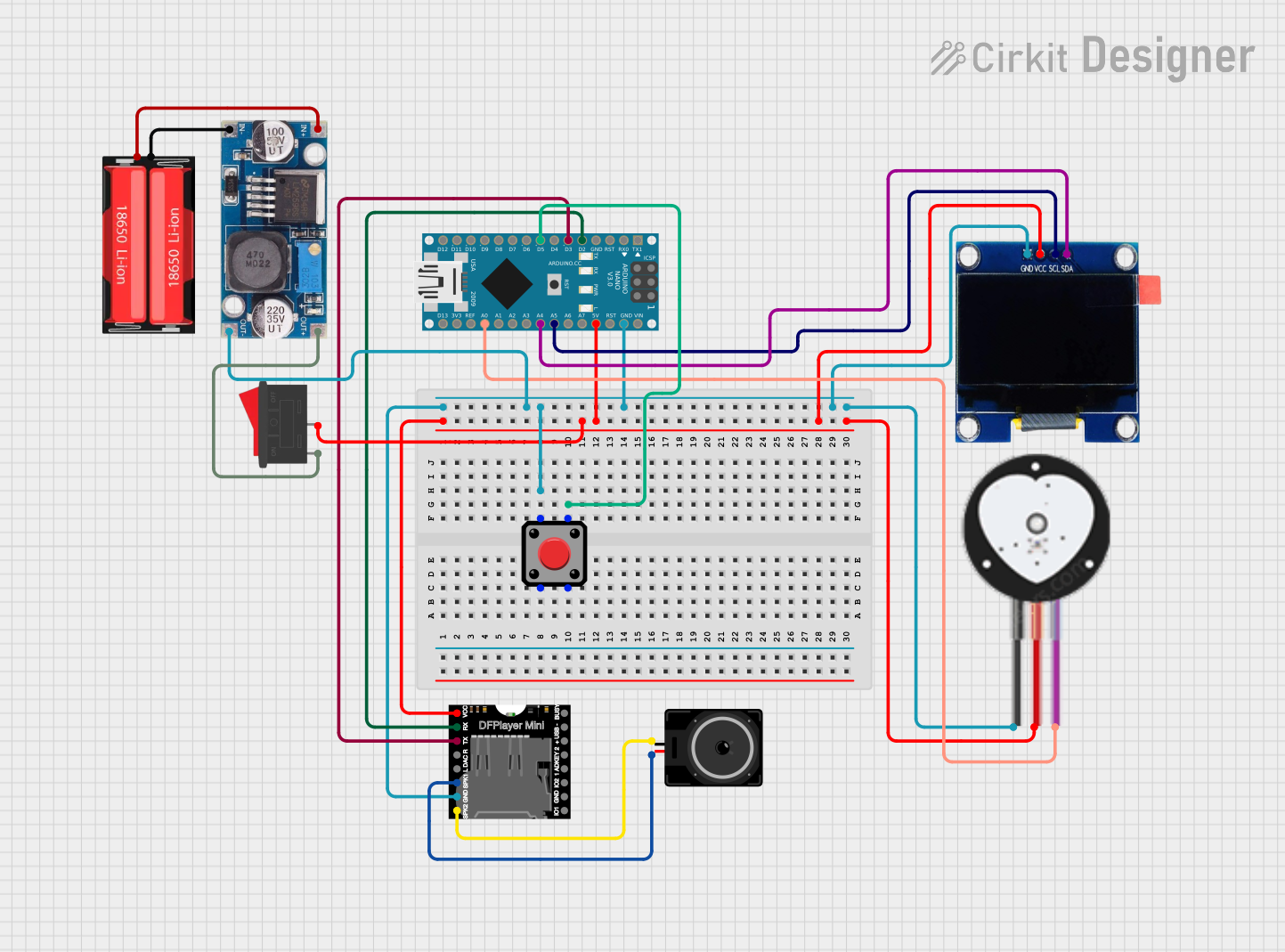
Circuit Documentation
Summary
This document provides a detailed overview of a circuit that includes an Arduino Nano as the central microcontroller, interfaced with a DFPlayer Mini MP3 module, an OLED display, a heart pulse sensor, a loudspeaker, a rocker switch, a voltage regulator (LM2596), a Li-Ion battery (18650), and a pushbutton. The circuit is designed to monitor heart pulses, display data on the OLED, and play audio files through the loudspeaker. The Arduino Nano controls the components, reads sensor data, and manages the display and audio output.
Component List
Arduino Nano
- Microcontroller board based on the ATmega328P
- Provides I/O pins for interfacing with other components
- Operates at 5V and can be powered via USB or external power supply
DFPlayer Mini
- Compact MP3 module for playing audio files from a microSD card
- Interfaces with the Arduino via serial communication
- Capable of driving a speaker directly
OLED 1.3"
- Small display with I2C interface
- Used for displaying system status, messages, or sensor data
Heart Pulse Sensor
- Sensor for detecting heart rate
- Outputs a signal that can be read by the Arduino's analog input
Loudspeaker
- Converts electrical signals into sound
- Connected to the DFPlayer Mini for audio output
Rocker Switch
- Mechanical switch used to control the power supply to the circuit
- Can be used to turn the system on or off
LM2596
- Voltage regulator module
- Steps down input voltage to a lower, regulated output voltage
18650 Li-Ion Battery
- Rechargeable battery providing power to the circuit
- Commonly used for portable electronics
Pushbutton
- Momentary switch that can be used to trigger events or actions in the circuit
Wiring Details
Arduino Nano
GNDconnected to common ground5Vconnected to the VCC of DFPlayer Mini, OLED display, and Heart Pulse Sensor via Rocker SwitchD2connected to RX of DFPlayer MiniD3connected to TX of DFPlayer MiniA4(SDA) connected to SDA of OLED displayA5(SCL) connected to SCL of OLED displayA0connected to SIGNAL of Heart Pulse SensorD5connected to Pin 4 of Pushbutton
DFPlayer Mini
VCCconnected to 5V supply via Rocker SwitchGNDconnected to common groundRXconnected to D2 of Arduino NanoTXconnected to D3 of Arduino NanoSPK1connected to pin2 of LoudspeakerSPK2connected to pin1 of Loudspeaker
OLED 1.3"
GNDconnected to common groundVCCconnected to 5V supplySCLconnected to A5 (SCL) of Arduino NanoSDAconnected to A4 (SDA) of Arduino Nano
Heart Pulse Sensor
GNDconnected to common groundVCCconnected to 5V supplySIGNALconnected to A0 of Arduino Nano
Loudspeaker
pin1connected to SPK2 of DFPlayer Minipin2connected to SPK1 of DFPlayer Mini
Rocker Switch
1connected to OUT+ of LM25962connected to VCC of DFPlayer Mini, OLED display, and Heart Pulse Sensor
LM2596
IN+connected to Positive of 18650 Li-Ion BatteryIN-connected to Negative of 18650 Li-Ion BatteryOUT+connected to Rocker SwitchOut-connected to common ground
18650 Li-Ion Battery
Positiveconnected to IN+ of LM2596Negativeconnected to IN- of LM2596
Pushbutton
Pin 1connected to common groundPin 4connected to D5 of Arduino Nano
Documented Code
Arduino Nano - sketch.ino
void setup() {
  // put your setup code here, to run once:

}

void loop() {
  // put your main code here, to run repeatedly:

}
Arduino Nano - documentation.txt
(No additional documentation provided for the code)
(Note: The code provided is a template and does not contain any functional code. It will need to be populated with the logic required to read the heart pulse sensor, control the OLED display, and manage audio playback through the DFPlayer Mini.)