
Arduino UNO-Based Battery-Powered Water Dispenser with Keypad Control
View and Edit Project In Cirkit Designer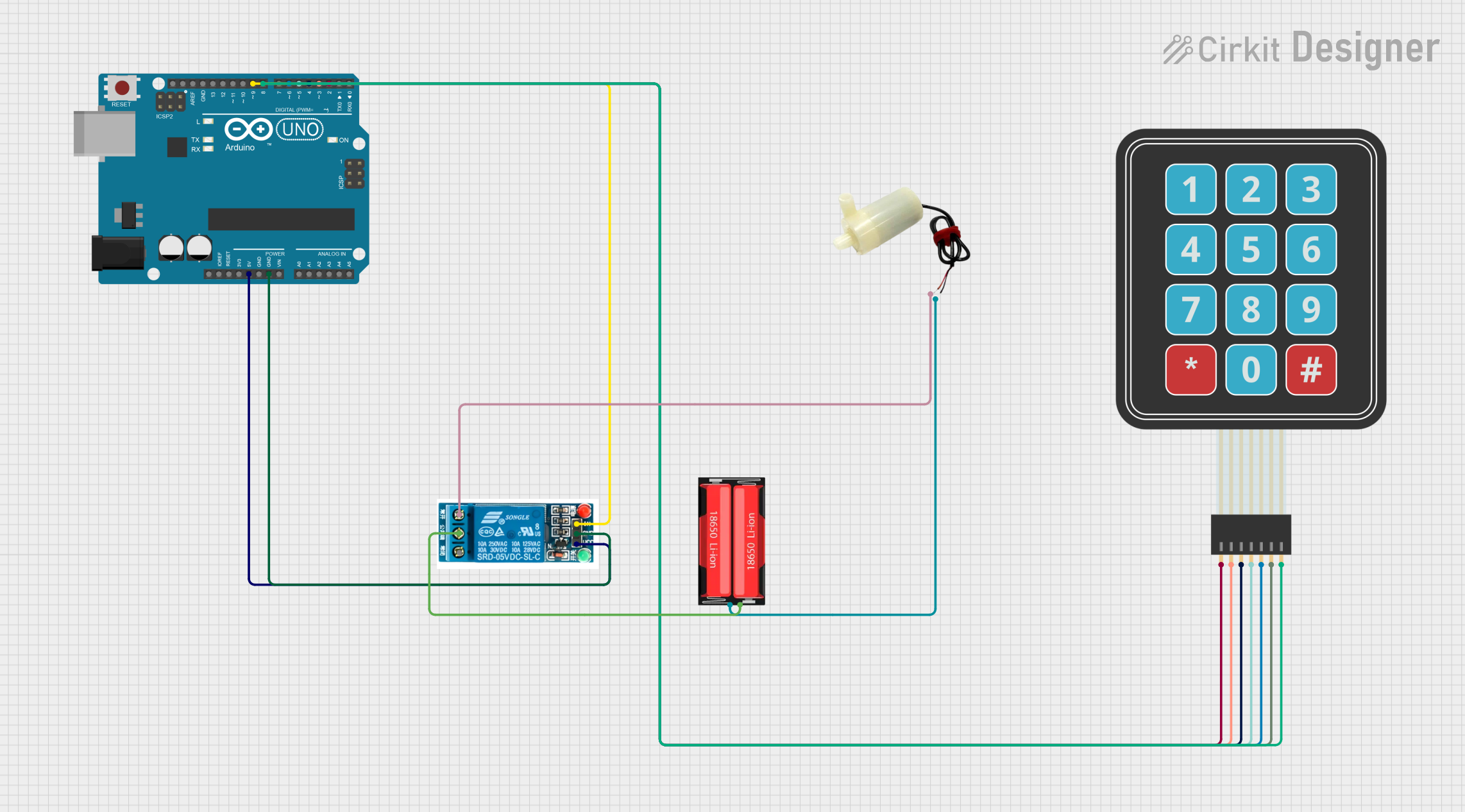
Circuit Documentation
Summary
This circuit is designed to control a 5V mini water pump using an Arduino UNO and a membrane matrix keypad. The user can input a time duration using the keypad, and the pump will dispense water for the specified duration. A 5V relay is used to control the pump, and the entire system is powered by a 18650 Li-Ion battery.
Component List
Membrane Matrix Keypad
- Description: A 4x3 matrix keypad used for user input.
- Pins: Row 1, Row 2, Row 3, Row 4, Column 1, Column 2, Column 3
Arduino UNO
- Description: A microcontroller board based on the ATmega328P.
- Pins: UNUSED, IOREF, Reset, 3.3V, 5V, GND, Vin, A0, A1, A2, A3, A4, A5, SCL, SDA, AREF, D13, D12, D11, D10, D9, D8, D7, D6, D5, D4, D3, D2, D1, D0
5V Relay
- Description: A relay module used to control the water pump.
- Pins: Normally Open, Common terminal, Normally Closed, In, GND, VCC
5V Mini Water Pump
- Description: A small water pump powered by 5V.
- Pins: positive pin, negative pin
18650 Li-Ion Battery
- Description: A rechargeable lithium-ion battery.
- Pins: Positive, Negative
Wiring Details
Membrane Matrix Keypad
- Row 1 connected to Arduino UNO D2
- Row 2 connected to Arduino UNO D3
- Row 3 connected to Arduino UNO D4
- Row 4 connected to Arduino UNO D5
- Column 1 connected to Arduino UNO D6
- Column 2 connected to Arduino UNO D7
- Column 3 connected to Arduino UNO D8
Arduino UNO
- D2 connected to Membrane Matrix Keypad Row 1
- D3 connected to Membrane Matrix Keypad Row 2
- D4 connected to Membrane Matrix Keypad Row 3
- D5 connected to Membrane Matrix Keypad Row 4
- D6 connected to Membrane Matrix Keypad Column 1
- D7 connected to Membrane Matrix Keypad Column 2
- D8 connected to Membrane Matrix Keypad Column 3
- 5V connected to 5V Relay VCC
- GND connected to 5V Relay GND
- D9 connected to 5V Relay In
5V Relay
- VCC connected to Arduino UNO 5V
- GND connected to Arduino UNO GND
- In connected to Arduino UNO D9
- Normally Open connected to 5V Mini Water Pump positive pin
- Common terminal connected to 18650 Li-Ion Battery Positive
5V Mini Water Pump
- positive pin connected to 5V Relay Normally Open
- negative pin connected to 18650 Li-Ion Battery Negative
18650 Li-Ion Battery
- Positive connected to 5V Relay Common terminal
- Negative connected to 5V Mini Water Pump negative pin
Code Documentation
#include <Keypad.h>

// Keypad setup
const byte ROWS = 4;
const byte COLS = 3;
char keys[ROWS][COLS] = {
  {'1', '2', '3'},
  {'4', '5', '6'},
  {'7', '8', '9'},
  {'*', '0', '#'}
};
byte rowPins[ROWS] = {2, 3, 4, 5}; // Connect to the keypad row pins
byte colPins[COLS] = {6, 7, 8};    // Connect to the keypad column pins
Keypad keypad = Keypad(makeKeymap(keys), rowPins, colPins, ROWS, COLS);

// Pin configuration
const int relayPin = 9; // Relay control pin

// Variables
String inputTime = ""; // Stores the user input time
bool dispensing = false;

void setup() {
  pinMode(relayPin, OUTPUT);
  digitalWrite(relayPin, LOW); // Ensure the pump is off initially
  Serial.begin(9600); // For debugging
}

void loop() {
  char key = keypad.getKey();

  if (key) {
    if (key == '#') {
      // Start dispensing if input is valid
      if (!dispensing && inputTime.length() > 0) {
        int timeInSeconds = inputTime.toInt(); // Convert input to integer
        startDispensing(timeInSeconds);
        inputTime = ""; // Clear input after dispensing
      }
    } else if (key == '*') {
      // Clear the input when * is pressed
      inputTime = "";
      Serial.println("Input cleared.");
    } else {
      // Append number to input
      inputTime += key;
      Serial.println("Input: " + inputTime);
    }
  }
}

void startDispensing(int duration) {
  Serial.println("Dispensing started for " + String(duration) + " seconds...");
  dispensing = true;

  digitalWrite(relayPin, HIGH); // Turn on the pump
  delay(duration * 1000); // Run pump for the entered duration
  digitalWrite(relayPin, LOW); // Turn off the pump

  Serial.println("Dispensing completed.");
  dispensing = false;
}
This code sets up the keypad and relay, reads user input from the keypad, and controls the water pump based on the input duration. The pump is turned on for the specified time and then turned off automatically.