
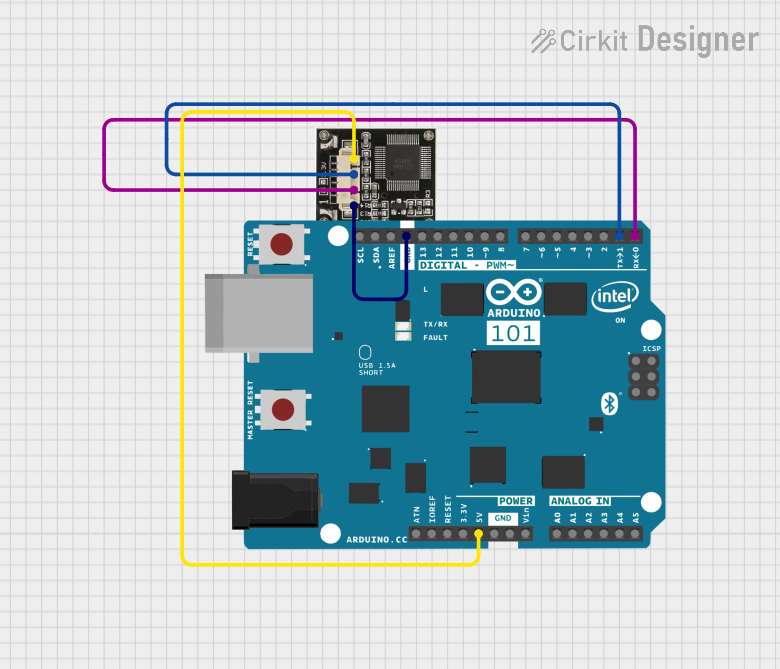
Circuit Documentation
Summary of the Circuit
This circuit consists of an Arduino 101 microcontroller board interfaced with an R307 fingerprint sensor. The purpose of the circuit is to utilize the Arduino 101 to communicate with the R307 sensor, process fingerprint data, and perform actions based on the fingerprint recognition results. The Arduino 101 provides the necessary computational power and connectivity, while the R307 sensor captures and processes the fingerprint data.
Component List
Arduino 101
- Description: A microcontroller board based on the Intel Curie module, designed for building IoT applications with built-in Bluetooth Low Energy (BLE) and sensor features.
- Pins: A5/SCL, A4/SDA, AREF, GND, D13/SCK, D12/MISO, D11 PWM/MOSI, D10 PWM/SS, D9 PWM, D8, D7, D6 PWM, D5 PWM, D4, D3 PWM, D2, D1/TX, D0/RX, AIN, ioref, RESET, 3V3, 5V, VIN, A0, A1, A2, A3, ICSP MISO, ICSP SCK, ICSP MOSI.
R307 Fingerprint Sensor
- Description: A fingerprint scanner module capable of performing fingerprint registration, image processing, fingerprint matching, and searching, etc.
- Pins: VCC, RX, TX, GND.
Wiring Details
Arduino 101
- 5V: Connected to the VCC pin of the R307 fingerprint sensor.
- D1/TX: Connected to the RX pin of the R307 fingerprint sensor.
- D0/RX: Connected to the TX pin of the R307 fingerprint sensor.
- GND: Connected to the GND pin of the R307 fingerprint sensor.
R307 Fingerprint Sensor
- VCC: Connected to the 5V pin of the Arduino 101.
- RX: Connected to the D1/TX pin of the Arduino 101.
- TX: Connected to the D0/RX pin of the Arduino 101.
- GND: Connected to the GND pin of the Arduino 101.
Documented Code
Arduino 101 Code
/*
 * Arduino Interface with R307 Fingerprint Sensor
 * This code interfaces the Arduino 101 with the R307 fingerprint sensor.
 * The sensor's TX pin is connected to the Arduino's RX pin (D0).
 * The sensor's RX pin is connected to the Arduino's TX pin (D1).
 * The sensor's VCC pin is connected to the Arduino's 5V pin.
 * The sensor's GND pin is connected to the Arduino's GND pin.
 */

#include <Adafruit_Fingerprint.h>

// Define the pins for the fingerprint sensor
#define rxPin 0
#define txPin 1

// Create the fingerprint sensor object
Adafruit_Fingerprint finger = Adafruit_Fingerprint(&Serial1);

void setup() {
  // Initialize serial communication
  Serial.begin(9600);
  while (!Serial);
  Serial.println("Adafruit Fingerprint sensor demo");

  // Initialize the fingerprint sensor
  finger.begin(57600);
  if (finger.verifyPassword()) {
    Serial.println("Found fingerprint sensor!");
  } else {
    Serial.println("Did not find fingerprint sensor :(");
    while (1) { delay(1); }
  }
}

void loop() {
  // Put your main code here, to run repeatedly:
  getFingerprintID();
  delay(50); // Add a small delay to avoid overwhelming the sensor
}

void getFingerprintID() {
  uint8_t p = finger.getImage();
  switch (p) {
    case FINGERPRINT_OK:
      Serial.println("Image taken");
      break;
    case FINGERPRINT_NOFINGER:
      Serial.println("No finger detected");
      return;
    case FINGERPRINT_PACKETRECIEVEERR:
      Serial.println("Communication error");
      return;
    case FINGERPRINT_IMAGEFAIL:
      Serial.println("Imaging error");
      return;
    default:
      Serial.println("Unknown error");
      return;
  }

  // OK success!
  p = finger.image2Tz();
  switch (p) {
    case FINGERPRINT_OK:
      Serial.println("Image converted");
      break;
    case FINGERPRINT_IMAGEMESS:
      Serial.println("Image too messy");
      return;
    case FINGERPRINT_PACKETRECIEVEERR:
      Serial.println("Communication error");
      return;
    case FINGERPRINT_FEATUREFAIL:
      Serial.println("Could not find fingerprint features");
      return;
    case FINGERPRINT_INVALIDIMAGE:
      Serial.println("Could not find fingerprint features");
      return;
    default:
      Serial.println("Unknown error");
      return;
  }

  // OK converted!
  p = finger.fingerFastSearch();
  if (p == FINGERPRINT_OK) {
    Serial.println("Found a print match!");
  } else if (p == FINGERPRINT_PACKETRECIEVEERR) {
    Serial.println("Communication error");
  } else if (p == FINGERPRINT_NOTFOUND) {
    Serial.println("Did not find a match");
  } else {
    Serial.println("Unknown error");
  }
}
R307 Fingerprint Sensor Code
The R307 fingerprint sensor does not have user-accessible code as it is a hardware module with pre-programmed firmware. Communication with the sensor is handled by the Arduino 101 through the provided library and code above.