
Arduino UNO-Based IR Sensor and OLED Display System with Servo Control
View and Edit Project In Cirkit Designer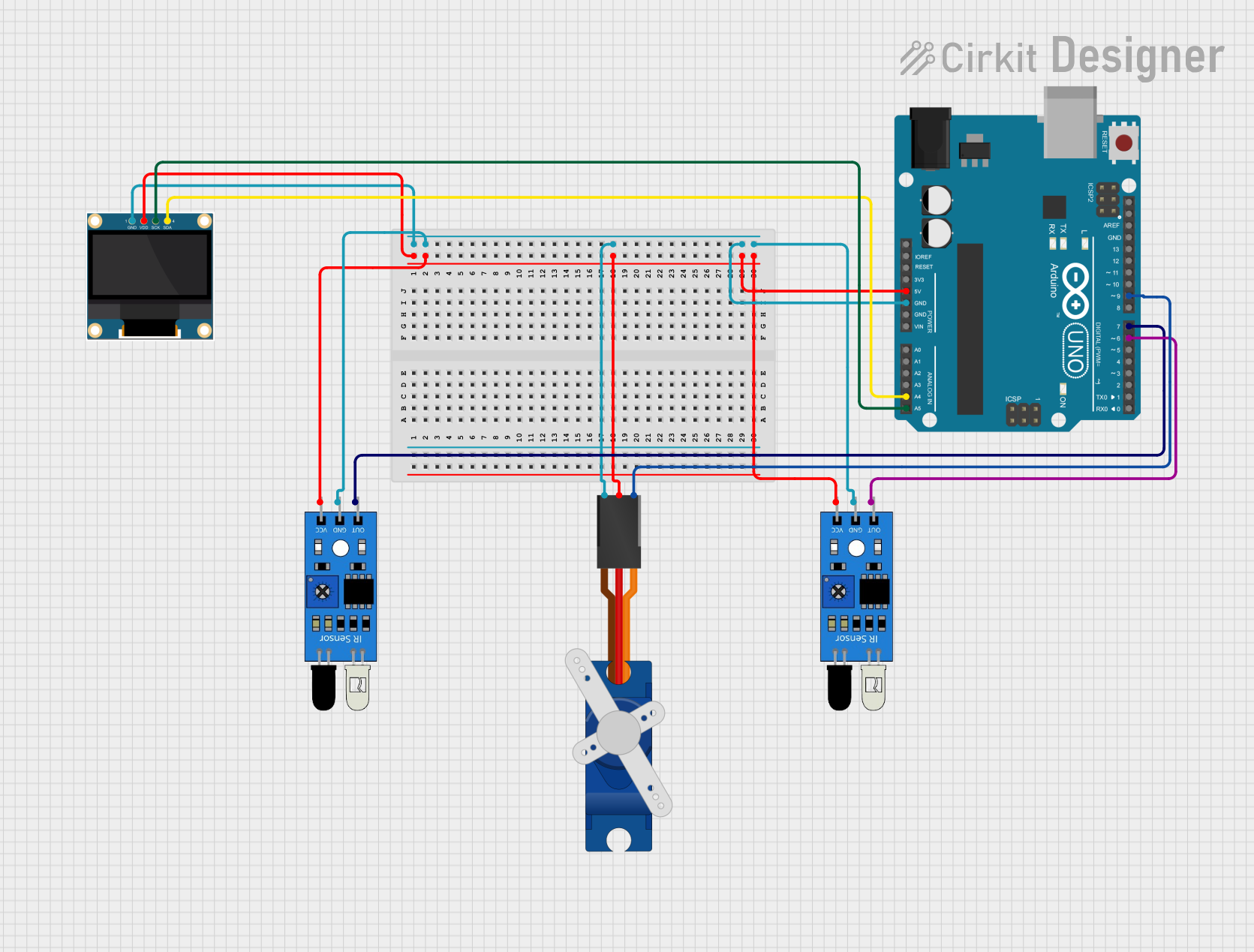
Circuit Documentation
Summary
This circuit involves an Arduino UNO microcontroller interfacing with two IR sensors, a 0.96" OLED display, and a Tower Pro SG90 servo motor. The IR sensors are used for detecting objects, the OLED display is used for visual output, and the servo motor is used for mechanical movement. The Arduino UNO serves as the central controller, processing inputs from the IR sensors and controlling the OLED display and servo motor.
Component List
IR Sensor
- Description: Infrared sensor used for object detection.
- Pins:
out,gnd,vcc
0.96" OLED Display
- Description: Small OLED display for visual output.
- Pins:
GND,VDD,SCK,SDA
Tower Pro SG90 Servo
- Description: Servo motor for mechanical movement.
- Pins:
Signal,+5V,GND
Arduino UNO
- Description: Microcontroller board used for controlling the circuit.
- Pins:
UNUSED,IOREF,Reset,3.3V,5V,GND,Vin,A0,A1,A2,A3,A4,A5,SCL,SDA,AREF,D13,D12,D11,D10,D9,D8,D7,D6,D5,D4,D3,D2,D1,D0
Wiring Details
IR Sensor 1
- Pin
vcc: Connected to5Von Arduino UNO - Pin
gnd: Connected toGNDon Arduino UNO - Pin
out: Connected toD7on Arduino UNO
IR Sensor 2
- Pin
vcc: Connected to5Von Arduino UNO - Pin
gnd: Connected toGNDon Arduino UNO - Pin
out: Connected toD6on Arduino UNO
0.96" OLED Display
- Pin
VDD: Connected to5Von Arduino UNO - Pin
GND: Connected toGNDon Arduino UNO - Pin
SCK: Connected toA5on Arduino UNO - Pin
SDA: Connected toA4on Arduino UNO
Tower Pro SG90 Servo
- Pin
+5V: Connected to5Von Arduino UNO - Pin
GND: Connected toGNDon Arduino UNO - Pin
Signal: Connected toD9on Arduino UNO
Code Documentation
Arduino UNO Code
sketch.ino
void setup() {
  // put your setup code here, to run once:

}

void loop() {
  // put your main code here, to run repeatedly:

}
documentation.txt