
Arduino UNO-Based Autonomous Obstacle-Avoiding Robot with IR and Ultrasonic Sensors
View and Edit Project In Cirkit Designer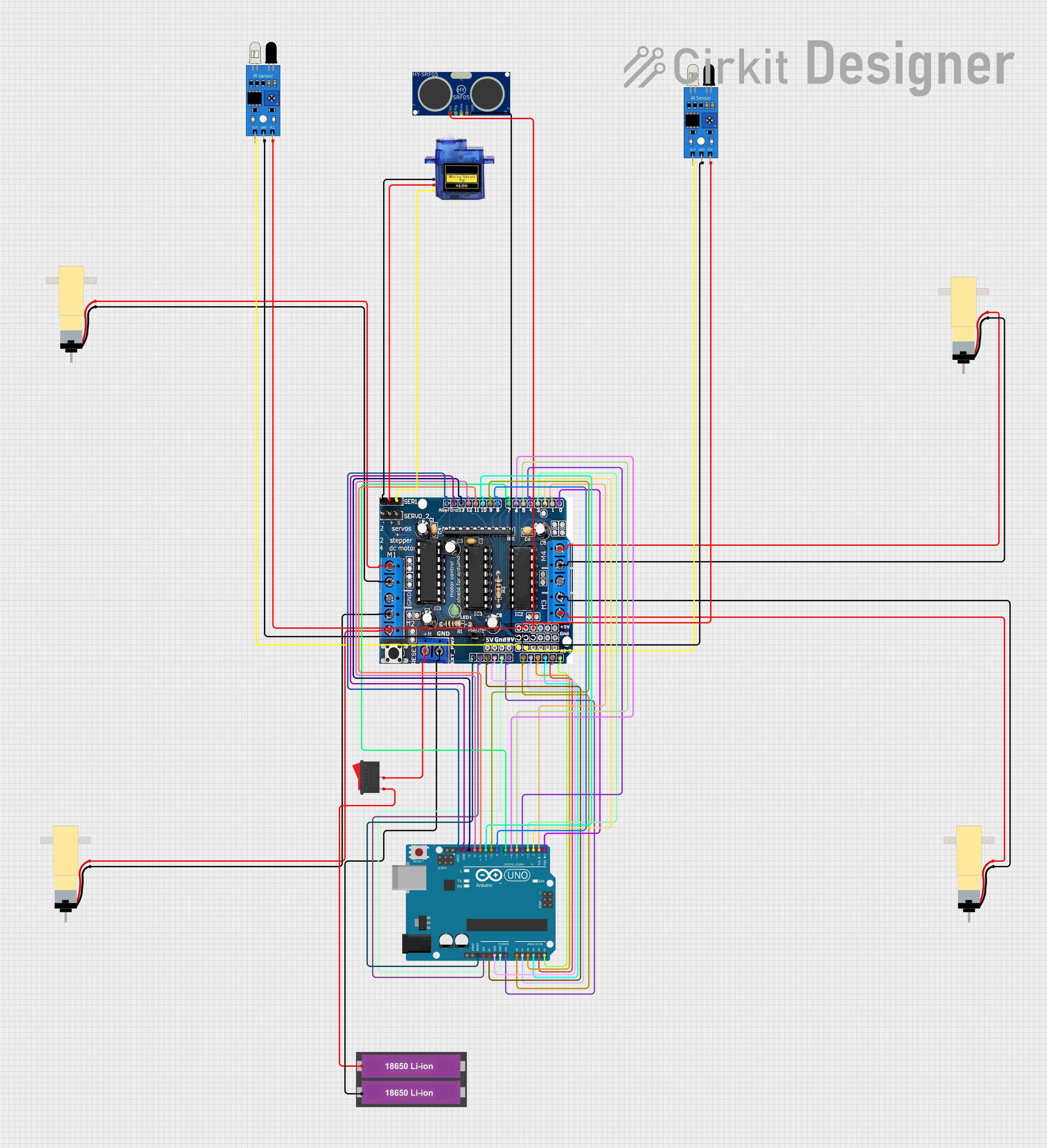
Circuit Documentation
Summary
This document provides a detailed overview of a circuit that includes an Arduino UNO, an L293D motor driver, multiple sensors (IR sensors and an ultrasonic sensor), a rocker switch, a micro servo, and several hobby gear motors. The circuit is designed to control the motors and sensors using the Arduino UNO, with the L293D acting as the motor driver. The Arduino UNO is programmed to control the motors and sensors based on the input from the IR sensors and the ultrasonic sensor.
Component List
Arduino UNO
- Description: A microcontroller board based on the ATmega328P.
- Pins: UNUSED, IOREF, Reset, 3.3V, 5V, GND, Vin, A0, A1, A2, A3, A4, A5, SCL, SDA, AREF, D13, D12, D11, D10, D9, D8, D7, D6, D5, D4, D3, D2, D1, D0
L293D
- Description: A quadruple high-current half-H driver.
- Pins: 5V, GND, +, Servo1, Servo2, RX/DO, TX/D1, 9V, A0, A1, A2, A3, A4/SDA, A5/SCL, VIN, 3.3V, RESET, D2, D3, D4, D5, D6, D7, D8, D9, D10, D11, D12, D13
18650 Li-ion Battery x 2
- Description: Rechargeable lithium-ion batteries.
- Pins: +, -
Hobby Gearmotor with 48:1 gearbox
- Description: A small DC motor with a 48:1 gearbox.
- Pins: pin 1, pin 2
Rocker Switch
- Description: A simple on/off switch.
- Pins: 1, 2
IR Sensor
- Description: Infrared sensor for obstacle detection.
- Pins: out, gnd, vcc
HC-SR05
- Description: Ultrasonic distance sensor.
- Pins: VCC, TRIG, GND, ECHO, OUT
Micro Servo 9G
- Description: A small servo motor.
- Pins: GND, +5V, PWM
Wiring Details
Arduino UNO
- Reset connected to L293D RESET
- 3.3V connected to L293D 3.3V
- 5V connected to L293D 5V
- GND connected to L293D GND
- Vin connected to L293D VIN
- A0 connected to L293D A0
- A1 connected to L293D A1
- A2 connected to L293D A2
- A3 connected to L293D A3
- A4 connected to L293D A4/SDA
- A5 connected to L293D A5/SCL
- AREF connected to L293D GND
- D13 connected to L293D D13
- D12 connected to L293D D12
- D11 connected to L293D D11
- D10 connected to L293D D10
- D9 connected to L293D D9
- D8 connected to L293D D8
- D7 connected to L293D D7
- D6 connected to L293D D6
- D5 connected to L293D D5
- D4 connected to L293D D4
- D3 connected to L293D D3
- D2 connected to L293D D2
- D1 connected to L293D TX/D1
- D0 connected to L293D RX/DO
L293D
- 5V connected to IR Sensor vcc and HC-SR05 VCC and Micro Servo 9G +5V
- GND connected to IR Sensor gnd and HC-SR05 GND and Micro Servo 9G GND and 18650 Li-ion Battery - and Hobby Gearmotor pin 1
- + connected to Rocker Switch 2 and Hobby Gearmotor pin 2
- Servo1 connected to Micro Servo 9G PWM
- A0 connected to IR Sensor out
- A1 connected to IR Sensor out
18650 Li-ion Battery x 2
- + connected to Rocker Switch 1
Rocker Switch
- 1 connected to 18650 Li-ion Battery +
- 2 connected to L293D +
IR Sensor
- out connected to L293D A0 and L293D A1
- gnd connected to L293D GND
- vcc connected to L293D 5V
HC-SR05
- VCC connected to L293D 5V
- GND connected to L293D GND
Micro Servo 9G
- GND connected to L293D GND
- +5V connected to L293D 5V
- PWM connected to L293D Servo1
Hobby Gearmotor with 48:1 gearbox
- pin 1 connected to L293D GND
- pin 2 connected to L293D +
Code Documentation
#include <NewPing.h>
#include <Servo.h>
#include <AFMotor.h>

//hc-sr04 sensor
#define TRIGGER_PIN A2
#define ECHO_PIN A3
#define max_distance 50

//ir sensor
#define irLeft A0
#define irRight A1

//motor
#define MAX_SPEED 200
#define MAX_SPEED_OFFSET 20

Servo servo;

NewPing sonar(TRIGGER_PIN, ECHO_PIN, max_distance);

AF_DCMotor motor1(1, MOTOR12_1KHZ);
AF_DCMotor motor2(2, MOTOR12_1KHZ);
AF_DCMotor motor3(3, MOTOR34_1KHZ);
AF_DCMotor motor4(4, MOTOR34_1KHZ);

int distance = 0;
int leftDistance;
int rightDistance;
boolean object;

void setup() {
  Serial.begin(9600);
  pinMode(irLeft, INPUT);
  pinMode(irRight, INPUT);
  servo.attach(10);
  servo.write(90);

  motor1.setSpeed(120);
  motor2.setSpeed(120);
  motor3.setSpeed(120);
  motor4.setSpeed(120);
}

void loop() {
  if (digitalRead(irLeft) == 0 && digitalRead(irRight) == 0 ) {
    objectAvoid();
    //forward
  }
  else if (digitalRead(irLeft) == 0 && digitalRead(irRight) == 1 ) {
    objectAvoid();
    Serial.println("TL");
    //left turn
    moveLeft();
  }
  else if (digitalRead(irLeft) == 1 && digitalRead(irRight) == 0 ) {
    objectAvoid();
    Serial.println("TR");
    //right turn
    moveRight();
  }
  else if (digitalRead(irLeft) == 1 && digitalRead(irRight) == 1 ) {
    //Stop
    Stop();
  }
}

void objectAvoid() {
  distance = getDistance();
  if (distance <= 15) {
    //stop
    Stop();
    Serial.println("Stop");

    lookLeft();
    lookRight();
    delay(100);
    if (rightDistance <= leftDistance) {
      //left
      object = true;
      turn();
      Serial.println("moveLeft");
    } else {
      //right
      object = false;
      turn();
      Serial.println("moveRight");
    }
    delay(100);
  }
  else {
    //forward
    Serial.println("moveforward");
    moveForward();
  }
}

int getDistance() {
  delay(50);
  int cm = sonar.ping_cm();
  if (cm == 0) {
    cm = 100;
  }
  return cm;
}

int lookLeft () {
  //look left
  servo.write(150);
  delay(500);
  leftDistance = getDistance();
  delay(100);
  servo.write(90);
  Serial.print("Left:");
  Serial.print(leftDistance);
  return leftDistance;
}

int lookRight() {
  //look right
  servo.write(30);
  delay(500);
  rightDistance = getDistance();
  delay(100);
  servo.write(90);
  Serial.print("   ");
  Serial.print("