
Arduino UNO-Based Battery-Powered Robotic System with Ultrasonic Sensor and Motor Control
View and Edit Project In Cirkit Designer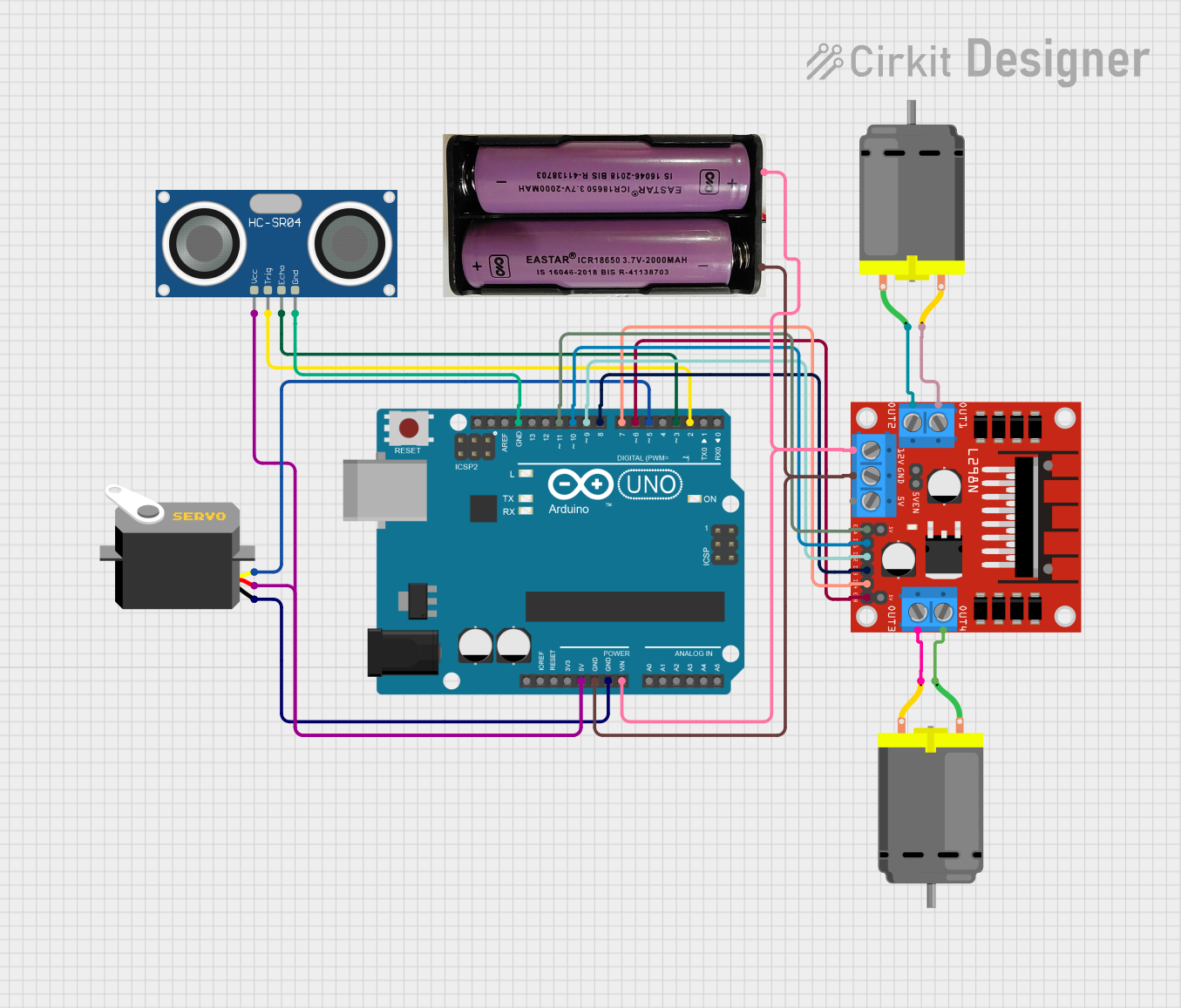
Circuit Documentation
Summary
This document provides a detailed overview of a circuit that includes an Arduino UNO microcontroller, an HC-SR04 Ultrasonic Sensor, a Servo motor, two DC motors, an L298N DC motor driver, and a 7.4V power supply. The circuit is designed to control the motors and read distance measurements from the ultrasonic sensor, with the Arduino UNO serving as the central control unit.
Component List
Arduino UNO
- Description: A microcontroller board based on the ATmega328P.
- Pins: UNUSED, IOREF, Reset, 3.3V, 5V, GND, Vin, A0, A1, A2, A3, A4, A5, SCL, SDA, AREF, D13, D12, D11, D10, D9, D8, D7, D6, D5, D4, D3, D2, D1, D0
HC-SR04 Ultrasonic Sensor
- Description: A sensor used to measure distance by using ultrasonic waves.
- Pins: VCC, TRIG, ECHO, GND
Servo
- Description: A motor that allows for precise control of angular position.
- Pins: gnd, vcc, pulse
DC Motor
- Description: A motor that converts electrical energy into mechanical energy.
- Pins: pin 1, pin 2
L298N DC Motor Driver
- Description: A dual H-Bridge motor driver that allows for control of two DC motors.
- Pins: OUT1, OUT2, 12V, GND, 5V, OUT3, OUT4, 5V-ENA-JMP-I, 5V-ENA-JMP-O, +5V-J1, +5V-J2, ENA, IN1, IN2, IN3, IN4, ENB
7.4V Power Supply
- Description: A power source providing 7.4V.
- Pins: +, -
Wiring Details
Arduino UNO
- 5V: Connected to VCC of HC-SR04 Ultrasonic Sensor and vcc of Servo.
- GND: Connected to GND of HC-SR04 Ultrasonic Sensor, gnd of Servo, and GND of L298N DC Motor Driver.
- Vin: Connected to + of 7.4V Power Supply.
- D11: Connected to ENA of L298N DC Motor Driver.
- D10: Connected to IN1 of L298N DC Motor Driver.
- D9: Connected to IN2 of L298N DC Motor Driver.
- D8: Connected to IN3 of L298N DC Motor Driver.
- D7: Connected to IN4 of L298N DC Motor Driver.
- D6: Connected to ENB of L298N DC Motor Driver.
- D5: Connected to pulse of Servo.
- D3: Connected to ECHO of HC-SR04 Ultrasonic Sensor.
- D2: Connected to TRIG of HC-SR04 Ultrasonic Sensor.
HC-SR04 Ultrasonic Sensor
- VCC: Connected to 5V of Arduino UNO.
- TRIG: Connected to D2 of Arduino UNO.
- ECHO: Connected to D3 of Arduino UNO.
- GND: Connected to GND of Arduino UNO.
Servo
- vcc: Connected to 5V of Arduino UNO.
- gnd: Connected to GND of Arduino UNO.
- pulse: Connected to D5 of Arduino UNO.
DC Motor 1
- pin 1: Connected to OUT2 of L298N DC Motor Driver.
- pin 2: Connected to OUT1 of L298N DC Motor Driver.
DC Motor 2
- pin 1: Connected to OUT4 of L298N DC Motor Driver.
- pin 2: Connected to OUT3 of L298N DC Motor Driver.
L298N DC Motor Driver
- GND: Connected to GND of Arduino UNO and - of 7.4V Power Supply.
- 12V: Connected to + of 7.4V Power Supply.
- ENA: Connected to D11 of Arduino UNO.
- IN1: Connected to D10 of Arduino UNO.
- IN2: Connected to D9 of Arduino UNO.
- IN3: Connected to D8 of Arduino UNO.
- IN4: Connected to D7 of Arduino UNO.
- ENB: Connected to D6 of Arduino UNO.
- OUT1: Connected to pin 2 of DC Motor 1.
- OUT2: Connected to pin 1 of DC Motor 1.
- OUT3: Connected to pin 2 of DC Motor 2.
- OUT4: Connected to pin 1 of DC Motor 2.
7.4V Power Supply
- +: Connected to 12V of L298N DC Motor Driver and Vin of Arduino UNO.
- -: Connected to GND of L298N DC Motor Driver and GND of Arduino UNO.
Documented Code
Arduino UNO Code
void setup() {
  // put your setup code here, to run once:

}

void loop() {
  // put your main code here, to run repeatedly:

}
This code is a basic template for the Arduino UNO. The setup function is used to initialize any settings or configurations, and the loop function contains the main code that runs repeatedly.