
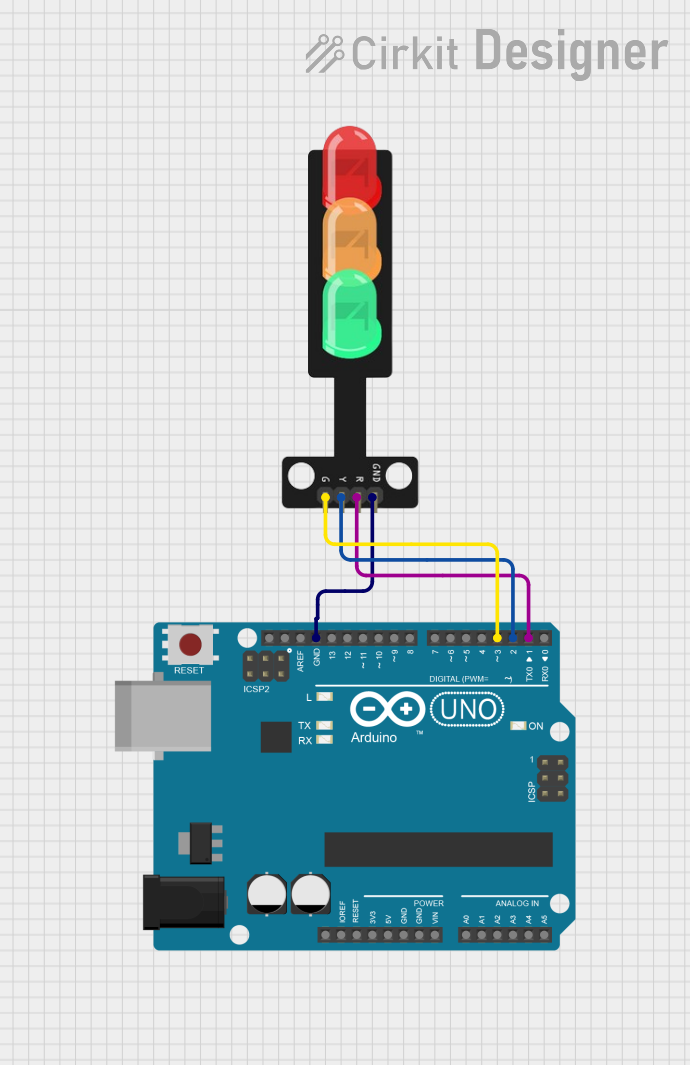
Traffic Light Control Circuit Documentation
Summary
This circuit is designed to control a traffic light system using an Arduino UNO microcontroller. The system operates a simple traffic light sequence with three lights: green, yellow, and red. The sequence starts with the green light on for 5 seconds, followed by the yellow light for 2 seconds, and then the red light for 5 seconds. This cycle repeats indefinitely.
Component List
Arduino UNO
- Description: A microcontroller board based on the ATmega328P.
- Purpose: Acts as the control unit for the traffic light system, driving the green, yellow, and red LEDs in sequence.
- Pins: UNUSED, IOREF, Reset, 3.3V, 5V, GND, Vin, A0-A5, SCL, SDA, AREF, D13-D0
Traffic Light
- Description: A simple traffic light module with three LEDs (green, yellow, red) and a common ground.
- Purpose: Displays the traffic light sequence as controlled by the Arduino UNO.
- Pins: Green, Yellow, Red, GND
Wiring Details
Arduino UNO
- GND: Connected to the GND pin of the Traffic Light.
- D3: Connected to the Green pin of the Traffic Light.
- D2: Connected to the Yellow pin of the Traffic Light.
- D1: Connected to the Red pin of the Traffic Light.
Traffic Light
- Green: Connected to pin D3 of the Arduino UNO.
- Yellow: Connected to pin D2 of the Arduino UNO.
- Red: Connected to pin D1 of the Arduino UNO.
- GND: Connected to the GND pin of the Arduino UNO.
Documented Code
/*
 * This Arduino sketch controls a traffic light system.
 * The sequence is as follows:
 * - Green LED on for 5 seconds
 * - Yellow LED on for 2 seconds
 * - Red LED on for 5 seconds
 * This sequence repeats indefinitely.
 */

// Pin definitions
const int greenPin = 3;  // Arduino UNO D3 pin connected to Traffic Light Green
const int yellowPin = 2; // Arduino UNO D2 pin connected to Traffic Light Yellow
const int redPin = 1;    // Arduino UNO D1 pin connected to Traffic Light Red

void setup() {
  // Initialize the digital pins as outputs
  pinMode(greenPin, OUTPUT);
  pinMode(yellowPin, OUTPUT);
  pinMode(redPin, OUTPUT);
}

void loop() {
  // Green LED on for 5 seconds
  digitalWrite(greenPin, HIGH);
  delay(5000);
  digitalWrite(greenPin, LOW);

  // Yellow LED on for 2 seconds
  digitalWrite(yellowPin, HIGH);
  delay(2000);
  digitalWrite(yellowPin, LOW);

  // Red LED on for 5 seconds
  digitalWrite(redPin, HIGH);
  delay(5000);
  digitalWrite(redPin, LOW);
}
File Name: sketch.ino
This code is written for the Arduino UNO microcontroller to control the traffic light sequence. The setup() function initializes the pins connected to the traffic light LEDs as outputs. The loop() function then controls the sequence of the lights, turning each LED on and off for the specified duration.