
Arduino UNO Controlled Dual Motor Driver with Joystick and Potentiometer Feedback
View and Edit Project In Cirkit Designer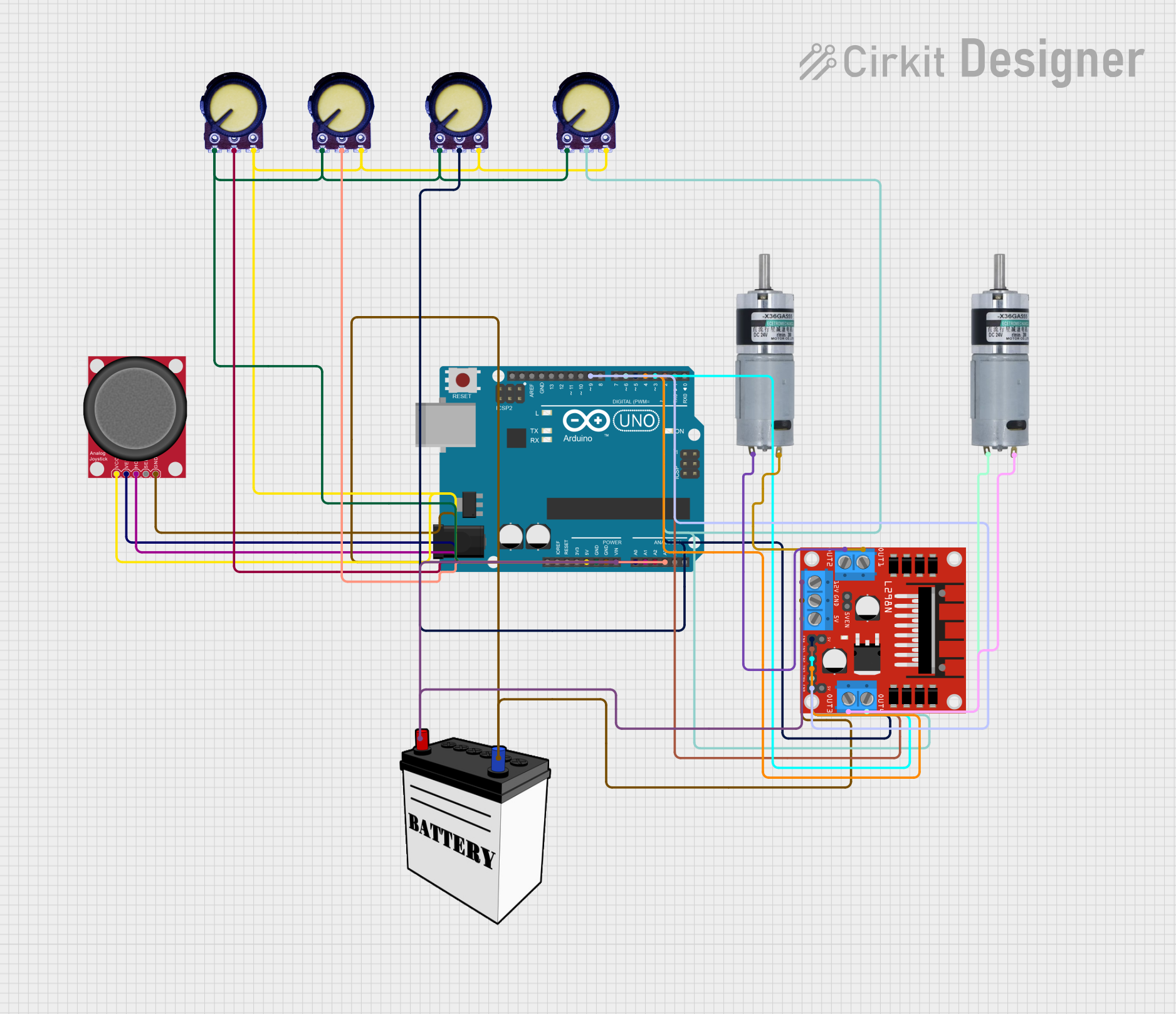
Circuit Documentation
Summary
This circuit is designed to control multiple DC motors using an Arduino UNO microcontroller in conjunction with an L298N DC motor driver. The speed and direction of the motors are determined by the input from an analog joystick and multiple potentiometers. A 12V battery provides power to the system, with voltage regulation for the Arduino and other components that require 5V.
Component List
Arduino UNO
- Microcontroller board based on the ATmega328P
- Provides I/O pins and power to the circuit
- Used for reading inputs and controlling outputs
MRB Planetary Gearbox Motor (x2)
- DC motor with a gearbox for increased torque
- Controlled by the L298N motor driver
Analog Joystick (Wokwi Compatible)
- Provides two-axis control input
- Connected to the Arduino for directional control of the motors
Potentiometer (x4)
- Variable resistor used for adjusting motor speed and delay
- Connected to the Arduino's analog inputs
L298N DC Motor Driver
- H-Bridge motor driver capable of driving two DC motors
- Interfaces between the Arduino and the motors
12V Battery
- Provides power to the motor driver and the Arduino (via Vin)
Wiring Details
Arduino UNO
5VandGNDpins provide power to the potentiometers and the joystickVinconnected to the 12V battery for power- Analog inputs
A0andA1connected to the joystick for X and Y axis control - Analog inputs
A2,A3, and additional unspecified pins connected to potentiometers for speed and delay control - Digital pins
D2,D3,D4,D5,D6, andD9connected to the L298N motor driver for motor control signals
MRB Planetary Gearbox Motors
- One motor connected to
OUT1andOUT2of the L298N motor driver - Another motor connected to
OUT3andOUT4of the L298N motor driver
Analog Joystick (Wokwi Compatible)
VCCandGNDconnected to the Arduino for powerVERTconnected toA0on the Arduino for vertical axis controlHORZconnected toA1on the Arduino for horizontal axis control
Potentiometers
- All
VCCpins connected to5Von the Arduino - All
GNDpins connected toGNDon the Arduino Outputpins connected to various analog inputs on the Arduino for speed and delay control
L298N DC Motor Driver
12VandGNDconnected to the 12V batteryENAandENBconnected toD5andD9on the Arduino for enabling motor outputsIN1,IN2,IN3, andIN4connected toD2,D3,D4, andD6on the Arduino for motor direction controlOUT1,OUT2,OUT3, andOUT4connected to the MRB Planetary gearbox motors
12V Battery
VCCconnected to12Von the L298N motor driver andVinon the ArduinoGNDconnected toGNDon the L298N motor driver and the Arduino
Documented Code
// Motor pins
const int motor1Pin1 = 2;
const int motor1Pin2 = 3;
const int motor1PWM = 5;

const int motor2Pin1 = 4;
const int motor2Pin2 = 6;
const int motor2PWM = 9;

// Potentiometer pins for speed control
const int potSpeed1 = A2;
const int potSpeed2 = A3;

// Joystick pins
const int joyX = A0;
const int joyY = A1;

void setup() {
  // Motor pins as outputs
  pinMode(motor1Pin1, OUTPUT);
  pinMode(motor1Pin2, OUTPUT);
  pinMode(motor1PWM, OUTPUT);

  pinMode(motor2Pin1, OUTPUT);
  pinMode(motor2Pin2, OUTPUT);
  pinMode(motor2PWM, OUTPUT);

  // Initialize serial communication
  Serial.begin(9600);
}

void loop() {
  // Read joystick values
  int joyXVal = analogRead(joyX);
  int joyYVal = analogRead(joyY);

  // Read potentiometer values for speed control
  int speed1 = map(analogRead(potSpeed1), 0, 1023, 0, 255);
  int speed2 = map(analogRead(potSpeed2), 0, 1023, 0, 255);

  // Control motor 1 direction based on joystick X axis
  if (joyXVal > 512) {
    digitalWrite(motor1Pin1, HIGH);
    digitalWrite(motor1Pin2, LOW);
  } else if (joyXVal < 512) {
    digitalWrite(motor1Pin1, LOW);
    digitalWrite(motor1Pin2, HIGH);
  } else {
    digitalWrite(motor1Pin1, LOW);
    digitalWrite(motor1Pin2, LOW);
  }

  // Control motor 2 direction based on joystick Y axis
  if (joyYVal > 512) {
    digitalWrite(motor2Pin1, HIGH);
    digitalWrite(motor2Pin2, LOW);
  } else if (joyYVal < 512) {
    digitalWrite(motor2Pin1, LOW);
    digitalWrite(motor2Pin2, HIGH);
  } else {
    digitalWrite(motor2Pin1, LOW);
    digitalWrite(motor2Pin2, LOW);
  }

  // Apply PWM for speed control
  analogWrite(motor1PWM, speed1);
  analogWrite(motor2PWM, speed2);
}
Note: The provided code snippet is a partial representation of the full code. It includes setup and loop functions for motor control based on joystick input and potentiometer readings for speed control. The code is designed to be uploaded to the Arduino UNO microcontroller.