
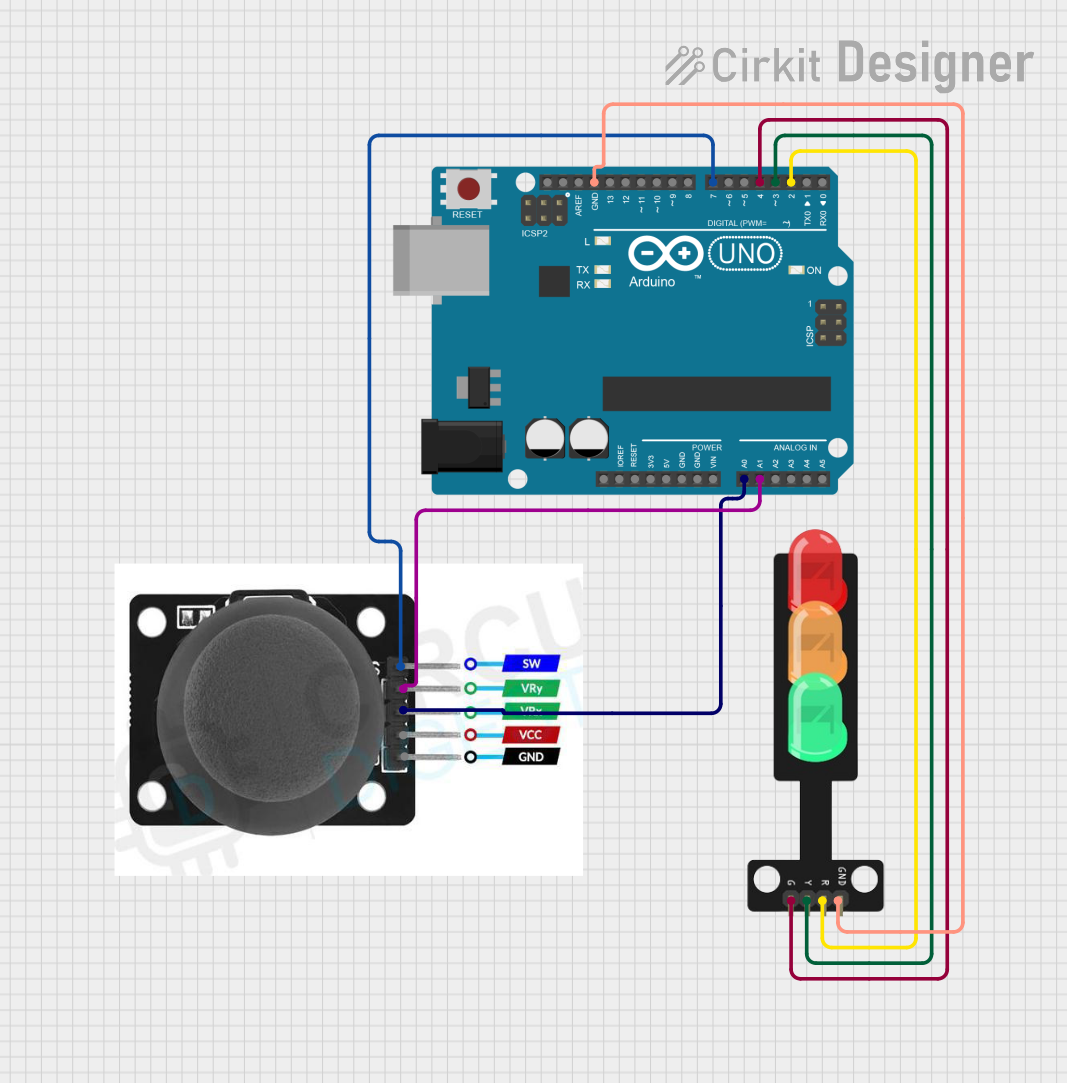
Circuit Documentation
Summary
This circuit is designed to control a traffic light system using a joystick module and an Arduino UNO. The joystick module is used to determine the direction of movement, which in turn controls the state of the traffic light LEDs (Red, Yellow, Green). The Arduino UNO reads the joystick inputs and drives the LEDs accordingly.
Component List
Arduino UNO
- Description: A microcontroller board based on the ATmega328P.
- Pins: UNUSED, IOREF, Reset, 3.3V, 5V, GND, Vin, A0, A1, A2, A3, A4, A5, SCL, SDA, AREF, D13, D12, D11, D10, D9, D8, D7, D6, D5, D4, D3, D2, D1, D0
Traffic Light
- Description: A module with three LEDs (Red, Yellow, Green) and a ground pin.
- Pins: Green, Yellow, Red, GND
Joystick Module
- Description: A module with a joystick that provides analog outputs for X and Y axes and a digital output for the switch.
- Pins: SW, VRY, VRX, VCC, GND
Wiring Details
Arduino UNO
- A0: Connected to VRX of the Joystick Module
- A1: Connected to VRY of the Joystick Module
- GND: Connected to GND of the Traffic Light
- D7: Connected to SW of the Joystick Module
- D4: Connected to Green of the Traffic Light
- D3: Connected to Yellow of the Traffic Light
- D2: Connected to Red of the Traffic Light
Traffic Light
- Green: Connected to D4 of the Arduino UNO
- Yellow: Connected to D3 of the Arduino UNO
- Red: Connected to D2 of the Arduino UNO
- GND: Connected to GND of the Arduino UNO
Joystick Module
- VRX: Connected to A0 of the Arduino UNO
- VRY: Connected to A1 of the Arduino UNO
- SW: Connected to D7 of the Arduino UNO
- VCC: (Not connected in this circuit)
- GND: (Not connected in this circuit)
Code
/*
 * This Arduino sketch controls a traffic light system using a joystick module.
 * When the joystick is moved up, the red LED turns on.
 * When the joystick is moved left, the yellow LED turns on.
 * When the joystick is moved right, the green LED turns on.
 * When the joystick is moved down, all LEDs turn on.
 */

// Pin definitions
const int VRX_PIN = A0; // Joystick X-axis
const int VRY_PIN = A1; // Joystick Y-axis
const int SW_PIN = 7;   // Joystick button (not used)
const int RED_LED_PIN = 2;   // Red LED
const int YELLOW_LED_PIN = 3; // Yellow LED
const int GREEN_LED_PIN = 4;  // Green LED

void setup() {
  // Initialize serial communication
  Serial.begin(9600);

  // Set LED pins as outputs
  pinMode(RED_LED_PIN, OUTPUT);
  pinMode(YELLOW_LED_PIN, OUTPUT);
  pinMode(GREEN_LED_PIN, OUTPUT);

  // Set joystick button pin as input
  pinMode(SW_PIN, INPUT);
}

void loop() {
  // Read joystick values
  int xValue = analogRead(VRX_PIN);
  int yValue = analogRead(VRY_PIN);

  // Determine joystick direction
  if (yValue < 300) { // Joystick moved up
    digitalWrite(RED_LED_PIN, HIGH);
    digitalWrite(YELLOW_LED_PIN, LOW);
    digitalWrite(GREEN_LED_PIN, LOW);
  } else if (xValue < 300) { // Joystick moved left
    digitalWrite(RED_LED_PIN, LOW);
    digitalWrite(YELLOW_LED_PIN, HIGH);
    digitalWrite(GREEN_LED_PIN, LOW);
  } else if (xValue > 700) { // Joystick moved right
    digitalWrite(RED_LED_PIN, LOW);
    digitalWrite(YELLOW_LED_PIN, LOW);
    digitalWrite(GREEN_LED_PIN, HIGH);
  } else if (yValue > 700) { // Joystick moved down
    digitalWrite(RED_LED_PIN, HIGH);
    digitalWrite(YELLOW_LED_PIN, HIGH);
    digitalWrite(GREEN_LED_PIN, HIGH);
  } else { // Joystick in neutral position
    digitalWrite(RED_LED_PIN, LOW);
    digitalWrite(YELLOW_LED_PIN, LOW);
    digitalWrite(GREEN_LED_PIN, LOW);
  }

  // Small delay to stabilize readings
  delay(100);
}
This code reads the joystick's X and Y values and controls the traffic light LEDs based on the joystick's position. The LEDs are turned on or off depending on the direction the joystick is moved.