
Arduino Nano Controlled Piezo Sensor Array with Servo Feedback
View and Edit Project In Cirkit Designer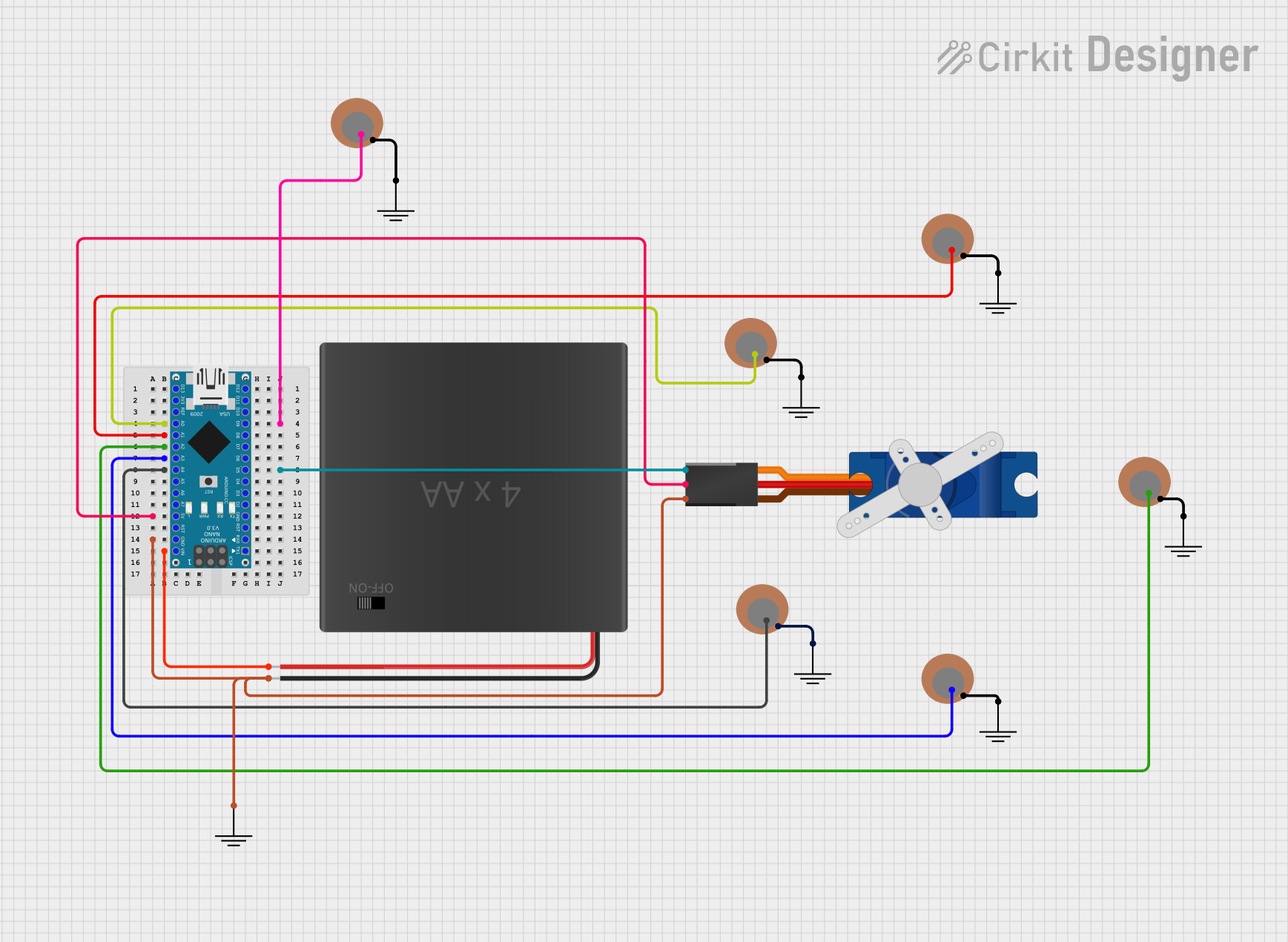
Circuit Documentation
Summary
This circuit integrates an Arduino Nano microcontroller with multiple Piezo sensors and a Tower Pro SG90 servo motor. The Arduino Nano serves as the central processing unit, interfacing with the Piezo sensors to likely detect vibrations or pressure changes. The servo motor is controlled by the Arduino, which provides the signal and power necessary for its operation. The circuit is powered by a 4xAA battery pack, which supplies power to the Arduino Nano and the servo motor.
Component List
Arduino Nano
- Microcontroller board based on the ATmega328P
- It has a variety of digital and analog I/O pins
- Can be powered via USB or an external power source
Piezo Sensors (Multiple Instances)
- Electronic devices that can measure vibration, pressure, or force by converting mechanical energy into electrical energy
- Typically used for sensing when a device is tapped or for generating sound
4xAA Battery Pack
- Provides a power source for the circuit
- Typically outputs 6V when fresh (4 x 1.5V AA batteries)
Tower Pro SG90 Servo
- A small and lightweight servo motor
- Used for precise control of mechanical movement
Ground (GND) Components (Multiple Instances)
- Reference points for the circuit's common ground potential
Wiring Details
Arduino Nano
A0connected to Piezo Sensor (+)D9connected to Piezo Sensor (+)A1connected to Piezo Sensor (+)A2connected to Piezo Sensor (+)A3connected to Piezo Sensor (+)A4connected to Piezo Sensor (+)D5connected to Tower Pro SG90 servo (Signal)5Vconnected to Tower Pro SG90 servo (+5V)GNDconnected to Tower Pro SG90 servo (GND) and 4xAA battery pack (NEG)VINconnected to 4xAA battery pack (POS)
Piezo Sensors
+pin connected to respective Arduino Nano analog input pins (A0,D9,A1,A2,A3,A4)-pin connected to Ground (GND)
Tower Pro SG90 Servo
Signalpin connected to Arduino Nano (D5)+5Vpin connected to Arduino Nano (5V)GNDpin connected to Arduino Nano (GND)
4xAA Battery Pack
POSconnected to Arduino Nano (VIN)NEGconnected to Arduino Nano (GND)
Documented Code
Arduino Nano Code (sketch.ino)
void setup() {
  // put your setup code here, to run once:

}

void loop() {
  // put your main code here, to run repeatedly:

}
Additional Notes (documentation.txt)
No additional code documentation was provided.