
Arduino Mega 2560-Based Water Quality Monitoring System with LCD Display and Buzzer Alert
View and Edit Project In Cirkit Designer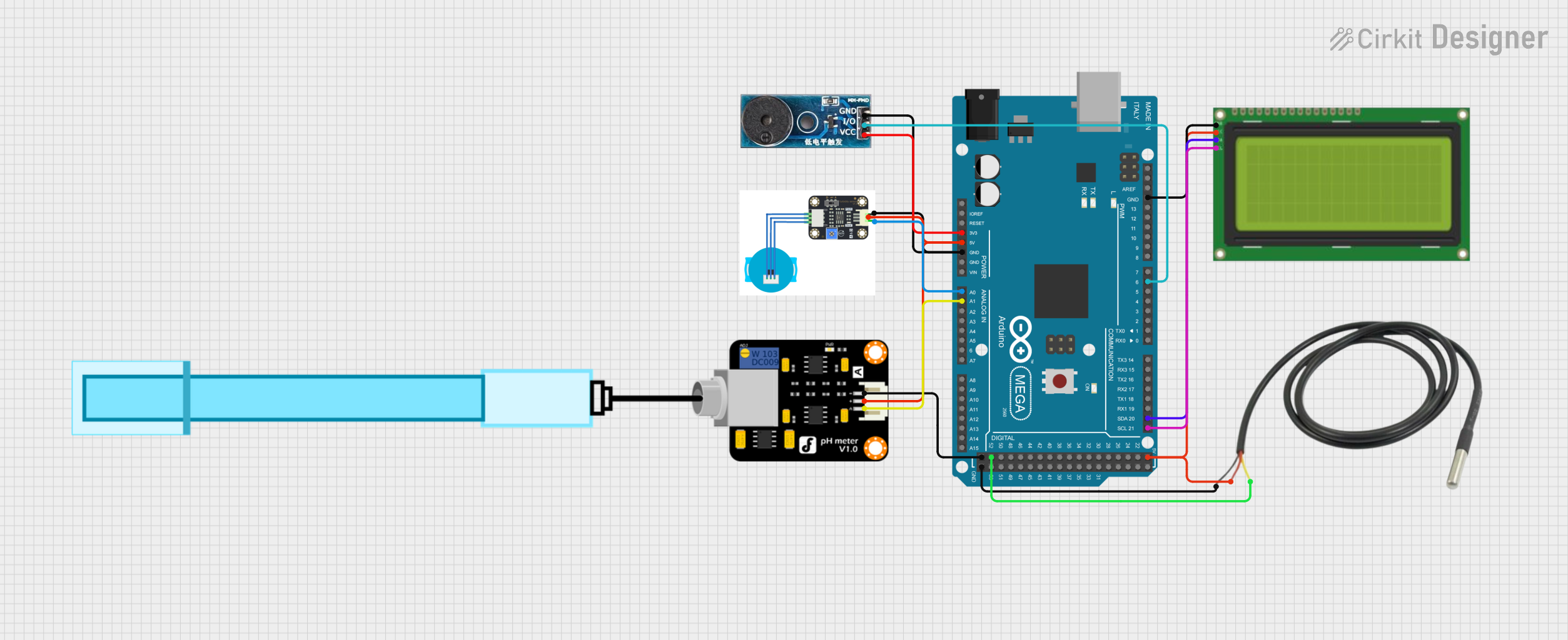
Circuit Documentation
Summary
This circuit is designed to monitor water quality by measuring pH, turbidity, and temperature. It uses an Arduino Mega 2560 microcontroller to read sensor data and display the results on an LCD screen. Additionally, a buzzer is used to alert when the pH or turbidity levels are out of the normal range.
Component List
Turbidity Sensor
- Pins: GND, IN, VCC
- Description: Measures the turbidity (cloudiness) of the water.
- Purpose: Provides turbidity data to the microcontroller.
PH Meter
- Pins: Signal, VCC, GND
- Description: Measures the pH level of the water.
- Purpose: Provides pH data to the microcontroller.
Temperature Sensor
- Pins: Temp GND Black, Temp VDD Red, Temp DQ Data Yellow
- Description: Measures the temperature of the water.
- Purpose: Provides temperature data to the microcontroller.
LCD 20x4 I2C
- Pins: GND, 5V, SCA, SCL
- Description: Displays the water quality data.
- Purpose: Provides a visual interface for the user.
Buzzer Module
- Pins: GND, VCC, I/O
- Description: Emits sound to alert the user.
- Purpose: Alerts the user when pH or turbidity levels are abnormal.
Arduino Mega 2560
- Pins: IOREF, RESET, 3V3, 5V, GND, VIN, A0-A15, D0-D53, SDA, SCL, AREF
- Description: Microcontroller that processes sensor data and controls the LCD and buzzer.
- Purpose: Central processing unit of the circuit.
Wiring Details
Turbidity Sensor
- GND connected to Arduino Mega 2560 GND
- IN connected to Arduino Mega 2560 A0
- VCC connected to Arduino Mega 2560 5V
PH Meter
- Signal connected to Arduino Mega 2560 A1
- VCC connected to Arduino Mega 2560 5V
- GND connected to Arduino Mega 2560 GND
Temperature Sensor
- Temp GND Black connected to Arduino Mega 2560 GND
- Temp VDD Red connected to Arduino Mega 2560 5V
- Temp DQ Data Yellow connected to Arduino Mega 2560 D52
LCD 20x4 I2C
- GND connected to Arduino Mega 2560 GND
- 5V connected to Arduino Mega 2560 5V
- SCA connected to Arduino Mega 2560 D20/SDA
- SCL connected to Arduino Mega 2560 D21/SCL
Buzzer Module
- GND connected to Arduino Mega 2560 GND
- VCC connected to Arduino Mega 2560 3V3
- I/O connected to Arduino Mega 2560 D6 PWM
Documented Code
#include <Wire.h>
#include <LiquidCrystal_I2C.h>
#include <OneWire.h>
#include <DallasTemperature.h>

#define PH_PIN A0        // Pin untuk sensor pH
#define TURBIDITY_PIN A1 // Pin untuk sensor kekeruhan
#define DS18B20_PIN 52    // Pin untuk sensor DS18B20
#define BUZZER_PIN 6     // Pin untuk buzzer

LiquidCrystal_I2C lcd(0x27, 20, 4); // Alamat I2C untuk LCD
OneWire oneWire(DS18B20_PIN);
DallasTemperature sensors(&oneWire);

void setup() {
  pinMode(BUZZER_PIN, OUTPUT); // Set pin buzzer sebagai output
  lcd.init(); // Inisialisasi LCD
  lcd.backlight(); // Hidupkan lampu latar LCD
  sensors.begin(); // Inisialisasi sensor DS18B20
}

void loop() {
  float phValue = analogRead(PH_PIN) * (5.0 / 1023.0); // Membaca nilai pH
  float turbidityValue = analogRead(TURBIDITY_PIN) * (5.0 / 1023.0); // Membaca nilai kekeruhan
  sensors.requestTemperatures(); // Meminta pembacaan suhu
  float temperature = sensors.getTempCByIndex(0); // Membaca suhu

  lcd.clear();
  lcd.setCursor(0, 0);
  lcd.print("Water Quality");
  lcd.setCursor(0, 1);
  lcd.print("pH: ");
  lcd.print(phValue);
  lcd.setCursor(10, 1);
  lcd.print("Turbidity: ");
  lcd.print(turbidityValue);
  lcd.setCursor(0, 2);
  lcd.print("Temp: ");
  lcd.print(temperature);
  lcd.print(" C");

  // Cek pH
  if (phValue < 6.5 || phValue > 8.5) { // pH asam atau basa
    lcd.setCursor(0, 3);
    lcd.print("pH tidak normal  ");
    activateBuzzer();
  }

  // Cek Kekeruhan
  if (turbidityValue > 2.0) { // Misalkan 2.0 adalah batas kekeruhan
    lcd.setCursor(0, 3);
    lcd.print("Kekeruhan tinggi  ");
    activateBuzzer();
  }

  delay(1000); // Delay untuk pembacaan berikutnya
}

void activateBuzzer() {
  digitalWrite(BUZZER_PIN, HIGH); // Nyalakan buzzer
  delay(15000); // Tunggu selama 15 detik
  digitalWrite(BUZZER_PIN, LOW); // Matikan buzzer
}
This code initializes the sensors and LCD, reads the sensor data, and displays it on the LCD. If the pH or turbidity levels are out of the normal range, the buzzer is activated to alert the user.