
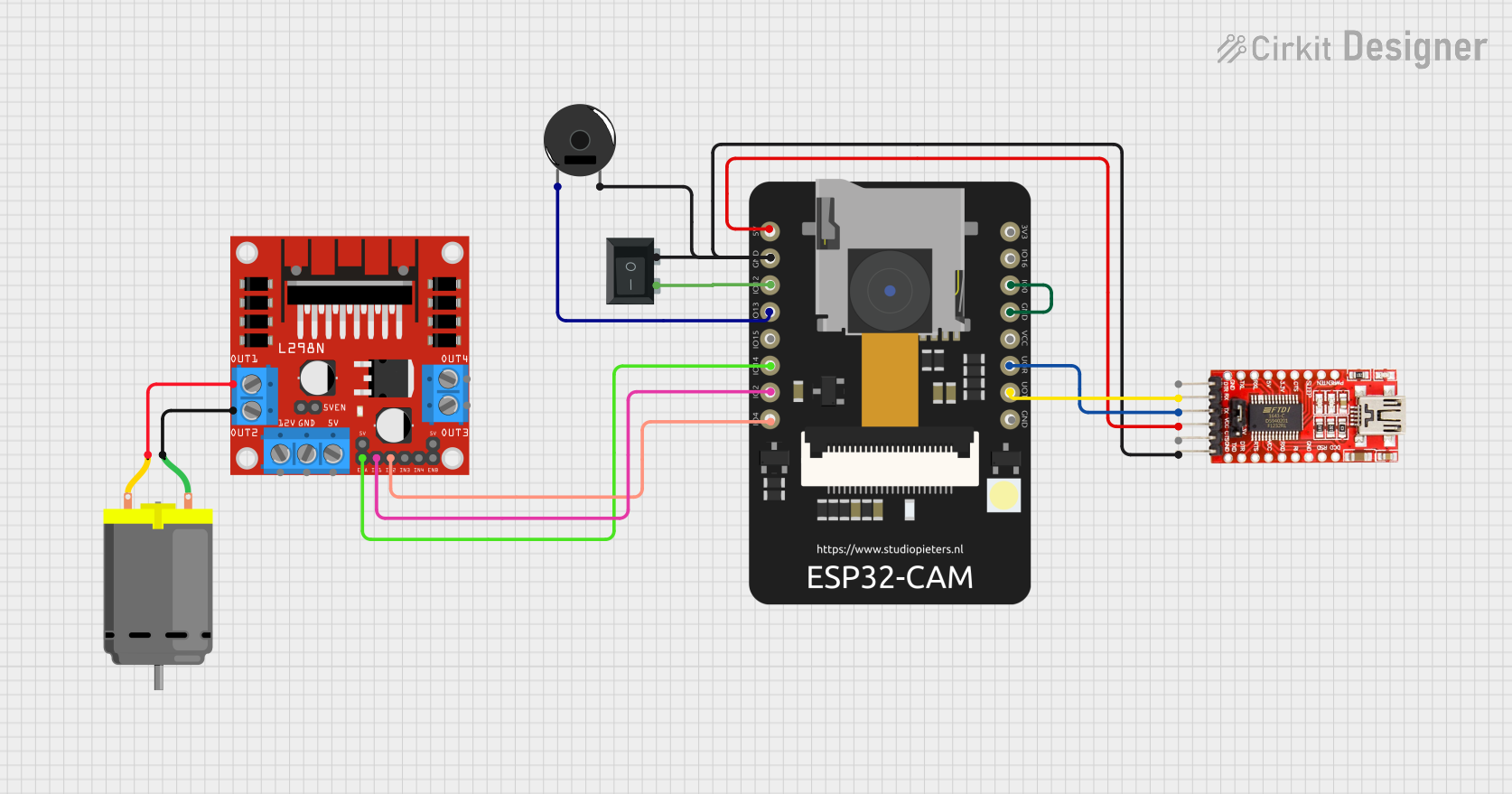
Circuit Documentation
Summary
This circuit involves an ESP32 CAM module, an FTDI Programmer, a DC Motor, an L298N DC motor driver, a Piezo Buzzer, and a Rocker Switch (SPST). The ESP32 CAM is used for capturing and streaming video, while the FTDI Programmer is used for programming the ESP32 CAM. The L298N motor driver controls the DC Motor, and the Piezo Buzzer provides audio feedback. The Rocker Switch is used to control the power to the ESP32 CAM.
Component List
ESP32 CAM
- Description: A low-cost microcontroller with an integrated camera module.
- Pins: 5V, GND, GPIO12, GPIO13, GPIO15, GPIO14, GPIO2, GPIO4, 3.3V, GPIO16, GPIO0, 3.3V / 5V / P_OUT, GPIO3 / RX, GPIO1 / TX
FTDI Programmer
- Description: A USB-to-serial converter used for programming microcontrollers.
- Pins: DTR, RX, TX, VCC, CTS, GND
DC Motor
- Description: A simple DC motor.
- Pins: pin 1, pin 2
L298N DC Motor Driver
- Description: A dual H-bridge motor driver that can control the speed and direction of two DC motors.
- Pins: OUT1, OUT2, 12V, GND, 5V, OUT3, OUT4, 5V-ENA-JMP-I, 5V-ENA-JMP-O, +5V-J1, +5V-J2, ENA, IN1, IN2, IN3, IN4, ENB
Piezo Buzzer
- Description: A simple piezoelectric buzzer for audio feedback.
- Pins: pin 1, pin 2
Rocker Switch (SPST)
- Description: A single-pole single-throw switch used to control the power to the ESP32 CAM.
- Pins: 1, 2
Wiring Details
ESP32 CAM
- 5V: Connected to VCC of FTDI Programmer
- GND: Connected to GND of FTDI Programmer, pin 2 of Piezo Buzzer, pin 1 of Rocker Switch
- GPIO12: Connected to pin 2 of Rocker Switch
- GPIO13: Connected to pin 1 of Piezo Buzzer
- GPIO14: Connected to ENA of L298N DC Motor Driver
- GPIO2: Connected to IN1 of L298N DC Motor Driver
- GPIO4: Connected to IN2 of L298N DC Motor Driver
- GPIO0: Connected to GND of ESP32 CAM
- GPIO3 / RX: Connected to TX of FTDI Programmer
- GPIO1 / TX: Connected to RX of FTDI Programmer
FTDI Programmer
- VCC: Connected to 5V of ESP32 CAM
- GND: Connected to GND of ESP32 CAM, pin 2 of Piezo Buzzer, pin 1 of Rocker Switch
- TX: Connected to GPIO3 / RX of ESP32 CAM
- RX: Connected to GPIO1 / TX of ESP32 CAM
DC Motor
- pin 1: Connected to OUT2 of L298N DC Motor Driver
- pin 2: Connected to OUT1 of L298N DC Motor Driver
L298N DC Motor Driver
- ENA: Connected to GPIO14 of ESP32 CAM
- IN1: Connected to GPIO2 of ESP32 CAM
- IN2: Connected to GPIO4 of ESP32 CAM
- OUT1: Connected to pin 2 of DC Motor
- OUT2: Connected to pin 1 of DC Motor
Piezo Buzzer
- pin 1: Connected to GPIO13 of ESP32 CAM
- pin 2: Connected to GND of FTDI Programmer, GND of ESP32 CAM, pin 1 of Rocker Switch
Rocker Switch (SPST)
- 1: Connected to GND of FTDI Programmer, GND of ESP32 CAM, pin 2 of Piezo Buzzer
- 2: Connected to GPIO12 of ESP32 CAM
Code Documentation
ESP32 CAM Code
#include "src/OV2640.h"
#include <WiFi.h>
#include <WebServer.h>
#include <WiFiClient.h>

// Select camera model
//#define CAMERA_MODEL_WROVER_KIT
#define CAMERA_MODEL_ESP_EYE
//#define CAMERA_MODEL_M5STACK_PSRAM
//#define CAMERA_MODEL_M5STACK_WIDE
//#define CAMERA_MODEL_AI_THINKER

#include "camera_pins.h"

#define SSID1 "ssid"
#define PWD1 "password"

OV2640 cam;

WebServer server(80);

const char HEADER[] = "HTTP/1.1 200 OK\r\n" \
                      "Access-Control-Allow-Origin: *\r\n" \
                      "Content-Type: multipart/x-mixed-replace; boundary=123456789000000000000987654321\r\n";
const char BOUNDARY[] = "\r\n--123456789000000000000987654321\r\n";
const char CTNTTYPE[] = "Content-Type: image/jpeg\r\nContent-Length: ";
const int hdrLen = strlen(HEADER);
const int bdrLen = strlen(BOUNDARY);
const int cntLen = strlen(CTNTTYPE);

void handle_jpg_stream(void)
{
  char buf[32];
  int s;

  WiFiClient client = server.client();

  client.write(HEADER, hdrLen);
  client.write(BOUNDARY, bdrLen);

  while (true)
  {
    if (!client.connected()) break;
    cam.run();
    s = cam.getSize();
    client.write(CTNTTYPE, cntLen);
    sprintf( buf, "%d\r\n\r\n", s );
    client.write(buf, strlen(buf));
    client.write((char *)cam.getfb(), s);
    client.write(BOUNDARY, bdrLen);
  }
}

const char JHEADER[] = "HTTP/1.1 200 OK\r\n" \
                       "Content-disposition: inline; filename=capture.jpg\r\n" \
                       "Content-type: image/jpeg\r\n\r\n";
const int jhdLen = strlen(JHEADER);

void handle_jpg(void)
{
  WiFiClient client = server.client();

  cam.run();
  if (!client.connected()) return;

  client.write(JHEADER, jhdLen);
  client.write((char *)cam.getfb(), cam.getSize());
}

void handleNotFound()
{
  String message = "Server is running!\n\n";
  message += "URI: ";
  message += server.uri();
  message += "\nMethod: ";
  message += (server.method() == HTTP_GET) ? "GET" : "POST";
  message += "\nArguments: ";
  message += server.args();
  message += "\n";
  server.send(200, "text / plain", message);
}

void setup()
{
  Serial.begin(115200);
  //while (!Serial);            //wait for serial connection.

  camera_config_t config;
  config.ledc_channel = LEDC_CHANNEL_0;
  config.ledc_timer = LEDC_TIMER_0;
  config.pin_d0 = Y2_GPIO_NUM;
  config.pin_d1 = Y3_GPIO_NUM;
  config.pin_d2 = Y4_GPIO_NUM;
  config.pin_d3 = Y5_GPIO_NUM;
  config.pin_d4 = Y6_GPIO_NUM;
  config.pin_d5 = Y7_GPIO_NUM;
  config.pin_d6 = Y8_GPIO_NUM;
  config.pin_d7 = Y9_GPIO_NUM;
  config.pin_xclk = XCLK_GPIO_NUM;
  config.pin_pclk = PCLK_GPIO_NUM;
  config.pin_vsync = VSYNC_GPIO_NUM;
  config.pin_href = HREF_GPIO_NUM;
  config.pin_sscb_sda = SIOD_GPIO_NUM;
  config.pin_sscb_scl = SIOC_GPIO_NUM;
  config.pin_pwdn = PWDN_GPIO_NUM;
  config.pin_reset = RESET_GPIO_NUM;
  config.xclk_freq_hz = 20000000;
  config.pixel_format = PIXFORMAT_JPEG;

  // Frame parameters
  //  config.frame_size = FRAMESIZE_UXGA;
  config.frame_size = FRAMESIZE_QVGA;
  config.jpeg_quality = 12;
  config.fb_count = 2;

#if defined(CAMERA_MODEL_ESP_EYE)
  pinMode(13, INPUT_PULLUP);
  pinMode(14, INPUT_PULLUP);
#endif

  cam.init(config);

  IPAddress ip;

  WiFi.mode(WIFI_STA);
  WiFi.begin(SSID1, PWD1);
  while (WiFi.status() != WL_CONNECTED)
  {
    delay(500);
    Serial.print(F("."));
  }
  ip = WiFi.localIP();
  Serial.println(F("WiFi connected"));
  Serial.println("");
  Serial.println(ip);
  Serial.print("Stream Link: http://");
  Serial.print(ip);
  Serial.println("/mjpeg/1");
  server.on("/mjpeg/