
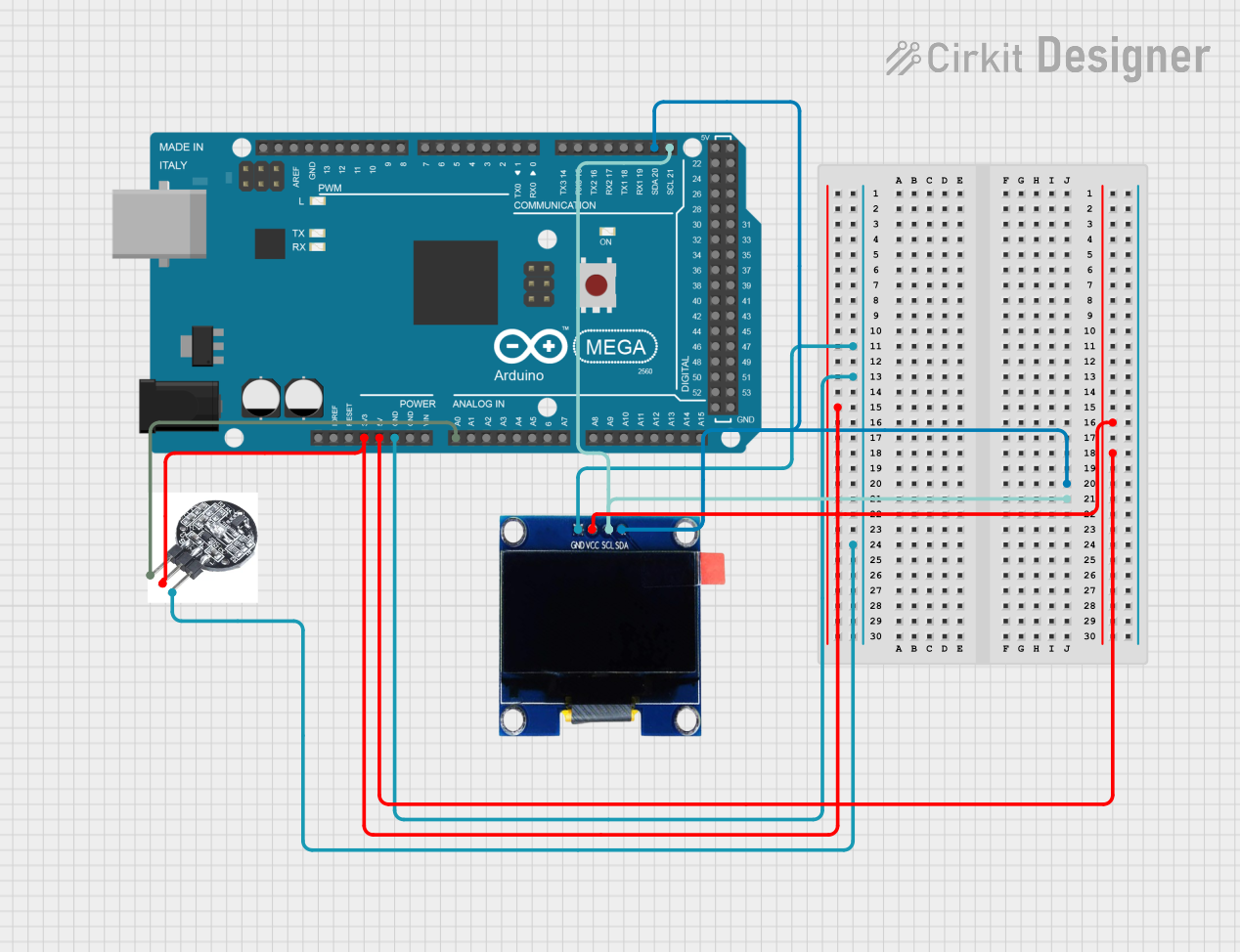
Circuit Documentation
Summary
This circuit is designed to monitor heart rate using a heartbeat sensor and display the pulse waveform and BPM (beats per minute) on a 1.3" OLED display. The circuit is controlled by an Arduino Mega 2560 microcontroller, which reads the sensor data, processes it, and updates the display accordingly.
Component List
Arduino Mega 2560
- Description: A microcontroller board based on the ATmega2560.
- Pins: IOREF, RESET, 3V3, 5V, GND, VIN, A0-A15, D21/SCL, D20/SDA, D19/RX1, D18/TX1, D17 PWM/RX2, D16 PWM/TX2, D15/RX3, D14/TX3, D0 RX0, D1 TX0, D2 PWM, D3 PWM, D4 PWM, D5 PWM, D6 PWM, D7 PWM, D8 PWM, D9 PWM, D10 PWM, D11 PWM, D12 PWM, D13 PWM, AREF, SDA, SCL, D52, D50, D48, D46, D44, D42, D40, D38, D36, D34, D32, D30, D28, D26, D24, D22, D53, D51, D49, D47, D45, D43, D41, D39, D37, D35, D33, D31, D29, D27, D25, D23.
OLED 1.3" Display
- Description: A 1.3-inch OLED display module.
- Pins: GND, VCC, SCL, SDA.
Heartbeat Sensor
- Description: A sensor module for detecting heartbeats.
- Pins: S, VCC, GND.
Wiring Details
Arduino Mega 2560
- 3V3: Connected to VCC of the Heartbeat Sensor.
- 5V: Connected to VCC of the OLED Display.
- GND: Connected to GND of both the OLED Display and the Heartbeat Sensor.
- A0: Connected to S of the Heartbeat Sensor.
- D21/SCL: Connected to SCL of the OLED Display.
- D20/SDA: Connected to SDA of the OLED Display.
OLED 1.3" Display
- GND: Connected to GND of the Arduino Mega 2560.
- VCC: Connected to 5V of the Arduino Mega 2560.
- SCL: Connected to D21/SCL of the Arduino Mega 2560.
- SDA: Connected to D20/SDA of the Arduino Mega 2560.
Heartbeat Sensor
- S: Connected to A0 of the Arduino Mega 2560.
- VCC: Connected to 3V3 of the Arduino Mega 2560.
- GND: Connected to GND of the Arduino Mega 2560.
Code Documentation
Arduino Code
#include <SPI.h>
#include <Wire.h>
#include <Adafruit_GFX.h>
#include <Adafruit_SSD1306.h>

// Create the OLED display object
Adafruit_SSD1306 display(128, 64, &Wire, -1);

// Define the sensor pin
#define sensor A0
#define HIGH_PULSE_THRESHOLD 540  // Adjust this threshold for your sensor

// Define variables for pulse and BPM calculation
int pulseValue;
long lastPulseTime = 0;
long pulseInterval = 0;
int pulseCount = 0;
int bpm = 0;

// Define variables for drawing the pulse wave on OLED
int x = 0;  // Position of the next data point
int lastX = 0;
int lastY = 0;

void setup() {
  // Start Serial communication for debugging
  Serial.begin(9600);

  // Initialize the OLED display
  if (!display.begin(SSD1306_SWITCHCAPVCC, 0x3C)) {  // Use the I2C address 0x3C for 128x64 OLED
    Serial.println(F("OLED display not detected!"));
    while (true);  // Stop execution if display is not found
  }

  display.clearDisplay();  // Clear any previous data on the screen
  display.setTextColor(SSD1306_WHITE);  // Set the text color to white
  display.setTextSize(2);  // Set the text size
}

void loop() {
  pulseValue = analogRead(sensor);  // Read the heart pulse sensor

  // Map the sensor value to a range suitable for displaying a graph
  int mappedValue = map(pulseValue, 0, 1024, 0, 45);
  int y = 60 - mappedValue;  // Set the y-coordinate based on the mapped sensor value

  // Draw the pulse graph on the OLED
  if (x > 128) {
    x = 0;  // Reset to the beginning if the display width is exceeded
    display.clearDisplay();  // Clear the display
  }

  // Draw a line from the last point to the new point
  display.drawLine(lastX, lastY, x, y, WHITE);
  lastX = x;
  lastY = y;
  x++;

  // Check if a pulse has been detected
  if (pulseValue > HIGH_PULSE_THRESHOLD) {
    if (millis() - lastPulseTime > 1000) {  // Debounce the pulse detection
      lastPulseTime = millis();
      pulseCount++;  // Increment pulse count
    }
  }

  // Calculate BPM every second (or update at your desired interval)
  if (millis() - lastPulseTime >= 1000) {  // Update BPM every second
    bpm = pulseCount * 60;  // Calculate BPM based on pulse count in the last second
    pulseCount = 0;  // Reset pulse count after each calculation
  }

  // Display the BPM on the OLED
  display.setCursor(0, 0);
  display.print("BPM: ");
  display.setTextSize(2);  // Larger text for BPM
  display.print(bpm);  // Show the calculated BPM
  display.display();  // Refresh the display

  delay(100);  // Add a small delay to prevent excessive updates
}
This code initializes the OLED display and reads the heartbeat sensor data. It maps the sensor values to a range suitable for displaying a graph on the OLED. The code also calculates the BPM and displays it on the OLED screen.