
ESP32-Based Weather Station with DHT22, BMP180, and I2C LCD Display
View and Edit Project In Cirkit Designer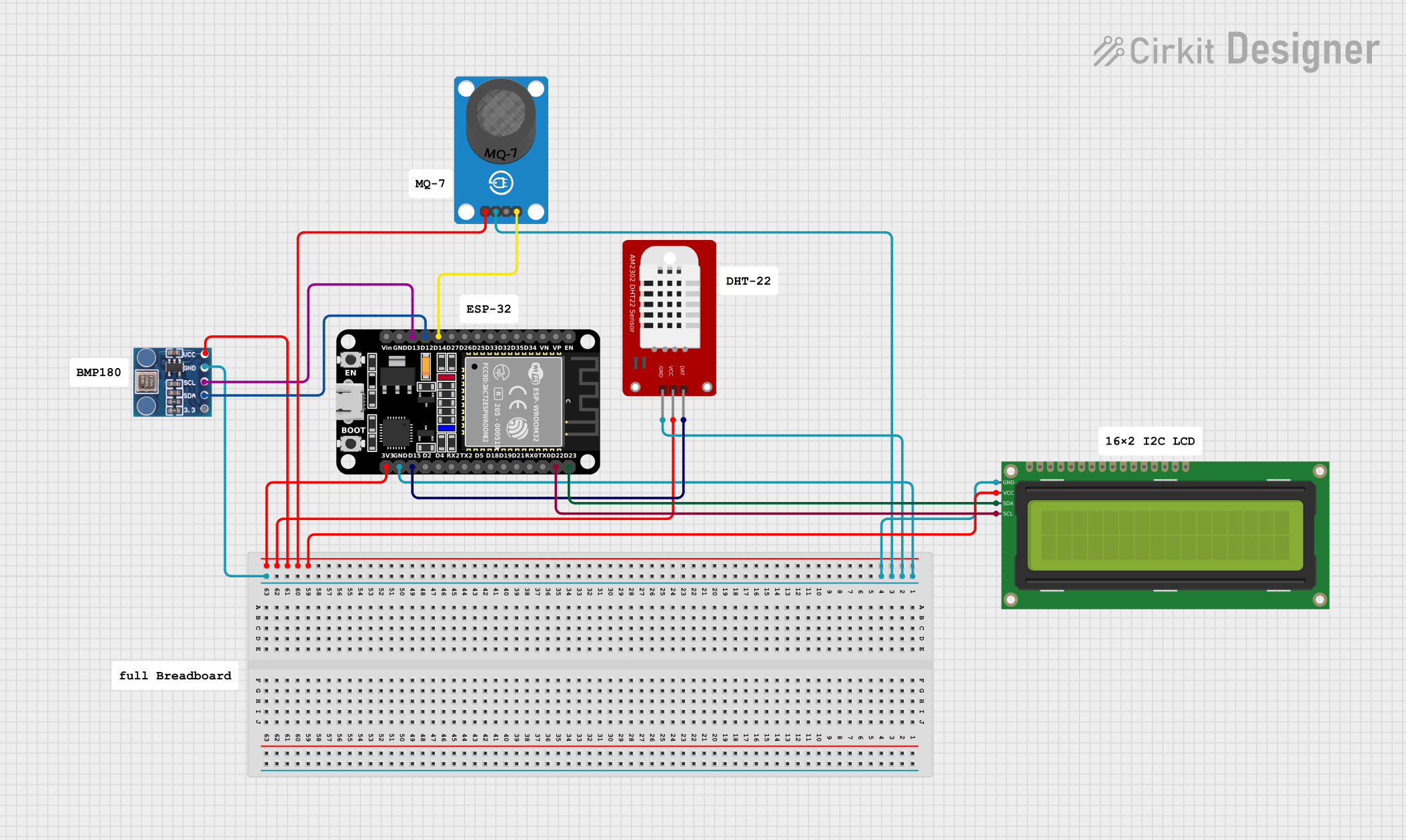
Circuit Documentation
Summary
This circuit is designed to interface an ESP32 microcontroller with various sensors and a display. The sensors include a DHT22 for temperature and humidity, a BMP180 for pressure, and an MQ-7 for gas detection. The data from these sensors is displayed on a 16x2 I2C LCD. The ESP32 reads data from the sensors and updates the display accordingly.
Component List
ESP32 (30 pin)
- Description: A powerful microcontroller with built-in Wi-Fi and Bluetooth capabilities.
- Pins: EN, VP, VN, D34, D35, D32, D33, D25, D26, D27, D14, D12, D13, GND, Vin, D23, D22, TX0, RX0, D21, D19, D18, D5, TX2, RX2, D4, D2, D15, 3V3
DHT22
- Description: A digital temperature and humidity sensor.
- Pins: GND, VCC, DAT
BMP180
- Description: A digital barometric pressure sensor.
- Pins: 3.3, SDA, SCL, GND, VCC
MQ-7 Breakout
- Description: A carbon monoxide gas sensor.
- Pins: VCC, GND, DO, AO
16x2 I2C LCD
- Description: A 16x2 character LCD with I2C interface.
- Pins: GND, VCC, SDA, SCL
Wiring Details
ESP32 (30 pin)
- GND: Connected to GND of DHT22, MQ-7 Breakout, 16x2 I2C LCD, and BMP180.
- 3V3: Connected to VCC of DHT22, MQ-7 Breakout, 16x2 I2C LCD, and BMP180.
- D14: Connected to AO of MQ-7 Breakout.
- D12: Connected to SDA of BMP180.
- D13: Connected to SCL of BMP180.
- D23: Connected to SDA of 16x2 I2C LCD.
- D22: Connected to SCL of 16x2 I2C LCD.
- D15: Connected to DAT of DHT22.
DHT22
- GND: Connected to GND of ESP32.
- VCC: Connected to 3V3 of ESP32.
- DAT: Connected to D15 of ESP32.
BMP180
- GND: Connected to GND of ESP32.
- VCC: Connected to 3V3 of ESP32.
- SDA: Connected to D12 of ESP32.
- SCL: Connected to D13 of ESP32.
MQ-7 Breakout
- GND: Connected to GND of ESP32.
- VCC: Connected to 3V3 of ESP32.
- AO: Connected to D14 of ESP32.
16x2 I2C LCD
- GND: Connected to GND of ESP32.
- VCC: Connected to 3V3 of ESP32.
- SDA: Connected to D23 of ESP32.
- SCL: Connected to D22 of ESP32.
Code Documentation
#include <DHT.h>
#include <Wire.h>
#include <Adafruit_Sensor.h>
#include <Adafruit_BMP280.h>
#include <LiquidCrystal_I2C.h>

#define DHTPIN D15    // Pin for DHT22 sensor
#define DHTTYPE DHT22   // Sensor type

DHT dht(DHTPIN, DHTTYPE);
Adafruit_BMP280 bmp; // I2C
LiquidCrystal_I2C lcd(0x27, 16, 2); // 16x2 LCD

void setup() {
  Serial.begin(9600);
  dht.begin();
  bmp.begin();
  lcd.begin();
  lcd.backlight();
}

void loop() {
  // Reading from DHT22
  float temperature = dht.readTemperature();
  float humidity = dht.readHumidity();

  // Reading from BMP280
  float pressure = bmp.readPressure() / 100.0F; // Convert pressure to hPa

  // Display on LCD
  lcd.clear();
  lcd.setCursor(0, 0);
  lcd.print("Temp: ");
  lcd.print(temperature);
  lcd.print(" C");

  lcd.setCursor(0, 1);
  lcd.print("Humidity: ");
  lcd.print(humidity);
  lcd.print(" %");

  delay(2000);  // Wait for 2 seconds
}
This code initializes the DHT22, BMP180, and 16x2 I2C LCD in the setup() function. In the loop() function, it reads temperature and humidity from the DHT22, pressure from the BMP180, and displays the temperature and humidity on the LCD. The loop runs every 2 seconds.