
Arduino UNO-Based Water Flow Meter with LCD Display and Flow Rate Sensor
View and Edit Project In Cirkit Designer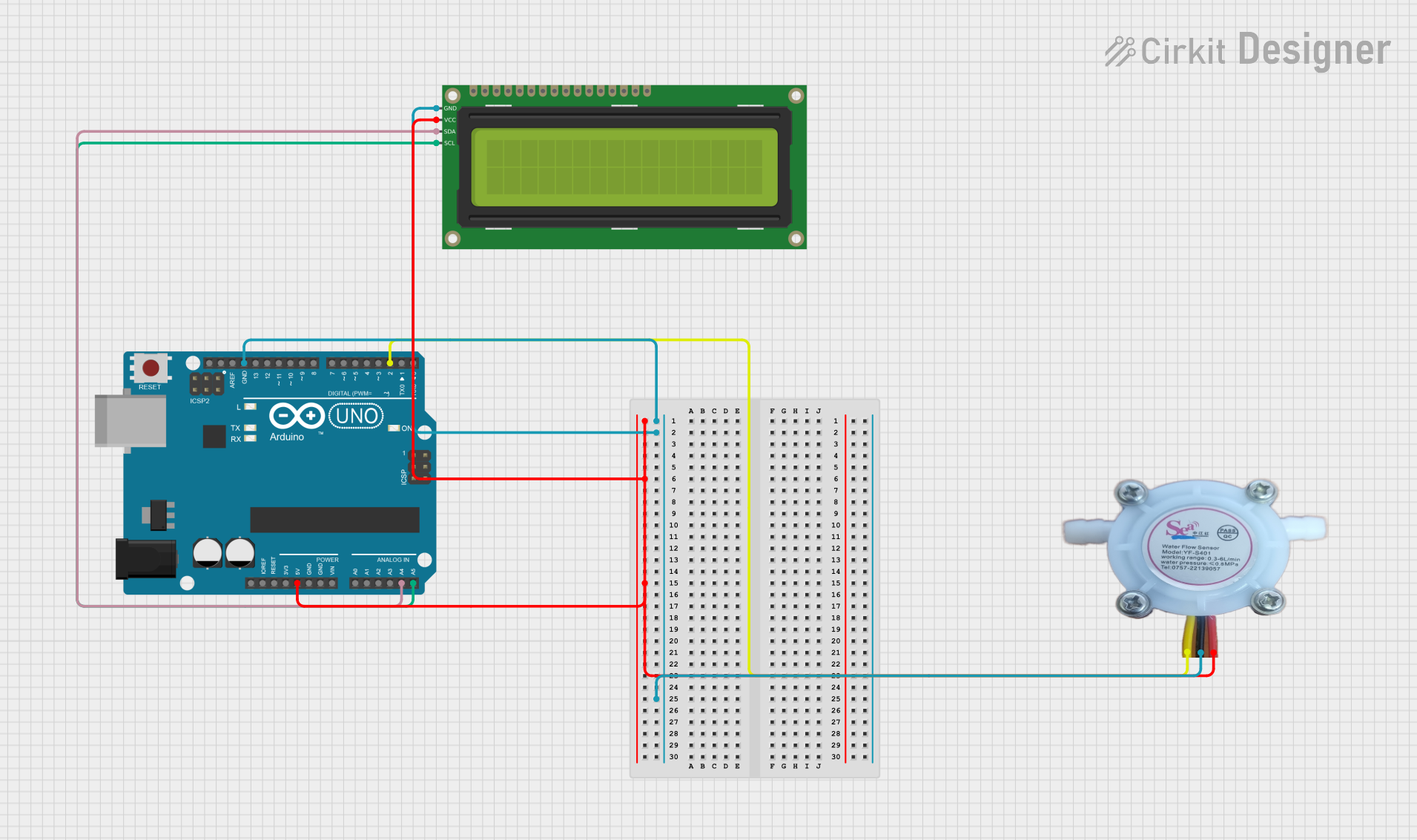
Circuit Documentation
Summary
This circuit is designed to measure and display the water flow rate using a Water Flow Rate Sensor YF-S401 and a 16x2 I2C LCD. The Arduino UNO microcontroller is used to process the sensor data and control the display. The system also includes a buzzer and LEDs to provide alerts based on the flow rate.
Component List
Arduino UNO
- Description: A microcontroller board based on the ATmega328P.
- Pins: UNUSED, IOREF, Reset, 3.3V, 5V, GND, Vin, A0, A1, A2, A3, A4, A5, SCL, SDA, AREF, D13, D12, D11, D10, D9, D8, D7, D6, D5, D4, D3, D2, D1, D0
Water Flow Rate Sensor YF-S401
- Description: A sensor used to measure the flow rate of water.
- Pins: GND negative, IN positive, OUT signal output
16x2 I2C LCD
- Description: A 16x2 character LCD with I2C interface.
- Pins: GND, VCC, SDA, SCL
Wiring Details
Arduino UNO
- 5V: Connected to VCC of the 16x2 I2C LCD and IN positive of the Water Flow Rate Sensor YF-S401
- GND: Connected to GND of the 16x2 I2C LCD and GND negative of the Water Flow Rate Sensor YF-S401
- A4: Connected to SDA of the 16x2 I2C LCD
- A5: Connected to SCL of the 16x2 I2C LCD
- D2: Connected to OUT signal output of the Water Flow Rate Sensor YF-S401
Water Flow Rate Sensor YF-S401
- GND negative: Connected to GND of the Arduino UNO
- IN positive: Connected to 5V of the Arduino UNO
- OUT signal output: Connected to D2 of the Arduino UNO
16x2 I2C LCD
- GND: Connected to GND of the Arduino UNO
- VCC: Connected to 5V of the Arduino UNO
- SDA: Connected to A4 of the Arduino UNO
- SCL: Connected to A5 of the Arduino UNO
Code Documentation
#define buzzer A2
#include <LiquidCrystal_I2C.h>
#include <Keypad.h>
#define ledg A1
#define ledr A0

volatile int flow_frequency; // Measures flow sensor pulses
float vol = 0.0, l_minute;
unsigned char flowsensor = 2; // Sensor Input
float fvol; // Flow volume in liters
float limitValue = 0.0; // Limit value entered from keypad
float flowRate;

unsigned long currentTime;
unsigned long cloopTime;

LiquidCrystal_I2C lcd(0x27, 16, 2);

const byte ROWS = 4; // Four rows
const byte COLS = 4; // Three columns

char keys[ROWS][COLS] = {
  {'1', '2', '3', 'A'},     // D - Enter, C - Unused, B - Backspace
  {'4', '5', '6', 'B'},
  {'7', '8', '9', 'C'},
  {'*', '0', '#', 'D'}      // * - Decimal Point
};

byte rowPins[ROWS] = {13, 12, 11, 10};
byte colPins[COLS] = {9, 8, 7, 6};

Keypad keypad = Keypad(makeKeymap(keys), rowPins, colPins, ROWS, COLS);
String input = ""; // Variable to store input as it is typed
bool monitoring = true; // Flag to control operation

void flow() {
  flow_frequency++;
} // Interrupt function for flow sensor

void setup() {
  pinMode(flowsensor, INPUT);
  pinMode(buzzer, OUTPUT);
  pinMode(ledg, OUTPUT);
  pinMode(ledr, OUTPUT);

  digitalWrite(flowsensor, HIGH); // Optional Internal Pull-Up
  Serial.begin(9600);

  digitalWrite(ledg, LOW);
  digitalWrite(ledr, LOW);

  attachInterrupt(digitalPinToInterrupt(flowsensor), flow, RISING); // Setup Interrupt
  lcd.init();
  lcd.backlight();

  lcd.setCursor(3, 0);
  lcd.print("WELCOME TO");
  lcd.setCursor(0, 1);
  lcd.print("WATER FLOW METER");
  delay(3000);
  lcd.clear();

  lcd.setCursor(0, 0);
  lcd.print("Press C for");
  lcd.setCursor(0, 1);
  lcd.print("Limit 0.5 L");
  delay(2000);
  lcd.clear();

  // Check if the user presses 'C' at the start
  lcd.setCursor(0, 0);
  lcd.print("Set Limit:");
  lcd.setCursor(0, 1);
  lcd.print("Press 'C'...");

  while (true) {
    char key = keypad.getKey();
    if (key == 'C') {
      limitValue = 0.5; // Set limit to 0.5
      lcd.clear();
      lcd.setCursor(0, 0);
      lcd.print("Limit Set To:");
      lcd.setCursor(0, 1);
      lcd.print("0.5 L");
      delay(2000);
      lcd.clear();
      lcd.setCursor(0, 0);
      lcd.print("Monitoring...");
      break;
    } else if (key == 'D') { // Proceed to set custom limit
      setLimitPrompt();
      break;
    }
  }
}

void loop() {
  char key = keypad.getKey();

  if (key) {
    if (monitoring) {
      handleMonitoringKey(key);
    } else {
      handlePostLimitKey(key);
    }
  }

  if (monitoring) {
    checkFlowRate();
  }
}

void handleMonitoringKey(char key) {
  // Handle 'B' for backspace
  if (key == 'B') {
    if (input.length() > 0) {
      input.remove(input.length() - 1); // Remove last character
      updateLCD();
    }
  }
  // Handle 'D' for enter key
  else if (key == 'D') {
    // Convert input to float and store in limitValue as the threshold
    limitValue = input.toFloat();
    lcd.clear();
    lcd.setCursor(0, 0);
    lcd.print("Limit Set To:");
    lcd.setCursor(0, 1);
    lcd.print(limitValue); // Display the entered limit
    Serial.print("Limit value set to: ");
    Serial.println(limitValue); // Debugging output
    delay(2000);
    input = ""; // Clear input buffer
    lcd.clear();
    lcd.setCursor(0, 0);
    lcd.print("Monitoring...");
  }
  // Handle '*' for decimal point
  else if (key == '*') {
    if (input.indexOf('.') == -1) {
      input += '.';
      updateLCD();
    }
  }
  // Handle regular characters
  else {
    input += key;
    updateLCD();
  }
}

void handlePostLimitKey(char key) {
  if (key == '#') {
    lcd.clear();
    lcd.setCursor(0, 0);
    lcd.print("Operation Stopped");
    Serial.println("Operation Stopped"); // Debugging output
    monitoring = false; // Stop further monitoring
  } else if (key == 'A') {
    vol = 0.0; // Reset volume
    fvol = 0.0;
    setLimitPrompt();
    monitoring = true; // Restart monitoring
  }
}

void checkFlowRate() {
  currentTime = millis();
  if (currentTime >= (cloopTime + 1000)) {
    cloopTime = currentTime; // Updates cloopTime
    if (flow_frequency != 0) {
      l_minute = (flow_frequency / 7.5) / 60.0; // L/min to L/sec
      flowRate = l_minute * 1000; // Flow rate in mL/sec

      vol += l_minute; // Accumulate volume in L
      fvol = vol / 10; // Convert to liters if needed

      lcd.clear();
      lcd.setCursor(0, 0);
      lcd.print("Rate:");
      lcd.print(flowRate);
      lcd.print(" mL/S");

      lcd.setCursor(0, 1);
      lcd.print("Vol:");
      lcd.print(fvol);
      lcd.print(" L");

      flow_frequency = 0; // Reset Counter

      Serial.print("Current flow rate: ");
      Serial.println(flowRate);
      Serial.print("Total volume: ");
      Serial.println(fvol);

      // Control LED based on flow
      if (flowRate > 0) {
        digitalWrite(ledg, HIGH);
      } else {
        digital