
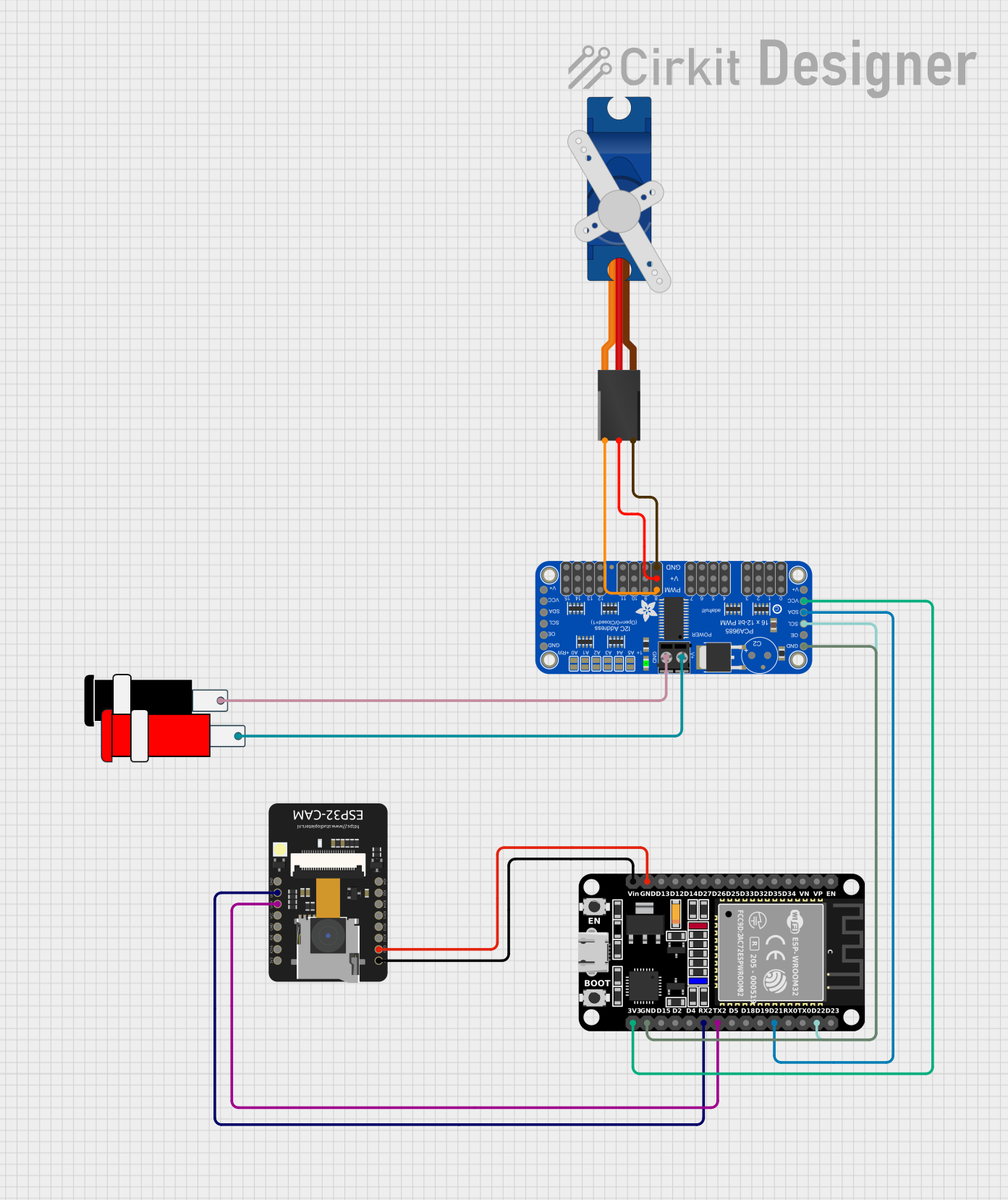
Circuit Documentation
Summary
This circuit is designed to control a servo motor using an ESP32 microcontroller and a PCA9685 PWM servo driver. The ESP32 also connects to an ESP32-CAM module for potential camera functionalities. The system is powered by a 5V power supply and can be controlled via a web interface over Wi-Fi.
Component List
ESP32 (30 pin)
- Description: A versatile microcontroller with Wi-Fi and Bluetooth capabilities.
- Pins: EN, VP, VN, D34, D35, D32, D33, D25, D26, D27, D14, D12, D13, GND, Vin, D23, D22, TX0, RX0, D21, D19, D18, D5, TX2, RX2, D4, D2, D15, 3V3
ESP32 - CAM
- Description: A camera module with an integrated ESP32 microcontroller.
- Pins: 5V, GND, IO12, IO13, IO15, IO14, IO2, IO4, VOT, VOR, VCC, IO0, IO16, 3V3
Adafruit PCA9685 PWM Servo Breakout
- Description: A 16-channel PWM driver for controlling servos and LEDs.
- Pins: 5.0V, GND, PWRIN, PWM7, PWM6, PWM5, PWM4, PWM3, PWM2, PWM1, PWM0, VCC, SDA, SCL, OE, PWM15, PWM14, PWM13, PWM12, PWM11, PWM10, PWM9, PWM8
Connector 5V
- Description: A simple connector for providing 5V power.
- Pins: GND, VCC
Tower Pro SG90 servo
- Description: A small and lightweight servo motor.
- Pins: Signal, +5V, GND
Wiring Details
ESP32 (30 pin)
GND is connected to:
- GND of ESP32 - CAM
- GND of Adafruit PCA9685 PWM Servo Breakout
Vin is connected to:
- 5V of ESP32 - CAM
D22 is connected to:
- SCL of Adafruit PCA9685 PWM Servo Breakout
D21 is connected to:
- SDA of Adafruit PCA9685 PWM Servo Breakout
TX2 is connected to:
- VOR of ESP32 - CAM
RX2 is connected to:
- VOT of ESP32 - CAM
3V3 is connected to:
- VCC of Adafruit PCA9685 PWM Servo Breakout
ESP32 - CAM
GND is connected to:
- GND of ESP32 (30 pin)
5V is connected to:
- Vin of ESP32 (30 pin)
VOR is connected to:
- TX2 of ESP32 (30 pin)
VOT is connected to:
- RX2 of ESP32 (30 pin)
Adafruit PCA9685 PWM Servo Breakout
SCL is connected to:
- D22 of ESP32 (30 pin)
SDA is connected to:
- D21 of ESP32 (30 pin)
GND is connected to:
- GND of ESP32 (30 pin)
- GND of Connector 5V
- GND of Tower Pro SG90 servo
VCC is connected to:
- 3V3 of ESP32 (30 pin)
PWRIN is connected to:
- VCC of Connector 5V
5.0V is connected to:
- +5V of Tower Pro SG90 servo
PWM8 is connected to:
- Signal of Tower Pro SG90 servo
Connector 5V
VCC is connected to:
- PWRIN of Adafruit PCA9685 PWM Servo Breakout
GND is connected to:
- GND of Adafruit PCA9685 PWM Servo Breakout
Tower Pro SG90 servo
Signal is connected to:
- PWM8 of Adafruit PCA9685 PWM Servo Breakout
+5V is connected to:
- 5.0V of Adafruit PCA9685 PWM Servo Breakout
GND is connected to:
- GND of Adafruit PCA9685 PWM Servo Breakout
Code Documentation
/*
 * ESP32-Based Wi-Fi Controlled Servo Motor with PCA9685 PWM Expansion
 * This code initializes the ESP32 and PCA9685 PWM driver. It sets up a Wi-Fi
 * connection and allows control of a servo motor connected to the PCA9685
 * via a web interface.
 */

#include <Wire.h>
#include <Adafruit_PWMServoDriver.h>
#include <WiFi.h>

// PCA9685 setup
Adafruit_PWMServoDriver pwm = Adafruit_PWMServoDriver();

// Wi-Fi credentials
const char* ssid = "your_SSID";
const char* password = "your_PASSWORD";

// Servo parameters
#define SERVOMIN  150 // Minimum pulse length count (out of 4096)
#define SERVOMAX  600 // Maximum pulse length count (out of 4096)
#define SERVO_FREQ 50 // Analog servos run at ~50 Hz updates

WiFiServer server(80);

void setup() {
  Serial.begin(115200);
  Wire.begin(21, 22); // SDA, SCL
  pwm.begin();
  pwm.setPWMFreq(SERVO_FREQ);  // Analog servos run at ~50 Hz updates

  // Connect to Wi-Fi
  Serial.print("Connecting to ");
  Serial.println(ssid);
  WiFi.begin(ssid, password);
  while (WiFi.status() != WL_CONNECTED) {
    delay(1000);
    Serial.print(".");
  }
  Serial.println("");
  Serial.println("WiFi connected.");
  Serial.print("IP address: ");
  Serial.println(WiFi.localIP());

  server.begin();
}

void loop() {
  WiFiClient client = server.available();
  if (client) {
    Serial.println("New Client.");
    String currentLine = "";
    while (client.connected()) {
      if (client.available()) {
        char c = client.read();
        Serial.write(c);
        if (c == '\n') {
          if (currentLine.length() == 0) {
            client.println("HTTP/1.1 200 OK");
            client.println("Content-type:text/html");
            client.println();
            client.println("<html><body>");
            client.println("<h1>ESP32 Servo Control</h1>");
            client.println("<form action='/servo' method='GET'>");
            client.println("<input type='number' name='angle' min='0' max='180'>");
            client.println("<input type='submit' value='Set Angle'>");
            client.println("</form>");
            client.println("</body></html>");
            client.println();
            break;
          } else {
            currentLine = "";
          }
        } else if (c != '\r') {
          currentLine += c;
        }
        if (currentLine.endsWith("GET /servo?angle=")) {
          int angle = client.parseInt();
          int pulse = map(angle, 0, 180, SERVOMIN, SERVOMAX);
          pwm.setPWM(8, 0, pulse);
        }
      }
    }
    client.stop();
    Serial.println("Client Disconnected.");
  }
}
This code initializes the ESP32 and the PCA9685 PWM driver, sets up a Wi-Fi connection, and allows control of a servo motor connected to the PCA9685 via a web interface. The web interface allows the user to set the angle of the servo motor by entering a value between 0 and 180 degrees.