
Arduino UNO Bluetooth Controlled Car with L298N Motor Driver
View and Edit Project In Cirkit Designer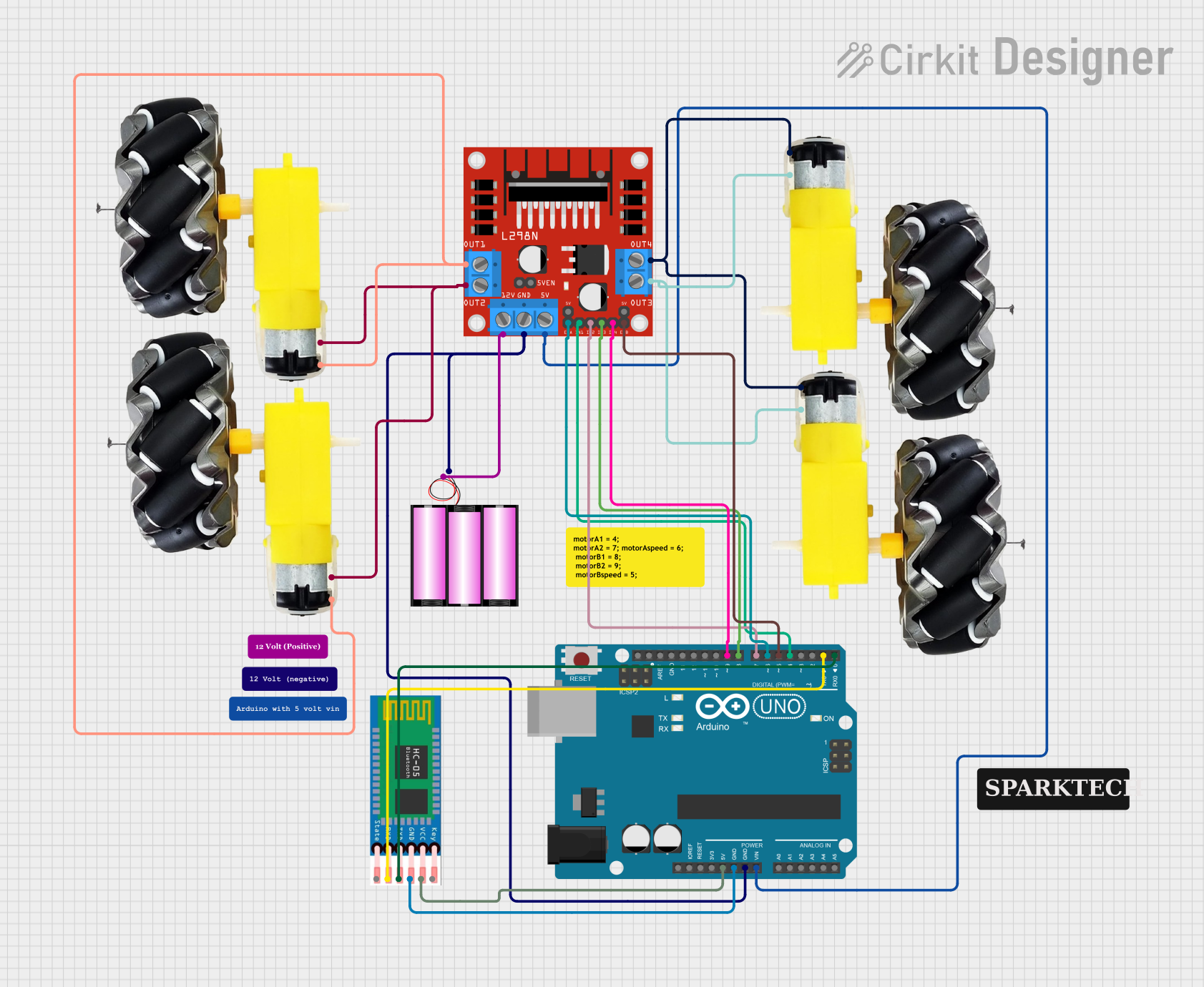
Circuit Documentation
Summary
This circuit is designed to control a Bluetooth-enabled car using an Arduino UNO microcontroller. The car is powered by a 12V battery and uses an L298N DC motor driver to control four motors. The HC-05 Bluetooth module allows for wireless communication with the Arduino, enabling remote control of the car.
Component List
L298N DC Motor Driver
- Description: Dual H-Bridge motor driver IC
- Pins: OUT1, OUT2, 12V, GND, 5V, OUT3, OUT4, 5V-ENA-JMP-I, 5V-ENA-JMP-O, +5V-J1, +5V-J2, ENA, IN1, IN2, IN3, IN4, ENB
Arduino UNO
- Description: Microcontroller board based on the ATmega328P
- Pins: UNUSED, IOREF, Reset, 3.3V, 5V, GND, Vin, A0, A1, A2, A3, A4, A5, SCL, SDA, AREF, D13, D12, D11, D10, D9, D8, D7, D6, D5, D4, D3, D2, D1, D0
HC-05 Bluetooth Module
- Description: Bluetooth module for wireless communication
- Pins: EN, VCC, GND, TXD, RXD, STATE
Battery 12V
- Description: Power source for the circuit
- Pins: +, -
Motor and Wheels (4 units)
- Description: DC motors with attached wheels
- Pins: vcc, GND
Wiring Details
L298N DC Motor Driver
- OUT1: Connected to vcc of two motors
- OUT2: Connected to GND of two motors
- 12V: Connected to + of the 12V battery
- GND: Connected to GND of the Arduino UNO and - of the 12V battery
- 5V: Connected to Vin of the Arduino UNO
- OUT3: Connected to GND of two motors
- OUT4: Connected to vcc of two motors
- ENA: Connected to D6 of the Arduino UNO
- IN1: Connected to D4 of the Arduino UNO
- IN2: Connected to D7 of the Arduino UNO
- IN3: Connected to D8 of the Arduino UNO
- IN4: Connected to D9 of the Arduino UNO
- ENB: Connected to D5 of the Arduino UNO
Arduino UNO
- GND: Connected to GND of the L298N DC motor driver, - of the 12V battery, and GND of the HC-05 Bluetooth module
- Vin: Connected to 5V of the L298N DC motor driver
- 5V: Connected to VCC of the HC-05 Bluetooth module
- D0: Connected to TXD of the HC-05 Bluetooth module
- D1: Connected to RXD of the HC-05 Bluetooth module
- D4: Connected to IN1 of the L298N DC motor driver
- D5: Connected to ENB of the L298N DC motor driver
- D6: Connected to ENA of the L298N DC motor driver
- D7: Connected to IN2 of the L298N DC motor driver
- D8: Connected to IN3 of the L298N DC motor driver
- D9: Connected to IN4 of the L298N DC motor driver
HC-05 Bluetooth Module
- VCC: Connected to 5V of the Arduino UNO
- GND: Connected to GND of the Arduino UNO
- TXD: Connected to D0 of the Arduino UNO
- RXD: Connected to D1 of the Arduino UNO
Battery 12V
- +: Connected to 12V of the L298N DC motor driver
- -: Connected to GND of the L298N DC motor driver and GND of the Arduino UNO
Motor and Wheels
- Motor 1 (vcc): Connected to OUT1 of the L298N DC motor driver
- Motor 1 (GND): Connected to OUT2 of the L298N DC motor driver
- Motor 2 (vcc): Connected to OUT1 of the L298N DC motor driver
- Motor 2 (GND): Connected to OUT2 of the L298N DC motor driver
- Motor 3 (vcc): Connected to OUT4 of the L298N DC motor driver
- Motor 3 (GND): Connected to OUT3 of the L298N DC motor driver
- Motor 4 (vcc): Connected to OUT4 of the L298N DC motor driver
- Motor 4 (GND): Connected to OUT3 of the L298N DC motor driver
Documented Code
//Arduino Bluetooth Controlled Car
//Before uploading the code you have to install the necessary library
//Note - Disconnect the Bluetooth Module before hitting the upload button otherwise you'll get a compilation error message.
//AFMotor Library https://learn.adafruit.com/adafruit-motor-shield/library-install
//After downloading the library open Arduino IDE >> go to sketch >> Include Library >> ADD. ZIP Library >> Select the downloaded
//ZIP File >> Open it >> Done
//Now You Can Upload the Code without any problem but make sure the bt module isn't connected with Arduino while uploading code

#include <AFMotor.h>

//initial motors pin
AF_DCMotor motor1(1, MOTOR12_1KHZ);
AF_DCMotor motor2(2, MOTOR12_1KHZ);
AF_DCMotor motor3(3, MOTOR34_1KHZ);
AF_DCMotor motor4(4, MOTOR34_1KHZ);

char command;

void setup()
{
  Serial.begin(9600);  //Set the baud rate to your Bluetooth module.
}

void loop(){
  if(Serial.available() > 0){
    command = Serial.read();
    Stop(); //initialize with motors stopped
    //Change pin mode only if new command is different from previous.
    //Serial.println(command);
    switch(command){
    case 'F':
      forward();
      break;
    case 'B':
       back();
      break;
    case 'L':
      left();
      break;
    case 'R':
      right();
      break;
    }
  }
}

void forward()
{
  motor1.setSpeed(255); //Define maximum velocity
  motor1.run(FORWARD); //rotate the motor clockwise
  motor2.setSpeed(255); //Define maximum velocity
  motor2.run(FORWARD); //rotate the motor clockwise
  motor3.setSpeed(255);//Define maximum velocity
  motor3.run(FORWARD); //rotate the motor clockwise
  motor4.setSpeed(255);//Define maximum velocity
  motor4.run(FORWARD); //rotate the motor clockwise
}

void back()
{
  motor1.setSpeed(255); //Define maximum velocity
  motor1.run(BACKWARD); //rotate the motor anti-clockwise
  motor2.setSpeed(255); //Define maximum velocity
  motor2.run(BACKWARD); //rotate the motor anti-clockwise
  motor3.setSpeed(255); //Define maximum velocity
  motor3.run(BACKWARD); //rotate the motor anti-clockwise
  motor4.setSpeed(255); //Define maximum velocity
  motor4.run(BACKWARD); //rotate the motor anti-clockwise
}

void left()
{
  motor1.setSpeed(255); //Define maximum velocity
  motor1.run(BACKWARD); //rotate the motor anti-clockwise
  motor2.setSpeed(255); //Define maximum velocity
  motor2.run(BACKWARD); //rotate the motor anti-clockwise
  motor3.setSpeed(255); //Define maximum velocity
  motor3.run(FORWARD);  //rotate the motor clockwise
  motor4.setSpeed(255); //Define maximum velocity
  motor4.run(FORWARD);  //rotate the motor clockwise
}

void right()
{
  motor1.setSpeed(255); //Define maximum velocity
  motor1.run(FORWARD); //rotate the motor clockwise
  motor2.setSpeed(255); //Define maximum velocity
  motor2.run(FORWARD); //rotate the motor clockwise
  motor3.setSpeed(255); //Define maximum velocity
  motor3.run(BACKWARD); //rotate the motor anti-clockwise
  motor4.setSpeed(255); //Define maximum velocity
  motor4.run(BACKWARD); //rotate the motor anti-clockwise
}

void Stop()
{
  motor1.setSpeed(0); //Define minimum velocity
  motor1.run(RELEASE); //stop the motor when release the button
  motor2.setSpeed(0); //Define minimum velocity
  motor2.run(RELEASE); //rotate the motor clockwise
  motor3.setSpeed(0);