
ESP32-S3 Wi-Fi Enabled ILI9341 Display for HTTP(S) Status Monitoring
View and Edit Project In Cirkit Designer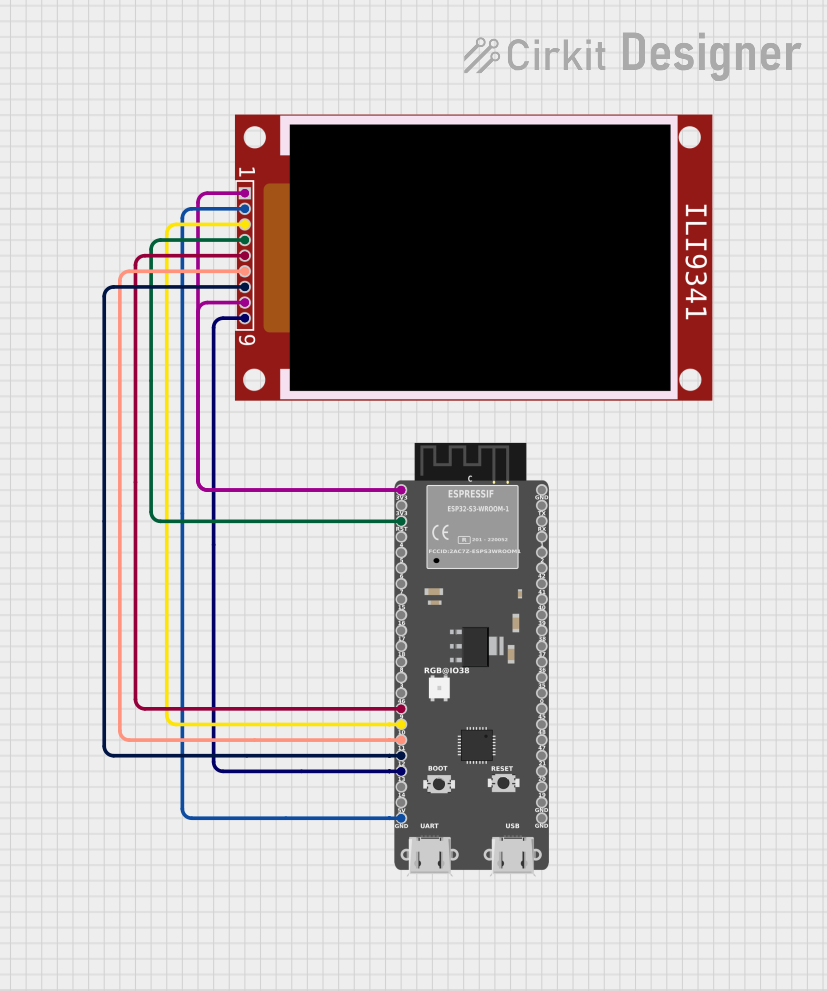
Circuit Documentation
Summary
This circuit integrates an ILI9341 TFT display with an ESP32-S3 microcontroller. The ESP32-S3 is used to fetch data from a specified URL and display the HTTP response on the ILI9341 screen. The circuit is designed to operate with both WiFi and SPI communication protocols, allowing for real-time data display.
Component List
1. ILI9341
- Description: A TFT display controller that interfaces with microcontrollers to display graphics and text.
- Purpose: To visually present data fetched from the internet.
2. ESP32-S3
- Description: A powerful microcontroller with integrated WiFi and Bluetooth capabilities.
- Purpose: To handle data fetching from the internet and control the ILI9341 display.
Wiring Details
ILI9341
- VCC: Connected to 3V3 of ESP32-S3
- GND: Connected to GND of ESP32-S3
- CS: Connected to GPIO10 of ESP32-S3
- RST: Connected to RST of ESP32-S3
- D/C: Connected to GPIO9 of ESP32-S3
- MOSI: Connected to GPIO11 of ESP32-S3
- SCK: Connected to GPIO12 of ESP32-S3
- LED: Connected to 3V3 of ESP32-S3
- MISO: Connected to GPIO13 of ESP32-S3
ESP32-S3
- 3V3: Connected to VCC of ILI9341
- GND: Connected to GND of ILI9341
- GPIO10: Connected to CS of ILI9341
- RST: Connected to RST of ILI9341
- GPIO9: Connected to D/C of ILI9341
- GPIO11: Connected to MOSI of ILI9341
- GPIO12: Connected to SCK of ILI9341
- GPIO13: Connected to MISO of ILI9341
Documented Code
ESP32-S3 Code
// ESP32-S3 + ILI9341 HTTP(S) status+response display (newline-aware, netlist-matched)
// ILI9341: CS->GPIO10, DC->GPIO9, SCK->GPIO12, MOSI->GPIO11, MISO->GPIO13, RST->ESP32 RST, VCC/LED->3V3, GND->GND

#include <WiFi.h>
#include <WiFiClientSecure.h>
#include <HTTPClient.h>
#include <SPI.h>
#include <Adafruit_GFX.h>
#include <Adafruit_ILI9341.h>

#define WIFI_SSID "CirkitWifi"
#define WIFI_PASS ""

// TFT pins (match your wiring)
#define TFT_CS    10
#define TFT_DC     9
#define TFT_RST   -1    // tied to ESP32 RST (no GPIO control)
#define TFT_SCLK  12
#define TFT_MOSI  11
#define TFT_MISO  13

const char* TEST_URL = "https://httpbin.org/ip";   // change to "http://httpbin.org/ip" for plain HTTP

Adafruit_ILI9341 tft(TFT_CS, TFT_DC, TFT_RST);
WiFiClientSecure tls;

// Simple text helpers
static int gY = 34;
inline void tftResetCursor() { gY = 34; }
void tftHeader(const char* title) {
  tft.fillScreen(ILI9341_BLACK);
  tft.setTextWrap(false);              // prevent internal wrapping
  tft.setTextSize(2);
  tft.setTextColor(ILI9341_CYAN, ILI9341_BLACK);
  tft.setCursor(4, 4);
  tft.print(title);
  tft.drawLine(0, 26, tft.width(), 26, ILI9341_DARKGREY);
  tftResetCursor();
}
void tftLine(const String& s, uint16_t color = ILI9341_WHITE) {
  const int lineH = 22;                // spacing for size=2 text
  if (gY > (tft.height() - lineH)) gY = 34;
  tft.fillRect(0, gY, tft.width(), lineH, ILI9341_BLACK);
  tft.setCursor(4, gY);
  tft.setTextSize(2);
  tft.setTextColor(color, ILI9341_BLACK); // opaque background to avoid artifacts
  tft.print(s);
  gY += lineH;
}

// Newline-aware, word-wrapping multi-line printer
void tftMultiNL(String s) {
  s.replace("\\r", "");   // keep '\\n' semantics
  s.replace("\\t", " ");  // normalize tabs

  const int charsPerLine = 26; // approx for size=2 in landscape
  int pos = 0;
  while (pos <= (int)s.length()) {
    int nl = s.indexOf('\\n', pos);
    String line = (nl >= 0) ? s.substring(pos, nl) : s.substring(pos);

    // wrap this logical line across the screen width
    int i = 0;
    while (i < (int)line.length()) {
      int take = min(charsPerLine, (int)line.length() - i);
      int end = i + take;

      // try not to split words if there's room
      if (end < (int)line.length() && line[end] != ' ') {
        int bk = line.lastIndexOf(' ', end - 1);
        if (bk >= i + 8) end = bk + 1;  // don't backtrack too aggressively
      }

      tftLine(line.substring(i, end), ILI9341_DARKGREY);
      i = end;
    }

    if (nl < 0) break;     // no more newlines
    pos = nl + 1;          // move past '\\n'
    if (line.length() == 0) tftLine("", ILI9341_DARKGREY); // preserve blank lines
  }
}

int httpGetAuto(const char* url, String& bodyOut) {
  HTTPClient http;
  http.setUserAgent("ESP32-HTTP-TEST/1.0");
  http.setTimeout(15000);

  bool isHttps = String(url).startsWith("https://");
  if (isHttps) {
    tls.setInsecure();          // demo only; consider proper CA/pinning for production
    tls.setTimeout(15000);
    if (!http.begin(tls, url)) return -1000;
  } else {
    if (!http.begin(url)) return -1000;
  }

  int code = http.GET();
  if (code > 0) bodyOut = http.getString();
  http.end();
  return code;
}

void connectWiFi() {
  WiFi.mode(WIFI_STA);
  WiFi.setSleep(false);
  WiFi.begin(WIFI_SSID, WIFI_PASS);
  unsigned long t0 = millis();
  while (WiFi.status() != WL_CONNECTED && millis() - t0 < 20000) {
    delay(300);
  }
}

void setup() {
  Serial.begin(115200); delay(50);

  // Safe pin states before SPI
  pinMode(TFT_CS, OUTPUT); digitalWrite(TFT_CS, HIGH);
  pinMode(TFT_DC, OUTPUT);
  if (TFT_RST >= 0) { pinMode(TFT_RST, OUTPUT); digitalWrite(TFT_RST, HIGH); }

  // Bind SPI to your pins (ESP32-S3)
  SPI.begin(TFT_SCLK, TFT_MISO, TFT_MOSI, TFT_CS);

  // Bring up TFT at conservative SPI clock
  tft.begin(8000000);
  tft.setRotation(1);
  tft.setTextWrap(false);   // keep internal wrap disabled
  tftHeader("HTTP(S) Test");

  tftLine("WiFi connecting...");
  connectWiFi();
  if (WiFi.status() == WL_CONNECTED) {
    tftLine("WiFi OK", ILI9341_GREEN);
    tftLine("IP: " + WiFi.localIP().toString());
  } else {
    tftLine("WiFi FAIL", ILI9341_RED);
    return;
  }

  // Do the GET
  tftLine("Requesting...");
  String body;
  int code = httpGetAuto(TEST_URL, body);

  if (code > 0) {
    tftLine("Status: " + String(code), ILI9341_YELLOW);
    // show first ~300 chars with preserved newlines
    String snip = body.substring(0, min(300, (int)body.length()));
    tftMultiNL(snip);
  } else {
    tftLine("Req error", ILI9341_RED);
    tftLine(String("Code: ") + String(code), ILI9341_RED);
  }
}

void loop() {}
This documentation provides a comprehensive overview of the circuit, detailing the components used, their wiring, and the code that drives the functionality of the system.