
Circuit Documentation
Summary of the Circuit
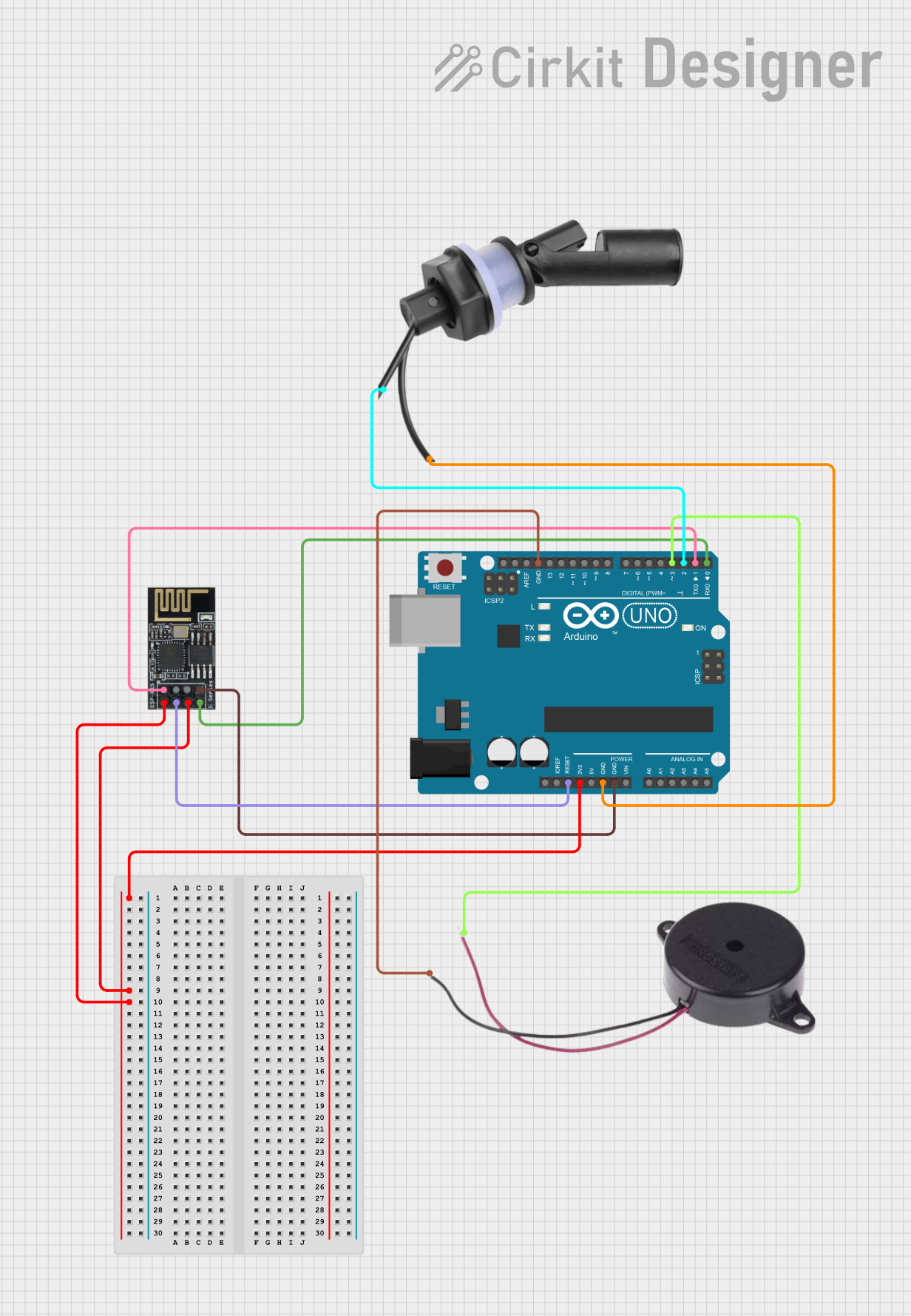
This circuit integrates an Arduino UNO microcontroller with a Wifi module ESP8266-01, a Buzzer, and a Water Level Float Switch Sensor. The Arduino UNO serves as the central processing unit, controlling the Wifi module for wireless communication, activating the Buzzer based on certain conditions, and monitoring the status of the Water Level Float Switch Sensor to detect the presence or absence of water.
Component List
Arduino UNO
- Description: A microcontroller board based on the ATmega328P.
- Purpose: Acts as the central controller for the circuit, interfacing with the Wifi module, Buzzer, and Water Level Sensor.
Wifi module ESP8266-01
- Description: A low-cost Wi-Fi microchip with full TCP/IP stack and microcontroller capability.
- Purpose: Provides wireless communication capabilities to the Arduino UNO.
Buzzer
- Description: An electromechanical component that produces sound.
- Purpose: Used to generate an audible alert based on certain triggers from the Arduino UNO.
Water Level Float Switch Sensor
- Description: A sensor that detects the level of water in a tank or container.
- Purpose: Sends a signal to the Arduino UNO to indicate the presence or absence of water.
Wiring Details
Arduino UNO
- 3.3V: Powers the Wifi module ESP8266-01.
- GND: Common ground for the Wifi module, Buzzer, and Water Level Float Switch Sensor.
- Reset: Connected to the Reset pin of the Wifi module ESP8266-01 for resetting the module.
- D0 (RX): Receives data from the TX pin of the Wifi module ESP8266-01.
- D1 (TX): Transmits data to the RX pin of the Wifi module ESP8266-01.
- D2: Connected to Wire1 of the Water Level Float Switch Sensor.
- D3: Connected to the POSITIVE pin of the Buzzer.
Wifi module ESP8266-01
- +3V3: Powered by the 3.3V output from the Arduino UNO.
- CH-PD (Chip power down): Pulled high to enable the chip, connected to 3.3V.
- GND: Connected to the common ground on the Arduino UNO.
- Reset: Connected to the Reset pin of the Arduino UNO for resetting the module.
- RX: Receives data from the TX (D1) pin of the Arduino UNO.
- TX: Transmits data to the RX (D0) pin of the Arduino UNO.
Buzzer
- POSITIVE: Connected to pin D3 of the Arduino UNO.
- NEGATIVE: Connected to the common ground on the Arduino UNO.
Water Level Float Switch Sensor
- Wire1: Connected to pin D2 of the Arduino UNO.
- Wire2: Connected to the common ground on the Arduino UNO.
Documented Code
Arduino UNO Code (sketch.ino)
void setup() {
  // put your setup code here, to run once:

}

void loop() {
  // put your main code here, to run repeatedly:

}
Note: The provided code is a template and does not contain any functional code. It is expected that the user will fill in the setup and loop functions with the necessary logic to control the Wifi module, Buzzer, and Water Level Float Switch Sensor.