
Arduino UNO Controlled Solenoid Door Lock with Keypad and LCD Interface
View and Edit Project In Cirkit Designer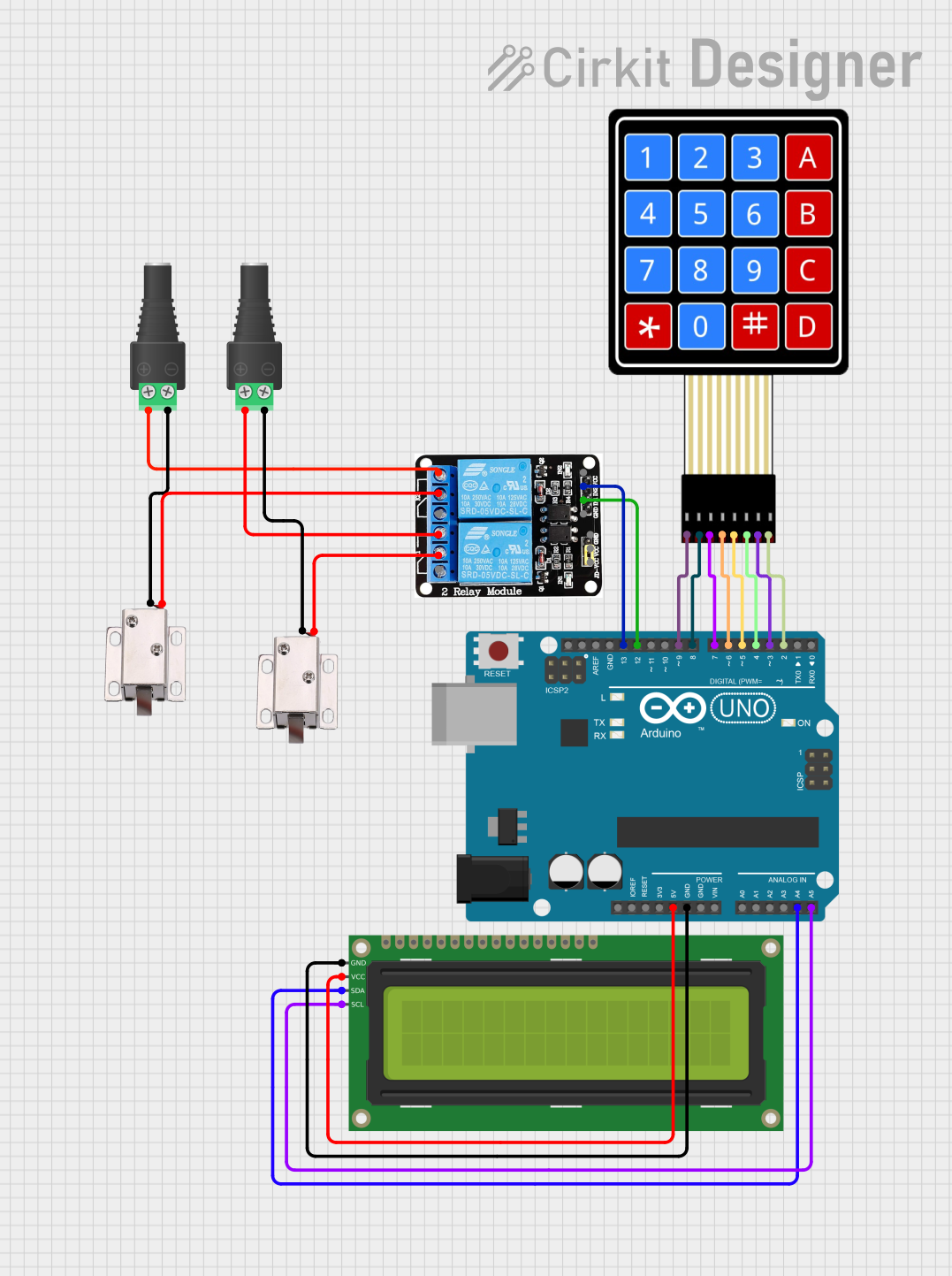
Circuit Documentation
Summary
This circuit is designed to control two 12V solenoid locks using an Arduino UNO microcontroller. The system includes a 4x4 membrane matrix keypad for password input and a 16x2 I2C LCD for user feedback. The Arduino UNO controls two relays which in turn drive the solenoid locks. The LCD displays prompts and feedback to the user, while the keypad allows for password entry to trigger the unlocking mechanism.
Component List
Arduino UNO
- Microcontroller board based on the ATmega328P
- It has 14 digital input/output pins, 6 analog inputs, a 16 MHz quartz crystal, a USB connection, a power jack, an ICSP header, and a reset button.
12V Solenoid Lock (x2)
- An electrically controlled lock mechanism
- Operates on 12V DC supply
5V 2-Relay Module (JD-VCC)
- A relay module with two relays that can control high power devices
- Each relay has three connection points: Normally Open (NO), Common (COM), and Normally Closed (NC)
2.1mm Barrel Jack with Terminal Block (x2)
- A power connector that provides an easy interface to a power supply
- Has positive (POS) and negative (NEG) terminals
4X4 Membrane Matrix Keypad
- A 16-button keypad that provides a user interface for password input
- Has 8 pins corresponding to 4 rows (R1-R4) and 4 columns (C1-C4)
16x2 I2C LCD
- A liquid crystal display that can show 16 characters per line on 2 lines
- Uses I2C communication, reducing the number of pins needed for interfacing
Wiring Details
Arduino UNO
5Vto 16x2 I2C LCDVCCGNDto 16x2 I2C LCDGNDA4 (SDA)to 16x2 I2C LCDSDAA5 (SCL)to 16x2 I2C LCDSCLD13to 5V 2-Relay ModuleIN2D12to 5V 2-Relay ModuleIN1D9-D2to 4X4 Membrane Matrix KeypadR1-R4, C1-C4respectively
12V Solenoid Locks
VCCof each solenoid lock to 5V 2-Relay ModuleCOMof the corresponding relayGNDof each solenoid lock to the negative terminal of the corresponding Barrel Jack with Terminal Block
5V 2-Relay Module (JD-VCC)
NOof each relay to the positive terminal of the corresponding Barrel Jack with Terminal Block
2.1mm Barrel Jack with Terminal Block
- Used to connect the solenoid locks to the power supply
4X4 Membrane Matrix Keypad
R1-R4to Arduino UNOD9-D6C1-C4to Arduino UNOD5-D2
16x2 I2C LCD
GNDto Arduino UNOGNDVCCto Arduino UNO5VSDAto Arduino UNOA4SCLto Arduino UNOA5
Documented Code
#include <LiquidCrystal_I2C.h>
#include <Keypad.h>

// Define the door lock passwords
const String door1_password = "1234";
const String door2_password = "5678";

// Define the relays for the door locks
const int door1_relay = 12;
const int door2_relay = 13;

// Initialize the LCD
LiquidCrystal_I2C lcd(0x27, 16, 2);

// Initialize the keypad
const byte ROWS = 4;
const byte COLS = 4;
char keys[ROWS][COLS] = {
  {'1', '2', '3', 'A'},
  {'4', '5', '6', 'B'},
  {'7', '8', '9', 'C'},
  {'*', '0', '#', 'D'}
};
byte rowPins[ROWS] = {9, 8, 7, 6};
byte colPins[COLS] = {5, 4, 3, 2};
Keypad keypad = Keypad(makeKeymap(keys), rowPins, colPins, ROWS, COLS);

void setup() {
  // Set the relay pins as outputs
  pinMode(door1_relay, OUTPUT);
  pinMode(door2_relay, OUTPUT);

  // Initialize the LCD with 16 columns and 2 rows
  lcd.begin(16, 2);
  lcd.backlight();
  lcd.print("Enter Password:");
}

void loop() {
  // Read the keypad input
  char key = keypad.getKey();
  if (key) {
    String password = "";
    bool correct_password = false;

    // Get the password
    while (key != '#') {
      password += key;
      lcd.setCursor(0, 1);
      lcd.print(password);
      key = keypad.getKey();
    }

    // Check the password
    if (password == door1_password) {
      correct_password = true;
      digitalWrite(door1_relay, HIGH);
      delay(30000); // Lock will be open for 30 seconds
      digitalWrite(door1_relay, LOW);
    } else if (password == door2_password) {
      correct_password = true;
      digitalWrite(door2_relay, HIGH);
      delay(30000); // Lock will be open for 30 seconds
      digitalWrite(door2_relay, LOW);
    }

    // Display the result
    lcd.clear();
    if (correct_password) {
      lcd.print("UNLOCK");
    } else {
      lcd.print("INVALID");
    }
    delay(3000); // Display the message for 3 seconds
    lcd.clear();
    lcd.print("Enter Password:");
  }
}
This code is responsible for reading input from the keypad, comparing the input to predefined passwords, and controlling the relays to unlock the solenoid locks accordingly. The LCD provides feedback to the user, prompting for a password and displaying the result of the input.