
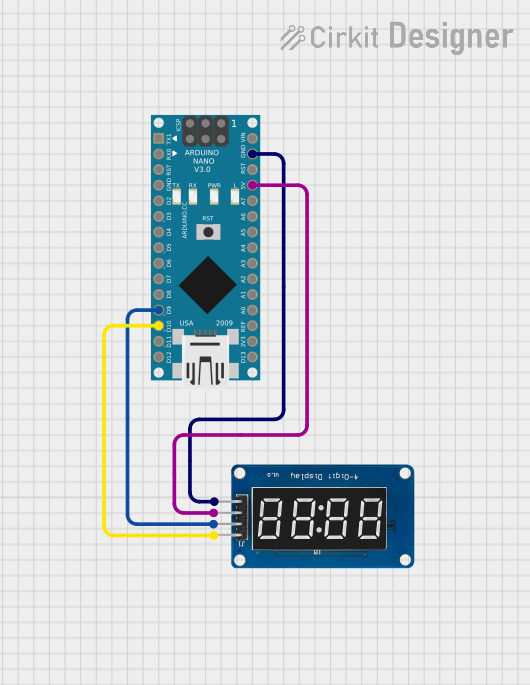
Circuit Documentation
Summary
This circuit involves an Arduino Nano microcontroller interfaced with a TM1637 display module. The Arduino Nano is responsible for fetching the current time from an RTC (Real-Time Clock) module and displaying it on the TM1637 display. The connections between the Arduino Nano and the TM1637 display are established through specific digital pins.
Component List
Arduino Nano
- Description: A compact microcontroller board based on the ATmega328P.
- Pins:
- D1/TX
- D0/RX
- RESET
- GND
- D2
- D3
- D4
- D5
- D6
- D7
- D8
- D9
- D10
- D11/MOSI
- D12/MISO
- VIN
- 5V
- A7
- A6
- A5
- A4
- A3
- A2
- A1
- A0
- AREF
- 3V3
- D13/SCK
TM1637
- Description: A 4-digit 7-segment display module with a built-in clock and data interface.
- Pins:
- CLK
- DIO
- VCC
- GND
Wiring Details
Arduino Nano
- D9: Connected to DIO of TM1637
- D10: Connected to CLK of TM1637
- GND: Connected to GND of TM1637
- 5V: Connected to VCC of TM1637
TM1637
- DIO: Connected to D9 of Arduino Nano
- CLK: Connected to D10 of Arduino Nano
- GND: Connected to GND of Arduino Nano
- VCC: Connected to 5V of Arduino Nano
Code Documentation
/*
 * This Arduino sketch displays the current time on a TM1637 display module.
 * The TM1637 is connected to the Arduino Nano as follows:
 * - CLK (TM1637) -> D10 (Arduino Nano)
 * - DIO (TM1637) -> D9 (Arduino Nano)
 * - VCC (TM1637) -> 5V (Arduino Nano)
 * - GND (TM1637) -> GND (Arduino Nano)
 */

#include <TM1637Display.h>
#include <Wire.h>
#include <RTClib.h>

#define CLK 10 // Define the clock pin
#define DIO 9  // Define the data pin

TM1637Display display(CLK, DIO);
RTC_DS3231 rtc;

void setup() {
  display.setBrightness(0x0f); // Set the display to maximum brightness
  if (!rtc.begin()) {
    display.showNumberDec(8888); // Show error if RTC is not found
    while (1);
  }
  if (rtc.lostPower()) {
    rtc.adjust(DateTime(F(__DATE__), F(__TIME__))); // Set RTC to compile time
  }
}

void loop() {
  DateTime now = rtc.now();
  int displayTime = now.hour() * 100 + now.minute();
  display.showNumberDecEx(displayTime, 0b01000000, true); // Display time with colon
  delay(1000); // Update every second
}
This code initializes the TM1637 display and the RTC module. In the setup function, the display brightness is set, and the RTC is initialized. If the RTC has lost power, it is reset to the compile time. The loop function continuously fetches the current time from the RTC and displays it on the TM1637 display, updating every second.