
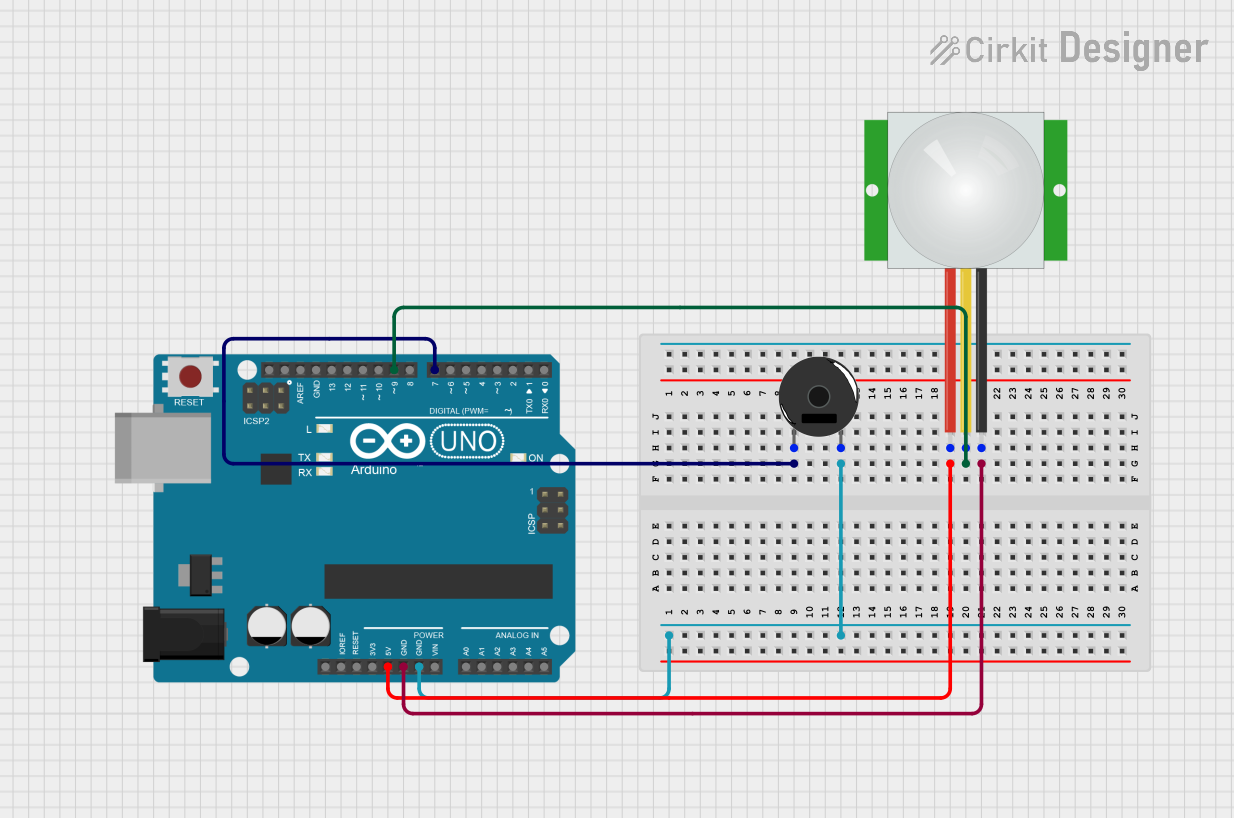
Circuit Documentation
Summary
This circuit consists of an Arduino UNO microcontroller, a Piezo Buzzer, and a PIR sensor. The PIR sensor detects motion and triggers the Piezo Buzzer to sound an alarm when motion is detected.
Component List
Arduino UNO
- Description: A microcontroller board based on the ATmega328P.
- Pins: UNUSED, IOREF, Reset, 3.3V, 5V, GND, Vin, A0, A1, A2, A3, A4, A5, SCL, SDA, AREF, D13, D12, D11, D10, D9, D8, D7, D6, D5, D4, D3, D2, D1, D0
Piezo Buzzer
- Description: An electronic device that produces a sound when a voltage is applied.
- Pins: pin 1, pin 2
PIR Sensor
- Description: A sensor that detects motion by measuring infrared (IR) light radiating from objects in its field of view.
- Pins: VDD, SIG, GND
Wiring Details
Arduino UNO
- D7: Connected to pin 1 of the Piezo Buzzer
- GND: Connected to pin 2 of the Piezo Buzzer
- 5V: Connected to VDD of the PIR sensor
- D9: Connected to SIG of the PIR sensor
- GND: Connected to GND of the PIR sensor
Piezo Buzzer
- pin 1: Connected to D7 of the Arduino UNO
- pin 2: Connected to GND of the Arduino UNO
PIR Sensor
- VDD: Connected to 5V of the Arduino UNO
- SIG: Connected to D9 of the Arduino UNO
- GND: Connected to GND of the Arduino UNO
Code Documentation
Arduino UNO Code
void setup() {
  // Initialize the Piezo Buzzer pin as an output
  pinMode(7, OUTPUT); // Piezo Buzzer connected to pin D7

  // Initialize the PIR sensor pin as an input
  pinMode(9, INPUT);  // PIR Sensor connected to pin D9
}

void loop() {
  // Read the state of the PIR sensor
  int pirState = digitalRead(9); // Read PIR sensor state from pin D9

  // Check if the PIR sensor is triggered
  if (pirState == HIGH) {
    // If the PIR sensor is triggered, turn on the Piezo Buzzer
    digitalWrite(7, HIGH); // Set pin D7 HIGH to turn on the Piezo Buzzer
  } else {
    // If the PIR sensor is not triggered, turn off the Piezo Buzzer
    digitalWrite(7, LOW); // Set pin D7 LOW to turn off the Piezo Buzzer
  }
}
This code initializes the Piezo Buzzer pin as an output and the PIR sensor pin as an input. In the main loop, it continuously reads the state of the PIR sensor. If motion is detected (PIR sensor state is HIGH), the Piezo Buzzer is turned on. If no motion is detected (PIR sensor state is LOW), the Piezo Buzzer is turned off.