
Arduino UNO R4 WiFi with IR Obstacle Detection and OLED Display
View and Edit Project In Cirkit Designer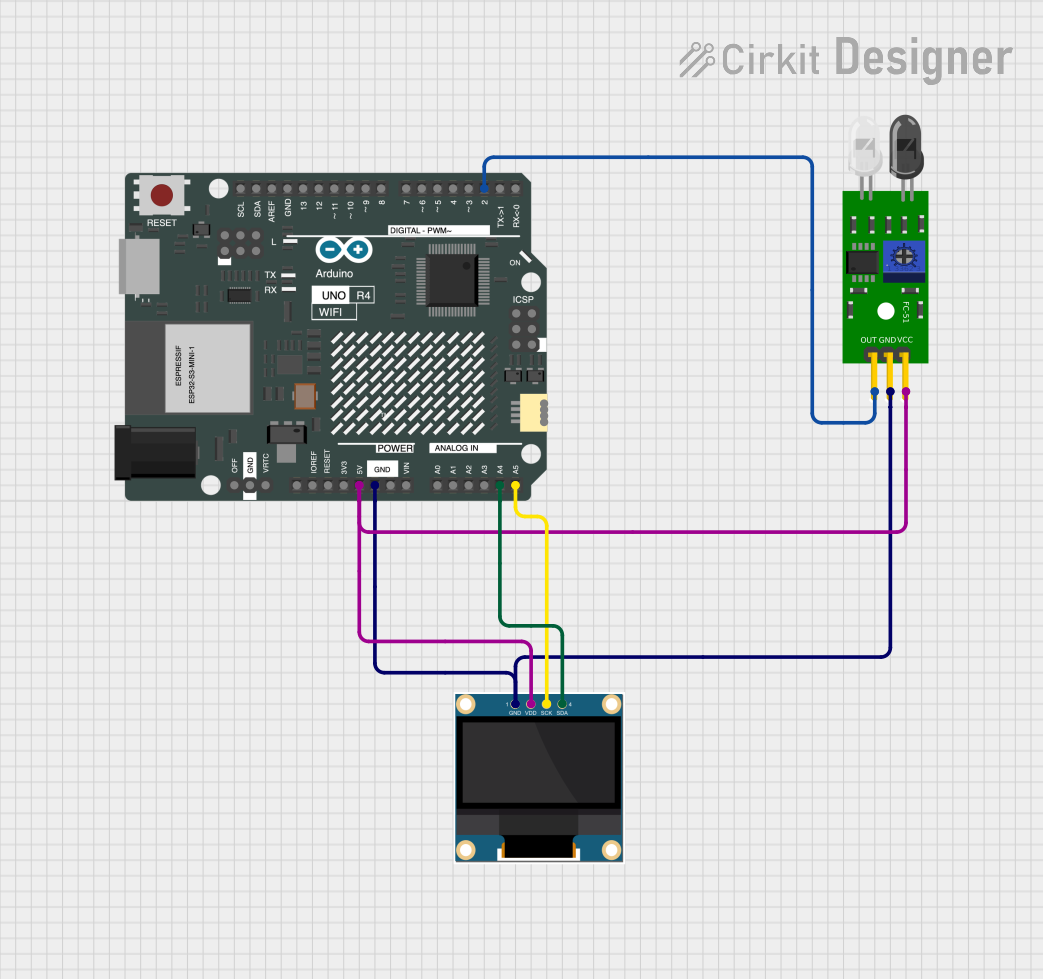
Circuit Documentation
Summary
The circuit in question is designed to detect the presence of an object using an FC-51 IR Obstacle Sensor and display the status on a 0.96" OLED screen. The Arduino UNO R4 WiFi serves as the central processing unit, reading the sensor data and controlling the OLED display. The circuit is powered by a 5V supply, which is distributed to all components. Communication with the OLED display is achieved through I2C protocol, utilizing the SDA and SCK lines from the Arduino.
Component List
Arduino UNO R4 WiFi
- Description: A microcontroller board based on the ATmega328, which includes WiFi capabilities and is compatible with Arduino shields and code.
- Pins: OFF, GND, VRTC, IIC0_SCL, IIC0_SDA, 3V3, GPIO 41, GPIO 0, GPIO 42, GPIO 43, GPIO 44, BOOT, IOREF, RESET, 5V, VIN, A0, A1, A2, A3, A4, A5, RSPCKA, CIPO, COPI, D0/RX, D1/TX, D2, D3, D4, D5, D6, D7, D8, D9, D10, D11, D12, D13, AREF, SDA, SCL.
FC-51 IR Obstacle Sensor
- Description: An infrared sensor capable of detecting obstacles in its path and providing a digital output signal.
- Pins: Out, GND, VCC.
0.96" OLED
- Description: A small OLED display that can be used to show text, graphics, and animations.
- Pins: GND, VDD, SCK, SDA.
Wiring Details
Arduino UNO R4 WiFi
- 5V connected to:
- FC-51 IR Obstacle Sensor VCC
- 0.96" OLED VDD
- GND connected to:
- FC-51 IR Obstacle Sensor GND
- 0.96" OLED GND
- A4 (SDA) connected to 0.96" OLED SDA
- A5 (SCK) connected to 0.96" OLED SCK
- D2 connected to FC-51 IR Obstacle Sensor Out
FC-51 IR Obstacle Sensor
- Out connected to Arduino UNO R4 WiFi D2
- GND connected to Arduino UNO R4 WiFi GND
- VCC connected to Arduino UNO R4 WiFi 5V
0.96" OLED
- GND connected to Arduino UNO R4 WiFi GND
- VDD connected to Arduino UNO R4 WiFi 5V
- SCK connected to Arduino UNO R4 WiFi A5
- SDA connected to Arduino UNO R4 WiFi A4
Documented Code
Arduino UNO R4 WiFi Code
#include <U8glib.h>
#define IR_PIN 2

U8GLIB_SSD1306_128X64 u8g(U8G_I2C_OPT_NONE);

void setup() {
  pinMode(IR_PIN, INPUT);
}

void loop() {
  int irState = digitalRead(IR_PIN);

  u8g.firstPage();
  do {
    u8g.setFont(u8g_font_unifont);
    if (irState  == LOW) {
      u8g.drawStr(5, 20, "Object detected");
    } else {
      u8g.drawStr(5, 20, "CLEAR ^");
    }
  } while (u8g.nextPage());
}
File Name: sketch.ino
This code initializes the OLED display and sets up the IR sensor pin as an input. In the loop, it reads the state of the IR sensor and updates the OLED display with a message indicating whether an object is detected or not.
FC-51 IR Obstacle Sensor Code
No specific code provided for the FC-51 IR Obstacle Sensor as it is directly interfaced with the Arduino UNO R4 WiFi.
0.96" OLED Code
No specific code provided for the 0.96" OLED as it is controlled by the Arduino UNO R4 WiFi through the I2C interface.
This documentation provides an overview of the circuit, including a description of each component, wiring details, and the embedded code for the Arduino UNO R4 WiFi. The circuit is designed to detect objects and display the status on an OLED screen, with the Arduino UNO R4 WiFi serving as the central controller.